PAGE 2
FOR SERVICE TECHNICIAN’S USE ONLY
DO NOT REMOVE OR DESTROY
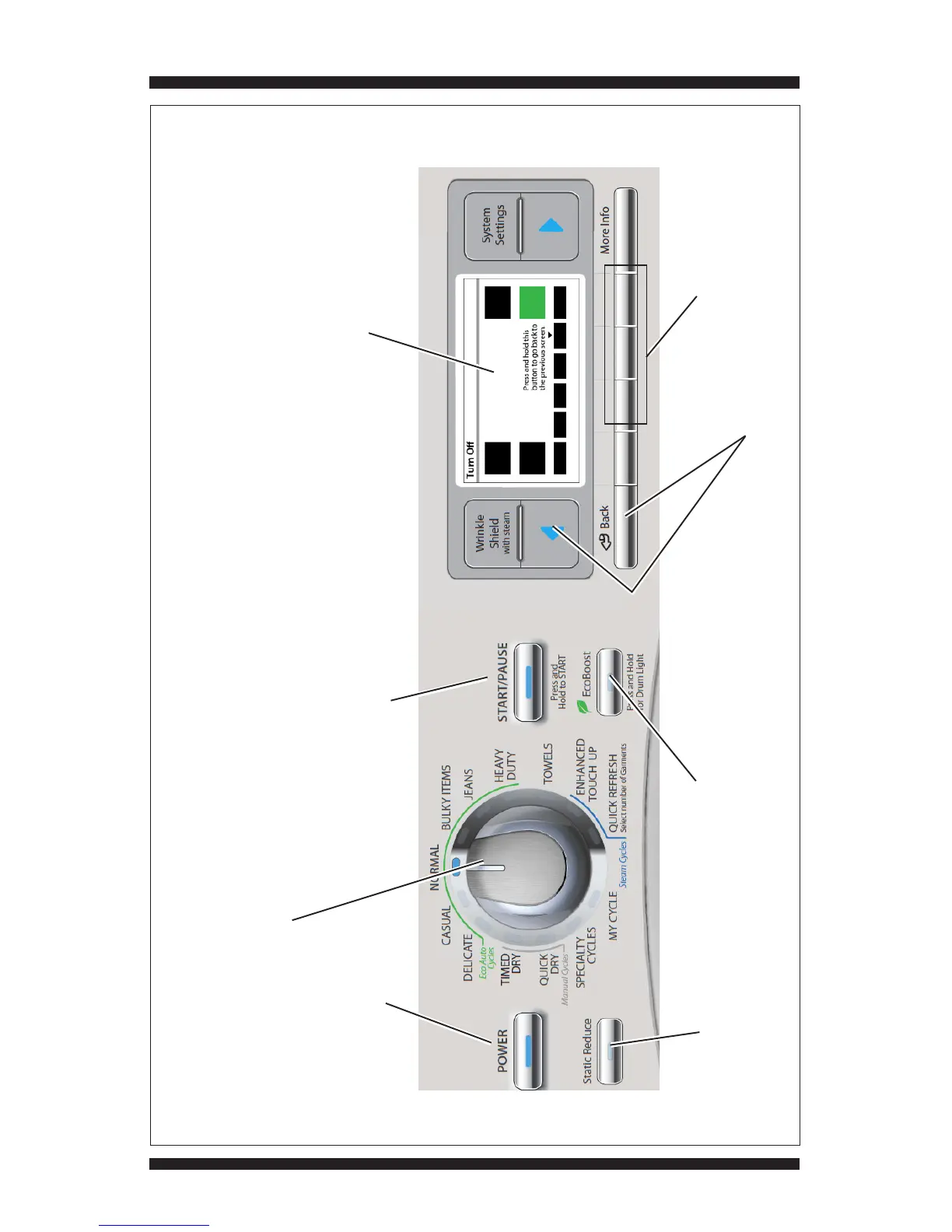
WHIRLPOOL CONTROL PANEL (features and appearances may vary between models)
Rotating the cycle selector knob turns off each
corresponding cycle indicator. (Features and
appearances vary between models).
“POWER” button: press once
to turn off indicator.
“START/PAUSE” button:
press once to turn off indicator.
Begin or continue test.
“Static Reduce” button:
press once to turn off indicator
(not available on all models).
“EcoBoost” button: press once
to turn off indicator
(not available on all models).
(1st, 2nd, 3rd) Recommended buttons
to access Diagnostic Mode.
Figure 1 - UI Component Test
Color LCD Screen – pressing the buttons around the screen
changes their on-screen representations from black to
green. UI Component Test, Error Codes, Diagnostics, and
System Information are accessed via Service Menus.
“Back & ( )” buttons: press one or more
times to exit Diagnostic Mode.
1st
2nd
3rd
t






 To Next Page