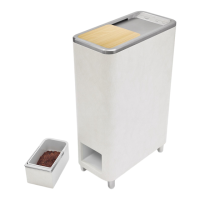
The Zera Food Recycler is a connected appliance designed to transform food scraps into homemade fertilizer for outdoor use. It utilizes a process that balances water, Zera™ additive packs, heat, and oxygen to optimize the rate of food recycling. The device is equipped with Wi-Fi connectivity, allowing users to monitor, manage, and maintain the recycler remotely via the Whirlpool® app.
Function Description:
The primary function of the Zera Food Recycler is to convert food waste into a nutrient-rich homemade fertilizer. Users add food scraps to the mixing bin, along with one unopened Zera™ additive pack. The device then initiates a recycling cycle, which typically completes within 24 hours, though it can extend up to 48 hours for unusually wet or large loads. Once the cycle is complete, the homemade fertilizer is automatically transferred to an output bin for easy removal and use. The appliance is designed for household use only and is intended for outdoor application of the resulting fertilizer on lawns, flower beds, and gardens.
Important Technical Specifications:
- Electrical Requirements: The food recycler operates on a single phase, 120 V, 60 Hz, AC only, 15 or 20 A fused and properly grounded circuit. It is equipped with a 3-conductor cord and a 3-prong grounding-type plug.
- Dimensions: The product measures 11" (28 cm) in width, 23 3/4" (60.33 cm) in depth, and 33 3/4" (85.73 cm) in height.
- Clearance: A 1" (25.4 mm) clearance at the back is required for proper airflow.
- Operating Temperature: For best performance, the food recycler should be used at temperatures between 60°F and 80°F (15°C and 27°C).
- Connectivity: The device supports Wi-Fi connectivity (2.4Ghz, preferably with WPA2 security) for integration with the Whirlpool® app.
- Capacity: The output bin holds one processed batch of homemade fertilizer. For best performance, fill the mixing bin up to the top of the mixing blade (max fill).
Usage Features:
- Food Waste Input: Users can add food scraps to the mixing bin until it is full or for up to seven days before starting a recycling cycle.
- Additive Packs: One unopened Zera™ additive pack is required for each recycling cycle. These packs are available on www.zera.com and at participating retailers.
- Cycle Initiation: A recycling cycle is started by pressing and holding the START/PAUSE keypad for 1 second. The cycle can be paused within the first 30 minutes to add more food waste.
- Output Ready Notification: The "Complete" indicator light illuminates when the recycling process is finished and the homemade fertilizer is ready. The lid will unlock automatically at this point.
- Homemade Fertilizer Application: The fertilizer can be used as a top dressing on outdoor flower beds and gardens (no more than 1/4" thick) or spread on lawns using a spreader. It is recommended for outdoor use only and should be kept away from plant stems/roots.
- Homemade Fertilizer Storage: If not used immediately, the homemade fertilizer can be stored in an airtight container or composted.
- Control Panel: The control panel includes indicator lights for various statuses such as "Control Locked," "Lid Locked," "Insert Bin," "Drain Water," "Close Lid," "Order Filter," "Replace Filter," "Wi-Fi Signal," and "Error." Keypads allow for "Connect," "Lock Lid/Control Lock/Unlock," "Start/Pause," "Cancel," and "Reset Filter" functions.
- Connectivity Features (via Whirlpool® app):
- Remote Start & Pause: Control the food recycler remotely and receive notifications when a cycle is complete.
- Cycle Progress: Monitor the progress of the recycling cycle from anywhere.
- Notifications: Receive push notifications when the cycle is complete or when the product needs attention.
Maintenance Features:
- Food Waste Jam/Foreign Object Removal: If a jam occurs, disconnect power, remove the funnel, and use a long-handled object (wooden spoon, tongs, spatula) to stir contents and remove any hard food pieces.
- Water Reservoir Emptying: The water reservoir should be drained once a year for best performance and to avoid buildup. The "Drain Water" indicator light will illuminate when the reservoir is full. To drain, remove the output bin, locate the drain hose, and drain water into a suitable container.
- Cleaning Exterior Surfaces: Clean exterior surfaces with a soft sponge or cloth and a mild detergent in warm water. Avoid abrasive or harsh cleaners.
- Cleaning Funnel Support Surface: Clean the funnel support with a sponge and mild detergent. Do not allow excess water into the mixing bin.
- Dust Screen Cleaning: The dust screen, located on the side of the mixing bin, should be cleaned after each cycle. It is removable and can be cleaned with a soft brush under running water or handwashed with warm soapy water.
- Air Filter Replacement: The air filter is designed for continuous air filtration and should be replaced every 2 months, or more often if odor levels increase. The "Replace Filter" indicator light will illuminate when a new filter is needed. To replace, remove the output bin, remove the filter holder, replace the old filter with a new one, and reinstall the filter holder and output bin. After replacement, press and hold "RESET FILTER" for 3 seconds to reset the filter indicator light.
- Extended Time Without Use: For prolonged non-use, run a complete cycle, empty the output bin, drain the water reservoir, clean all exterior surfaces, and unplug the device.

 Need help?
 General


 To Next Page