EasyManua.ls Logo

White 2137 - Setting the Stitch Length; Stitch Length Dial Operation

Default Icon
38 pages
Print Icon
To Next Page IconTo Next Page
To Previous Page IconTo Previous Page
Loading...
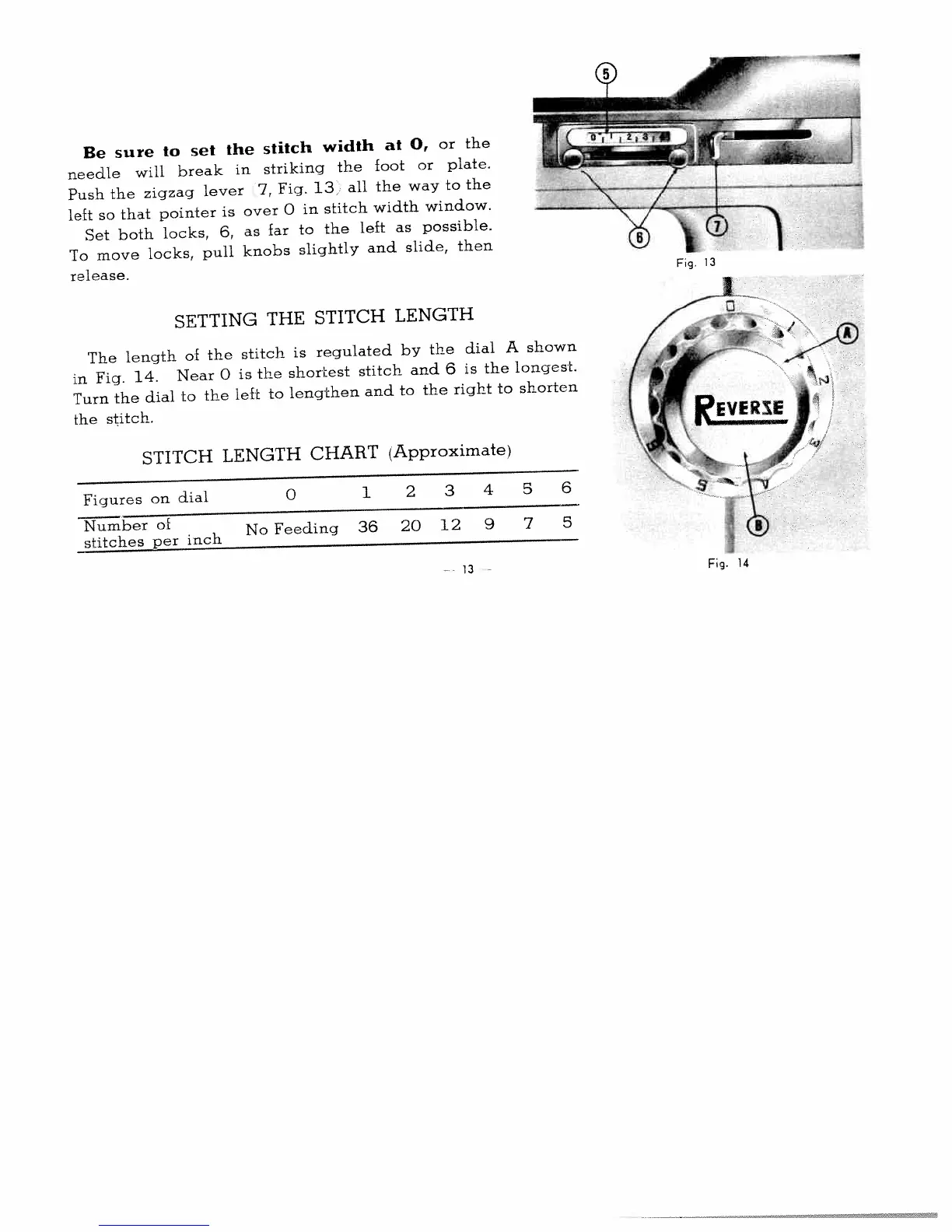
Be
sure
to
set
the
stitch
width
at
0,
or
the
needle
will
break
in
striking
the
foot
or
plate.
Push
the
zigzag
lever
7,
Fig.
13
all
the
way
to
the
leEt
so
that
pointer
is
over
0
in
stitch
width
window.
Set
both
locks,
6,
as
far
to
the
left
as
possible.
To
move
locks,
pull
knobs
slightly
and
slide,
then
release.
SETTING
THE
STITCH
LENGTH
The
length
of
the
stitch
is
regulated
by
the
dial
A
shown
in
Fig.
14.
Near
0
is
the
shortest
stitch
and
6
is
the
longest.
Turn
the
dial
to
the
left
to
lengthen
and
to
the
right
to
shorten
the
stitch.
STITCH
LENGTH
CHART
(Approximate)
Figures
on
dial
0
1
2
3
4
5
6
Number
of
stitches
per
inch
No
Feeding
36
20
12
9
7
5
Fig
13
I
Fig.
14
13

Related product manuals