EasyManua.ls Logo

White 4040 - Control para Seleccionar la Puntada

White 4040
68 pages
Print Icon
To Next Page IconTo Next Page
To Previous Page IconTo Previous Page
Loading...
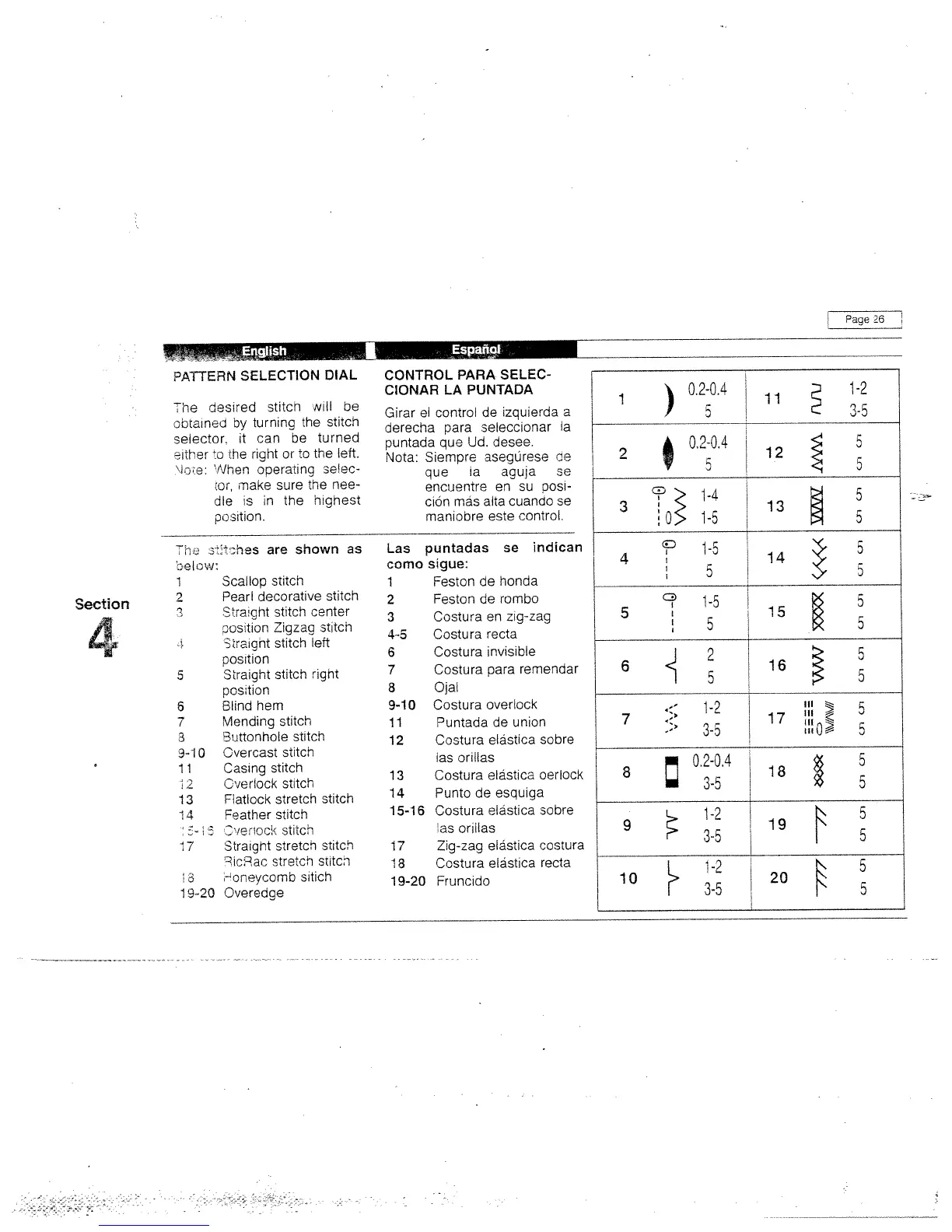
PATTERN
SELECTION
DIAL
The
desired
stitch
will
be
obtained
by
turning
the
stitch
selector,
it
can
be
turned
crther
o
the
right
or
to
the
left.
‘Ice:
IVhen
operating
selec
:or,
maKe
sure
the
nee
dle
s
in
the
highest
Tho
o
Dhes
are
shown
as
be
I
OW:
1
Scallop
stitch
2
Pearl
decorative
stitch
3
Stra;gnt
stitch
center
csition
Zigzag
stitch
3traight
stitch
left
position
5
Slraight
stitch
right
position
6
Blind
hem
7
Mending
stitcn
3
Buttonhole
stitch
3-10
Overcast
stitch
1
1
Oasing
stitch
2
Overlock
stitch
13
Fatlock
stretch
stitch
14
eather
stitch
_‘/e’cc:<
stitco
7
Stratgnt
stretch
stitch
°icRac
stretch
sntcn
-oneycornb
sitich
19-20
Overedge
CONTROL
PARA
SELEC
CIONAR
LA
PUNTADA
Girar
ci
control
de
zquierda
a
derecha
para
seleccionar
a
puntada
que
Ud.
desee.
Nota:
Siempre
asegbrese
he
que
a
agua
se
encuentre
en
su
posi
c:on
más
alta
cuando
se
maniobre
este
control.
Las
puntadas
se
indican
como
sigue:
1
Feston
de
honda
2
Feston
de
rombo
3
Costura
en
zig-zag
4-5
Costura
recta
6
Costura
invisible
7
Costura
para
remendar
8
9-10
11
12
13
14
15-16
17
18
19-20
Ojal
Costura
overlook
Puntada
de
union
Costura
elbstica
sobre
as
orillas
Costura
elãstica
oerlock
Punto
de
esquiga
Costura
elãstica
sobre
as
oriilas
Zig-zag
elbstica
costura
Costura
elãstica
recta
Fruncido
Page
26
position.
Section
4
1
0.2-0.4
11
1-2
‘F
5
3-5
2
°‘
12
3
13
14
5
5
-0
15
5
6
16
.—
1-2
7
.
17
3-o
“0
0
8
:
0.2-0.4
18
9
19
10
20

Related product manuals