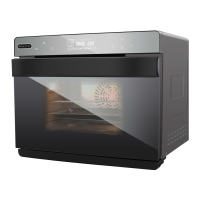
The Whynter Grande 40 Quart Capacity Counter-Top Multi-Function Intelligent Convection Steam Oven Air Fryer, Oven, Yogurt Maker, Dehydrator & DIY Mode is a versatile kitchen appliance designed to offer a wide range of cooking functions in a compact countertop form factor. This device integrates multiple cooking technologies, including steam, convection, and air frying, to provide users with healthy and efficient meal preparation options.
Function Description
At its core, the Whynter Grande is a multi-function oven that leverages hot steam, hot air convection, and air frying capabilities. Unlike traditional ovens that primarily rely on hot air, this appliance introduces steam into the cooking process, which is a key differentiator. Steam ovens work by siphoning water from a dedicated water tank into a built-in boiler, where it is heated to 212 degrees Fahrenheit (100 degrees Celsius) and then released into the oven cavity. This superheated steam cooks food thoroughly and often faster than conventional methods.
The integration of convection technology means that a fan circulates hot air within the oven, ensuring even heat distribution and consistent cooking results. When combined with steam, this creates a moist and efficient cooking environment. The air frying function utilizes high-speed hot air circulation to crisp foods with little to no oil, offering a healthier alternative to deep frying.
The oven features a comprehensive control panel with an LED display that provides clear information about cooking time, temperature, and selected functions. Users can choose from a variety of predefined programs or utilize a "DIY Mode" for customized cooking. The display shows icons for various states, such as preset function, time-delay, water level (with a flashing indicator for low water), water tray cleaning, child lock, descaling, and indicators for top and bottom heater pipes, internal fan, and high temperature.
Key cooking modes and their functions include:
- Steam Mode: This is the primary steam cooking function, ideal for vegetables, fish, shrimp, crab, eggs, chicken, papaya, and potatoes. It ensures food retains moisture, natural vitamins, and minerals.
- Strengthening Heating: A combination of back heater convection, top heater pipe, and bottom heater pipe for robust and even heating.
- Top Heater Pipe: Utilizes only the top heating element, suitable for broiling or browning the top of dishes.
- Top/Bottom Heater Pipe: Engages both top and bottom heating elements for conventional baking and roasting.
- Hot Air Convection: Uses the top heater pipe and rear fan for circulating hot air, similar to a standard convection oven.
- Back Heater Convection | Air Fryer: Employs back heating and the rear fan, specifically for air frying and other convection-based cooking.
- High-Temperature Steaming: Combines steam with back heater convection for intense, moist heat.
- Back Heater Convection + Turning Fork: Integrates convection with a rotisserie function, perfect for roasting whole chickens or larger cuts of meat.
- Top Heater Pipe + Turning Fork: Combines top heating with the rotisserie function.
- Ferment Function: Maintains a low, consistent temperature (85°F - 120°F) using the top heater pipe, suitable for proofing dough or making yogurt.
- Preheat Function: Quickly brings the oven to a default temperature of 360°F using back heater convection, shutting off once the target temperature is reached.
- Yogurt Function: A dedicated steam mode for making yogurt at a default temperature of 115°F for 8 hours.
- Air Fryer Menu: Offers 9 specific programs and recipes, primarily using back heater convection.
- Dried Fruit and Nuts Menu: Provides 9 programs for dehydrating various fruits and nuts, utilizing either back heater convection or top & bottom heater pipes.
- Roast Menu: Features 9 programs for roasting different meats and vegetables, employing multiple heating modes.
- Bake Menu: Includes 9 programs for baking various items like bread, pizza, cakes, cookies, and tarts, primarily using top & bottom heater pipes.
- DIY (Do It Yourself) Mode: Allows users to choose from 9 distinct function modes and customize time and temperature settings, offering flexibility for unique recipes.
Usage Features
The Whynter Grande is designed for ease of use, with a touch screen LED display and intuitive controls.
Powering On and Menu Selection:
To power on the oven, users press the Power button. The unit then enters a full-screen standby mode. If no selection is made within three minutes, it returns to standby. Menu selection is straightforward: users navigate through functions using the selection keys (< and >) and confirm their choice with the Enter (▷||) button. A beep confirms the selection, and the clock starts counting down.
Setting Time and Temperature:
For DIY functions or custom settings, users can adjust cooking time (hours and minutes) and temperature by confirming blinking numbers on the display. The temperature range is adjustable from 85°F to 450°F.
During Operation:
The oven allows for pausing and resuming cooking by pressing the Enter (▷||) button. Users can also adjust the cooking time (minutes only, not hours) and temperature during operation by pressing and holding the Setting key until the Time-delay icon appears, then using the selection keys.
Cooking Completion:
Once cooking is finished, "END" appears on the display, accompanied by 10 beeps. If the oven temperature is above 120°F, a high-temperature icon is displayed, and the internal fan runs for 3 minutes to circulate hot air and cool down the cavity.
Water Management:
For steam functions, the water reservoir must be filled with distilled or filtered water. The oven will beep and flash a water level icon if the tank is not in place or runs out of water. After steam programs, a water tray cleaning icon flashes for 1 minute, indicating the need to wipe residual water and drain the water tank. The drip tray must always be in place during operation and emptied after each use.
Safety Features:
- Child Lock: Activated by pressing and holding the child lock key for three seconds in standby mode, preventing accidental operation. Deactivated by repeating the action.
- Open/Close Door Protection: The oven pauses operation if the door is opened and automatically resumes once the door is closed.
- High Temperature Warning: An icon indicates when the oven temperature is high, reminding users to exercise caution.
Special Cordset Instructions:
The device comes with a short power supply cord to minimize entanglement and tripping risks. If an extension cord is used, it must have an electrical rating at least as great as the appliance's and be arranged to avoid draping over surfaces where it could be tripped over.
Maintenance Features
Regular maintenance is crucial for the longevity and optimal performance of the Whynter Grande oven.
General Cleaning:
Before any cleaning, the oven must be turned off and unplugged from the outlet. Abrasive cleansers and metal pads should be avoided to prevent damage to the oven interior and bakeware.
Post-Steam Cleaning:
After steam programs, the water tray cleaning icon prompts users to wipe residual water from the oven interior and drain the water tank. The drip tray should be slid out, emptied, and cleaned after each use. The oven should never be operated without the drip tray in place.
Descaling Function:
Over time, mineral scales can accumulate inside the steam generator, especially if tap water is used. The oven features a dedicated descaling function to remove this buildup.
- The descaling icon flashes on the screen after 100 hours of operation to remind users to run the cycle.
- To descale, all accessories must be removed from the oven.
- A descaling solution (approximately 180 ml of white vinegar with 1.2 liters of distilled/filtered water) is poured into the water tank.
- Users select the Descaling function and press Enter (▷||) to start.
- During the 50-minute descaling process, the oven prompts users to remove and drain the water tank twice (at 20 minutes and 10 minutes remaining) and refill it with clean distilled/filtered water.
- After the cycle, the oven interior should be wiped dry with a cloth, and the door left open to air dry completely.
Water Quality:
It is highly recommended to use distilled or filtered water to minimize mineral scale accumulation. Any residual water in the water tank should be removed after each use.
Troubleshooting:
The manual provides a comprehensive troubleshooting guide for common issues, including error codes (Er1, Er2, Er3, Er4, Er7, Er8) related to sensor circuits, display malfunctions, oven light issues, exhaust fan problems, unresponsive buttons, lack of steam, oven not working, steam leakage, and internal wall stains. Solutions typically involve restarting the unit, checking connections, or contacting customer support. Stains on internal oven walls are noted as normal with use and can be addressed through cleaning and maintenance instructions.


 To Next Page
 General