12
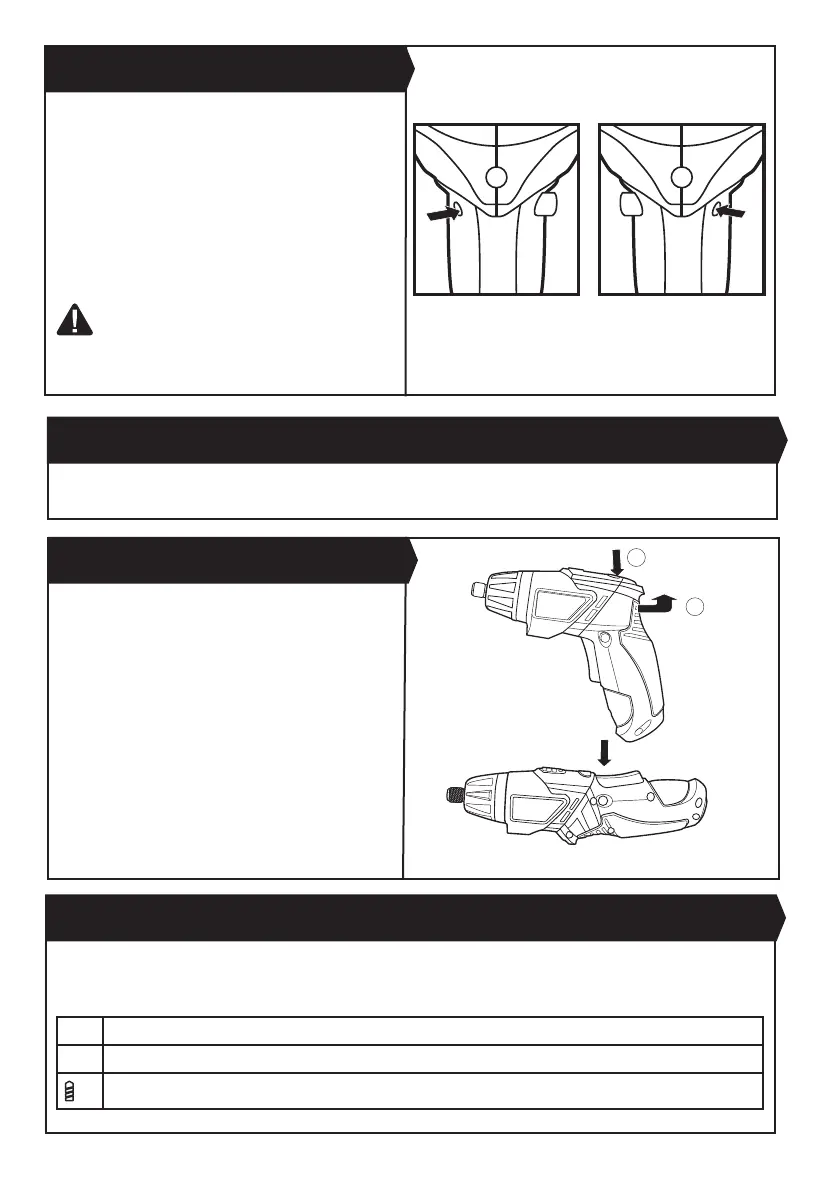
Your tool is equipped with a forward, reverse rotation
and lock control (4) located above the on/off switch
(6). It was designed for changing rotation of the chuck
and for locking the on/off switch (6) in the center
position to help prevent accidental start and accidental
battery discharge.The screwdriver has forward/reverse
function, press the forward/reverse rotating control to
the right (See Fig. E1), it is forward function, then press
the forward/reverse rotating control to the left (See Fig.
E2), it is reverse function.
WARNING! Do not change direction of rotation
until the tool comes to a complete stop.
Shifting
during rotation of the chuck can cause damage to the tool.
4. FORWARD, REVERSE ROTATION AND LOCK
CONTROL(See Fig. E1, E2)
5. USING THE WORK LIGHT
The work light (3) will illuminate whenever the trigger is pressed. LED lighting increases visibility, great for dark or
enclosed areas.
Fig. E1
This machine can be used with a straight handle
or pistol grip. Press the button (8) and hold it while
adjusting the handle to desired position. Release the
button to lock the handle.
6. ROTATING HANDLE (See Fig. F)
1
2
Fig. F
Fig. E2
7. TORQUE ADJUSTMENT
The torque is adjusted by rotating the torque adjustment ring (2). The torque is greater when the torque adjustment ring
is set on a higher setting. The torque is less when the torque adjustment ring is set on a lower setting.
Make the setting as follows:
1-3 for driving small screws
4-6 for driving screws into soft material
for drilling purpose



 To Next Page