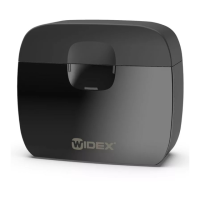
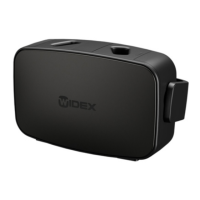
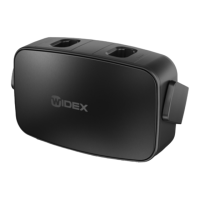
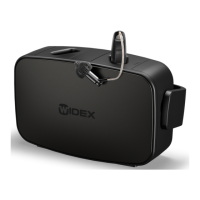
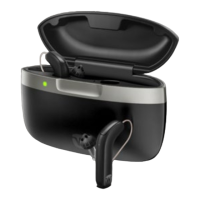
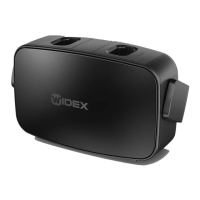
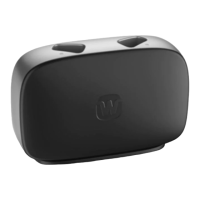
The WIDEX mRIC CHARGE n CLEAN (WPC101 model) is a charger designed for indoor use, specifically for detecting, charging, and maintaining MRR2D hearing aids. It features a compact design with individual charging units for each hearing aid, a maintenance compartment for the receivers, and a light indicator with three lights to show the charging status of the hearing aids and the status of the maintenance cycle.
Function Description:
The charger is designed to simultaneously charge two hearing aids. Each hearing aid can also be charged individually, depending on its battery status. A full charge takes approximately 4 hours, and a 30-minute charge provides about 4 hours of use. While the hearing aids are charging, a maintenance cycle is performed, which includes Ultraviolet-C (UV-C) treatment and drying. This maintenance cycle lasts 30 minutes.
Important Technical Specifications:
- Model: WPC101
- Intended Use: Charging MRR2D hearing aids.
- Operating Conditions:
- Temperature: 0° C (32° F) to 35° C (95° F)
- Humidity: 20% rH to 75% rH
- Storage and Transport Conditions:
- Temperature: -20° C (-4° F) to 60° C (140° F)
- Humidity: 5% rH to 90% rH
- Atmospheric pressure: 750 mbar to 1060 mbar
- Power Supply: Requires a Widex power adapter and cable. The USB port must be USB 2.0 compatible for optimal operation.
- Radio Transmitter: Operates at 6.78 MHz, 13.4 dBµA/m @ 3 m.
Usage Features:
- Power On: When connected to a power supply, the indicator lights flash white 5 times and then turn off, indicating standby mode.
- Charging Process:
- Gently place hearing aids into their respective charging wells and receivers into the maintenance compartment. The hearing aids automatically turn off.
- Close the lid to begin charging and maintenance.
- Charging Indicators:
- Solid yellow: Charger is detecting the hearing aid.
- Flashing green: Hearing aid is charging, low battery (less than 40% charged).
- Glowing green: Hearing aid is charging (more than 40% charged).
- Solid green: Hearing aid is fully charged (100% battery).
- One indicator flashing red: An error occurred during charging, and charging has stopped. (Refer to troubleshooting).
- Both indicators flashing red: An error occurred during charging, and charging has stopped. (Refer to troubleshooting).
- Flashing yellow: Hearing aid temperature is too high during charging, and charging is paused. (Refer to troubleshooting).
- Maintenance Indicators:
- Flashing white: Maintenance cycle (UV-C treatment or drying) is in progress.
- Solid white: Maintenance cycle is complete.
- Solid yellow: Maintenance cycle is paused, but charging continues. This occurs if the lid is opened during the maintenance cycle; the cycle will restart when the lid is closed.
- Flashing red: An error occurred during maintenance, and the cycle has stopped. (Refer to troubleshooting).
- Flashing yellow: Maintenance cycle is paused due to overheating (fan still running). (Refer to troubleshooting).
- Removing Hearing Aids: Avoid pulling the earwire to remove hearing aids, as this can damage the connection. Instead, grasp the hearing aid itself. Hearing aids turn on a few seconds after removal. Remember to turn them off if not using immediately. Hearing aids may feel warm after charging; wait a few minutes for them to reach room temperature if uncomfortable.
Maintenance Features:
- Cleaning: The charger generally does not require extensive cleaning.
- Wipe the charger with a soft, dry cloth if necessary.
- If dust is present in the charging well, gently blow it out. If insufficient, use a cotton bud.
- To remove earwax, wipe with a soft cloth moistened with a mild household detergent.
- Never use sharp or pointy objects to clean the charger.
- Keep the charger and small parts away from children, pets, and mentally disabled individuals.
- Do not expose the charger to temperatures above 60° C (140° F), prolonged sunlight, open flames, or ignition sources.
- Place the charger upright on a flat, stable surface with adequate space, away from flammable substances.
- Do not attempt to open or repair the charger. Contact a hearing care professional for defects.
- Use only Widex chargers, power adapters, and cables with your hearing aids.
- Never immerse the charger in water or leave it in direct sunlight.
- Only insert hearing aids into the charging wells.
- EU Directives: Complies with Directive 2014/53/EU. A Declaration of Conformity is available online.
- Disposal: Do not dispose of hearing aids, accessories, or chargers with ordinary household waste. They should be disposed of at designated collection points for electrical and electronic equipment or returned to a hearing care professional for safe disposal.

 Need help?
 General

 To Next Page