The WiiM Mini is a high-resolution wireless audio streaming device designed to integrate seamlessly into your existing audio system, offering a versatile platform for enjoying music from various sources. It boasts both WiFi and Bluetooth 5.0 connectivity, allowing for flexible streaming options from smart devices, Network Attached Storage (NAS), and a wide array of online streaming services.
Function Description
At its core, the WiiM Mini acts as a bridge, transforming your traditional audio setup into a modern, connected system. It's capable of streaming and outputting high-quality music, supporting high-resolution audio playback. The device features both analog and digital output options, specifically AUX OUT and SPDIF Optical Out, making it compatible with a broad range of amplifiers, receivers, and powered speakers. For input, it includes an AUX IN port, allowing you to connect external audio sources like a turntable or CD player and integrate them into your wireless streaming ecosystem. Power is supplied via a USB Type-C 5V/1A port.
The top of the device features intuitive controls: Volume Up (+), Volume Down (-), and Play/Pause buttons. An LED indicator provides visual feedback on the device's status, such as bootup, WiFi connection, Bluetooth pairing, and update modes.
Usage Features
The WiiM Mini offers a rich set of features designed to enhance your audio experience:
- Wireless Streaming: Enjoy music via your home network without distance limitations, or connect directly via Bluetooth 5.0 for up to 15 meters of range.
- Protocol Support: It supports a comprehensive list of streaming protocols, including AirPlay 2, Spotify Connect, Tidal Connect, Qplay, DLNA, and UPnP, ensuring compatibility with most popular streaming platforms and devices.
- Diverse Music Sources: Stream from online services like Spotify, Tidal, Deezer, Qobuz, iHeartRadio, TuneIn, and Napster, directly from your smart device, NAS, or via Bluetooth. The analog input (AUX IN) further expands your source options.
- Voice Control Integration: The WiiM Mini supports voice control through "Works with Alexa" and "Works with Siri." Once configured, you can use voice commands to search, play, stop, or skip music, and control multi-room groups. For Alexa, you can combine the WiiM Mini with other Amazon devices for multi-room music playback. For Siri, you can control playback through Apple Music and other compatible apps.
- Multiroom and Multizone Streaming: Connect multiple WiiM Mini units (or other compatible models from the manufacturer) within the same network to create a multiroom or multizone audio system. This allows you to play the same music in sync across different rooms or play different music in various zones. The app provides controls to group devices, designate a master device, and add or remove slave devices for synchronized playback.
- High-Quality Music Streaming: The device is engineered for high-fidelity audio, supporting high-resolution music streaming.
- App Control: The dedicated WiiM Home application, available for iOS and Android devices, serves as the central control hub. Through the app, you can:
- Device Settings: Rename your device, view speaker information (IP address, MAC address, firmware version), set up alarm clocks with music, configure preset music buttons, adjust Alexa language settings, and fine-tune audio sync for multiroom playback.
- Local Music Playback: Access and play music stored on your mobile device (excluding iTunes library for iOS) or from a NAS with DLNA support.
- Source Selection: Easily switch between WiFi, Bluetooth, and AUX IN modes directly from the app.
- Streaming Service Management: Manage and enable various online streaming services to be displayed on the main interface of the app.
- Left and Right Channel Configuration: For multi-unit setups, you can assign individual units as left or right channels or set them to stereo mode, allowing for a customized stereo soundstage.
- Presets: Configure up to six preset buttons for quick access to your favorite online music or radio stations.
- PC Streaming: The WiiM Mini can stream audio from Windows PCs and Macs using applications like iTunes, Foobar2000, and Spotify Connect. For iTunes, users can easily play, switch music, control volume, and group/ungroup audio devices. For Windows PC users, Foobar2000 with UPnP component support allows streaming to the WiiM Mini.
Maintenance Features
The WiiM Mini is designed for ease of use and ongoing performance:
- Global Online Updates: The device supports free global online updates, ensuring you always have access to the latest features and improvements.
- Factory Reset: In case of connection issues or to clear all settings, the device can be restored to factory settings.
- LED Indicator: The multi-color LED indicator provides clear status updates for various operations, including bootup, WiFi setup, Bluetooth pairing, AUX-in mode, OTA updates, and factory reset, aiding in troubleshooting and understanding the device's current state.
- App-Based Troubleshooting: The WiiM Home app simplifies the setup process, guiding users through WiFi configuration and device management. It also provides prompts and information that can help resolve common issues.
- Support and After Service: Contact information is provided for support and after-sales service, ensuring assistance is available if needed.

 Need help?
 General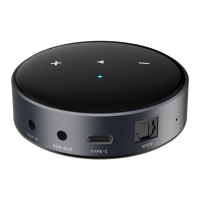

 To Next Page