2
Program Menus
Tea Recipes
ProgramMenus
ContinuedonPage3
Your Curtis G3/Gold Cup Series is Factory Pre-Set for Optimum Performance.
Afterconnectiontowaterandpower;thereartoggleswitchmustbeon.Youwillhearabeepsound,indicatingpowerisavailabletothe
controller.
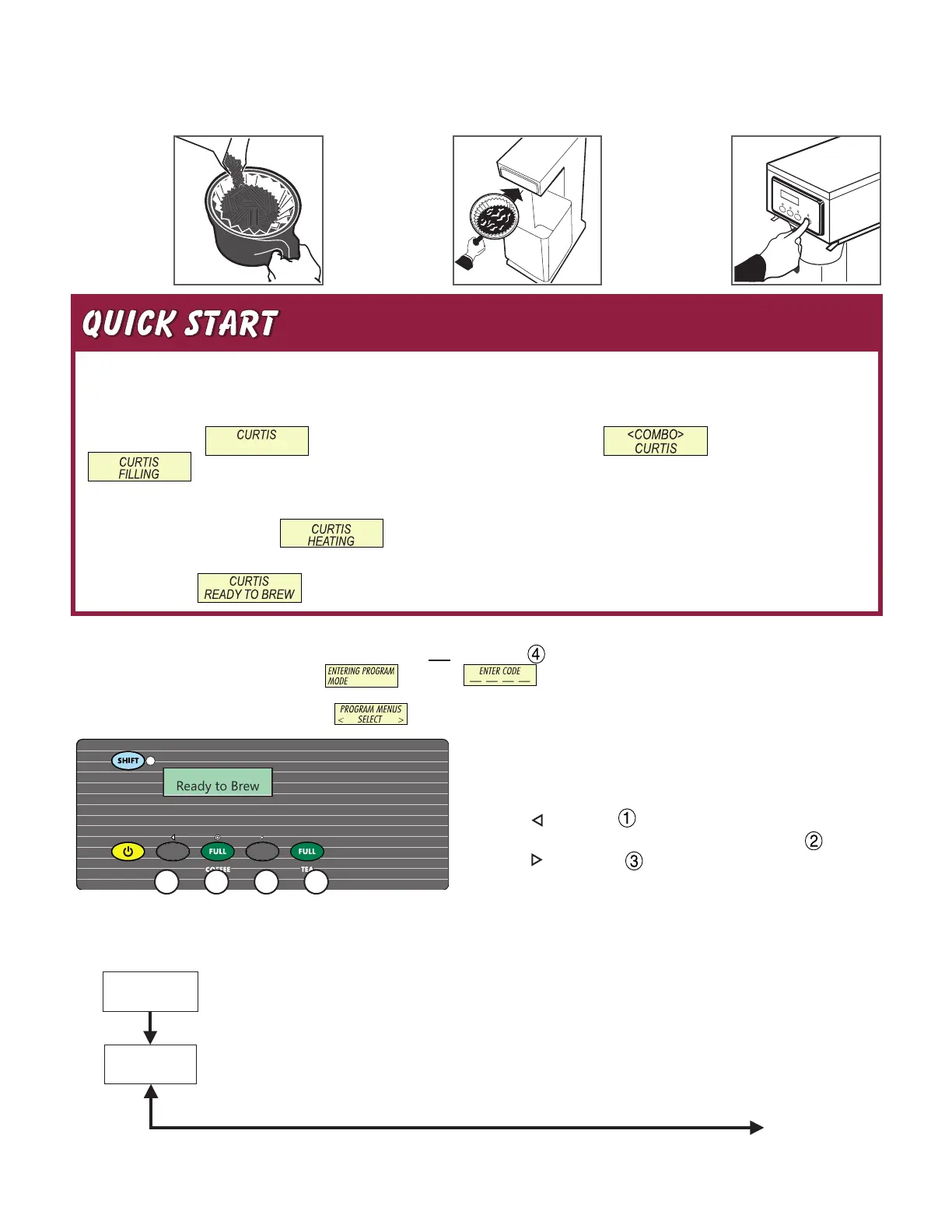
Thecontroldisplays .PressON/OFFbuttonandthescreenwilldisplay .Afterthreeseconds,
is displayed.
Thetheheatingtankwillllinapproximatelytwotothreeminutes,dependingonwaterowrate.
Whentheproperlevelisreached willappearonthescreen.Ittakesapproximately20minutestoreachsetpointtem-
peratureof204°F.
Controlwilldisplay whentemperaturereachesthesetpoint(204°F).Unitisnowreadytobrew.
Brewing Instructions – Tea
1. BrewershouldbeON(Conrmatreartoggleswitch,thenpressON/OFFbutton)andReady-to-Brewdisplayed.
2. Makesuredeckisfoldeddownandteacontainerisinplace.
3. Placelterin
brewbasket.
Pourteainto
basketmarked
ICEDTEA.
4. Slidebrew
cone into rails.
Placetea
container under
brewcone.
Programming
Turnoff(darkdisplay)bypressingON/OFFbutton(yellow).PressandholdBREWbutton4(green)andthenpressandreleaseON/OFFbutton(yellow).
ContinueholdingBREWbutton.Displaywillread ,waituntil isdisplayedEnterthe4-digitaccesscode,thedigits1-4corre-
spondtothebuttons(seeillustrationbelow).
Thedefaultcodesetatthefactoryis1-2-3-4.Then willbedisplayed.
Allprogrammingselectionsareperformedwiththethreecenterbuttons.
Thesymbolsbelowthebuttonsare:
ScrollLEFT
SELECTIONorENTERtosavenewparameter
ScrollRIGHT
431 2
SelectingBrewbyVolumeorBrewbyTimedependsonwhetheryouknowyourbrewtimebeforestarting.
FromProgram Menuspress>displaywillnowshowthenextfeature.
Tea Recipes (Factorysetting,Standard–PurpleFull,Standard–PurpleHalf)
PresstoSelect.Press<or>totogglebetweenStandard-Gray,Standard-Purple,Tropical-Gray,Tropical-
Purple,76/308-Grayand76/308-Purple.Setandexitprogrammingbypressing.
5. Pressthe
teabrew
button to begin
brewingtea.


 To Next Page
 Loading...