WP410, WP480G, WP490G Wildix Phones Guide
WP410, WP480G, WP490G Wildix Phones Guide
Page 10 of 13
"available" (tick icon)
"offline" (no icon)
"busy" (handset icon)
"incoming call" (arrow icon)
"away" (clock icon)
"dnd" (brick icon)
Troubleshooting
For reset and recovery of WP4X0 2015-2017, refer to Reset and Recovery of WP410 2015-2017 Manual
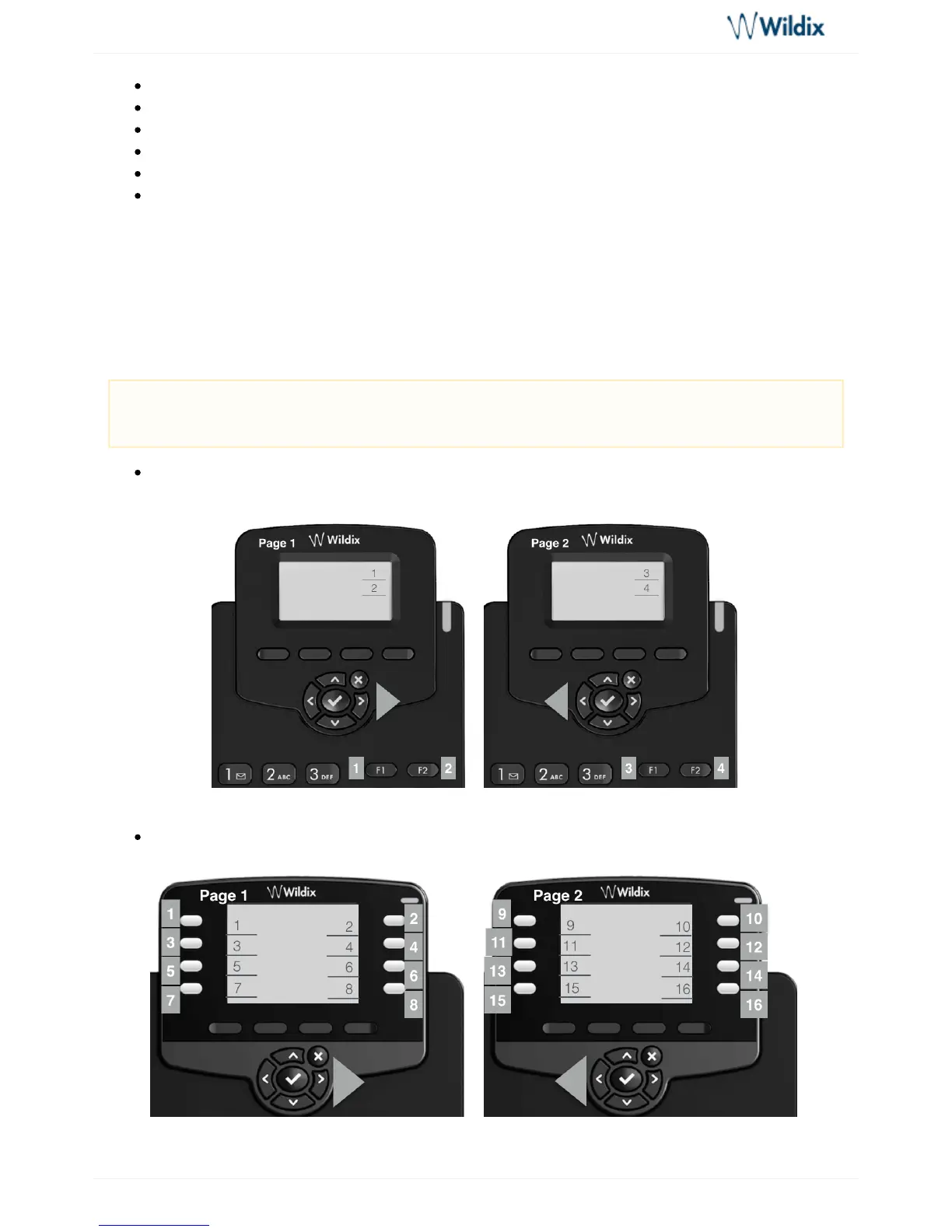
Appendix 1 - BLF keys distribution scheme
4 BLF keys (2 pages) for WP410 Sept 2016 / 2017 (use keys to move between theNavigation
pages):
16 BLF keys (2 pages) for WP480G 2017 (use keys to move between the pages):Navigation
Note: BLF keys are set up by a user via Collaboration or by PBX administrator via WMS. Refer to
the section for more information.Function keys of Collaboration User Guide



 To Next Page