WP410, WP480G, WP490G Wildix Phones Guide
WP410, WP480G, WP490G Wildix Phones Guide
Page 3 of 13
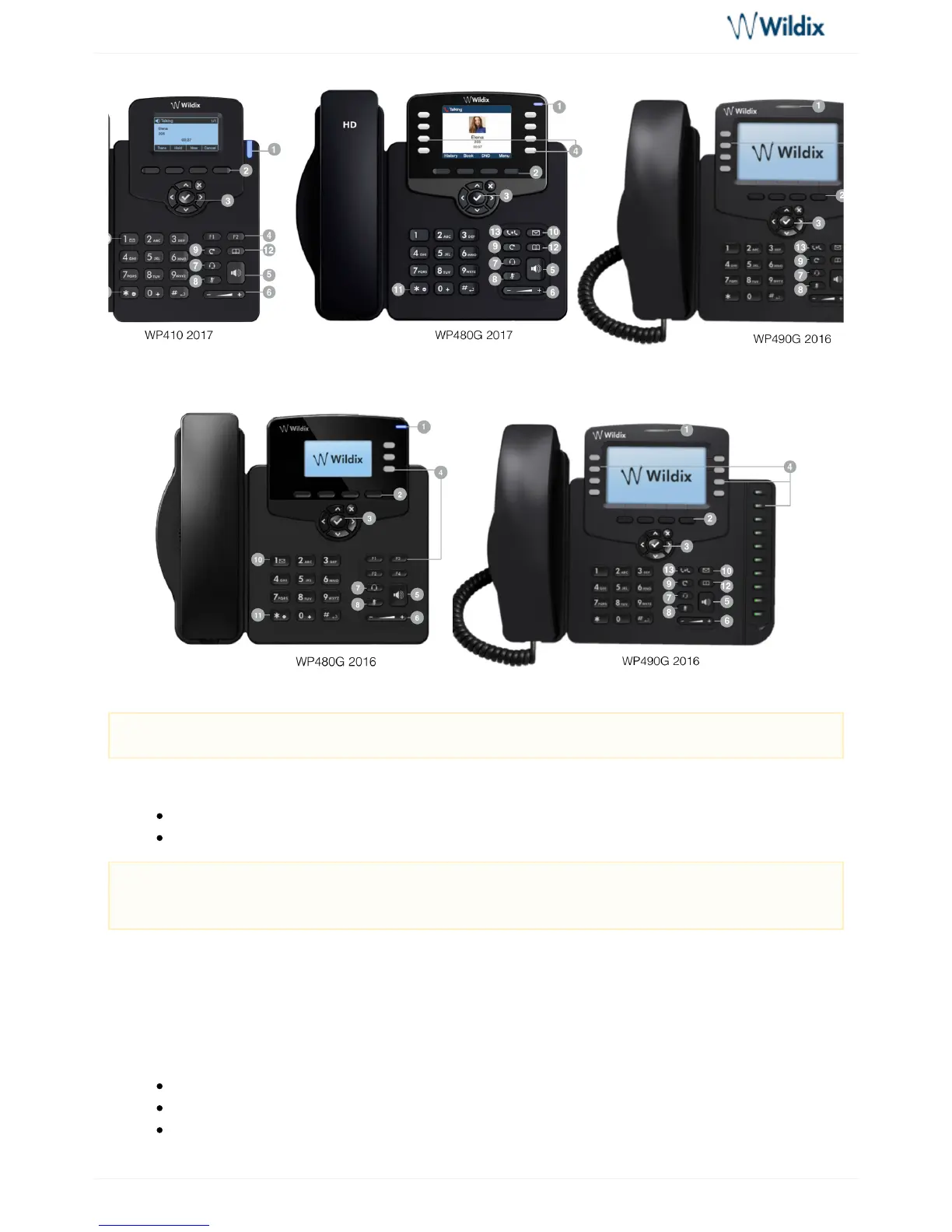
1 – LED indicator
Flashing: Incoming call / Missed call / New VM message
Off: In the standby mode
2 – keysSoft
Used to confirm different operations indicated on the screen above the corresponding soft keys.
On the idle screen soft keys provide access to phone’s menus: ; ; ; History Phonebook Features Menu
: access call history and call from historyHistory
: access to shared PBX phonebooks and call from phonebooksPhonebook
: caFeatures ll features, read for detailsAppendix 2: Call features
Note: keypad instruction for WP410 sept 2016 is equal to WP410 2017.
System administrator can control the behavior of the LED indicator using Provisioning Custom
.Settings



 To Next Page