«
¢
«
①
② ¦«
①
② ¦«
③ ¦««««
④«
O WiMjUS
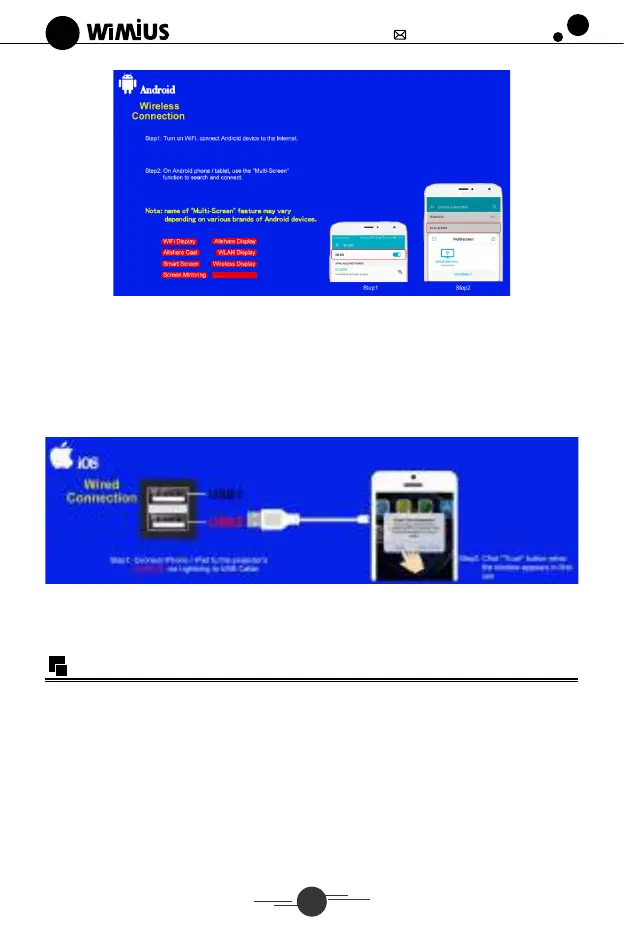
Anhd
Wireless
Connection
Note •wti.so-w-.•
support@wimius.com
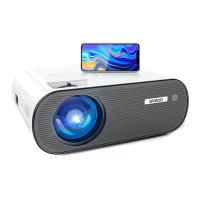
Wired Connection For IOS System Only
(There are 2 USB ports, please only plug USB cable to "USB-2" port)
1.Turn on the projector, connect your iPhone or iPad to the projector "USB-2" port via
ORIGINAL Lightning to USB cable( Charging cable) .
2. Select "Trust" in the pop-up window. Then it works.
For Android System: It doesn't support cable connection. Please use the
method of wireless connection only.
Connecting with Other Devices
I. Connecting with PC
(J) Connect projector with PC by VGA cable or HDMI cable.
(2)Choose the media signal channel
2. USB Multimedia Connecting
O) Insert the flash disk to USB interface.
(2)Choose the media signal channel
(3)According to the programs to choose :"photos""music""movie" or "text'!
O Choose the file you want to play, press the key "play pause" to play or pause the file.


 To Next Page