① ¦«
②
①
②
③
①
②
①
② ¦«
¦¡
① ¦«
②¯¯
«▼
O WiMjUS
E support@wimius.com
3. Connecting with MacBook or Mac Book Air
(D Choose the media signal channel :"HDMI"
Use a Type-C to HDMI adapter to connect your MacBook, or a Mini Display to HDMI
adapter to connect with your MacBook Air (adapter not included).
4. Connecting with Sound bar
(D Usethe AVcablecoming with the projectorto connect with soundbar.
Turn on the projector and the sound bar.
($)More details, please contact seller at support@wimius.com.
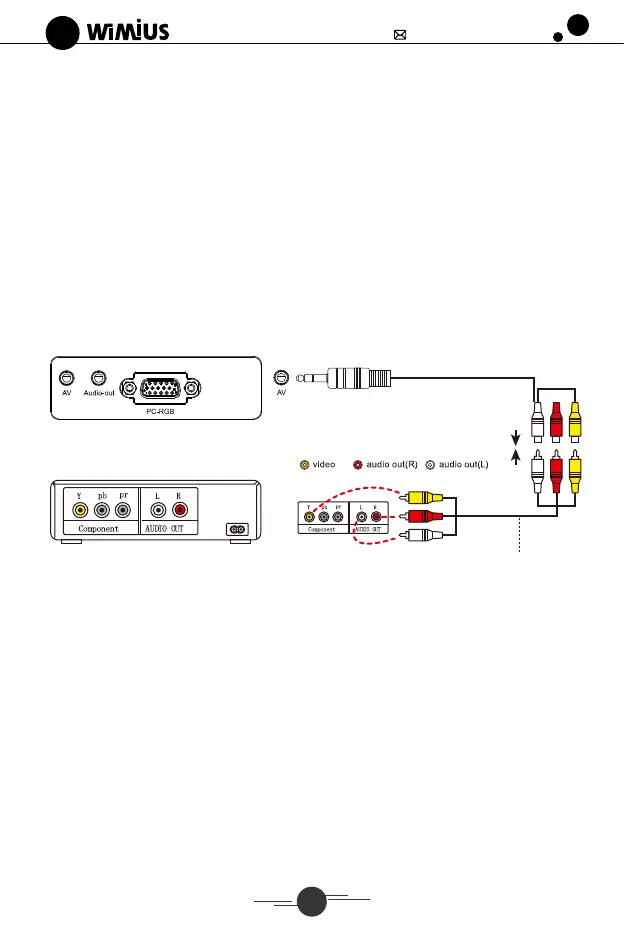
5. Connecting with DVD
(D Usethe AVcablecoming with the projectorto connect with DVD.
Turn on the projector and DVD player
o
AV
pc-RGB
Y pb pr
Component
AUDIO
Video Player
O video O audio out(R) audio Out(L)
arr
Audio signal line
6. Connecting with Amazon fire TV Stick
(D Plugthe TV stick into HDMIport of the projector.
Choose the media signal channel
RS: It only supports 1080P TV stick, not 4K TV stick
7. Connecting with XBOX/PS4
(D Choose the media signal channel
Use HDMI cable connect to XBOX/PS4
Warm tips
If you want to make the projection screen full screen during video/picture playback,
you can press the "V" button on the projector or remote control.
12


 To Next Page
 Loading...