EasyManua.ls Logo

Wimius K3 - Page 14

Wimius K3
17 pages
Print Icon
To Next Page IconTo Next Page
To Previous Page IconTo Previous Page
Loading...





  

 ¤
  

 



« « 

O WiMjUS
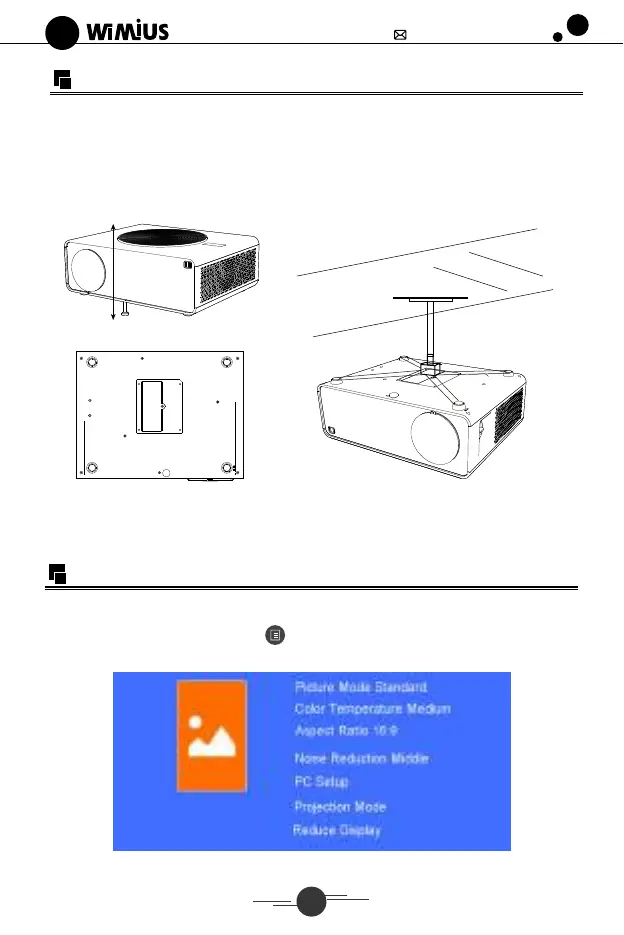
Installing the projector
xsupport@wimius.com
o
We provide a screw in the packaging, there is a screw hole at the bottom of the
projector, you can install it to lift the base of the projector on the plate to get a better
projection angle. See below (1).
For Ceiling mount, there are 4 holes at the bottom of the projector(M4*10mm).
Please slowly rotate it out first. See below
(2) (3)
NOTE: The hanging bracket is an accessory that is not supplied.
Main Menu Function
1. Picture Menu
Press "M"on theprojectororpress"" ontheremotecontroltomakesomepersonal
settings.
Hi:ui•
13