EasyManua.ls Logo

Wimius K7 - Page 19

Wimius K7
25 pages
Print Icon
To Next Page IconTo Next Page
To Previous Page IconTo Previous Page
Loading...
support01@wimius.com
Extend:
makes
all
of
your
monitors
act
like
one
big
monitor
extending
the
deskiop
across
all
of
them.
Projector
only:
Displays
only
on
the
secondary
monitor
like
a
projector.
You
can
change
the
screen
resolution
on
the
Projector
Only
Mode
Step:
Start
>
Control
Panel
>
Appearance
and
Personalization
>
Adjust
Screen
Resolution
Manufacture
Keys
Manufacture |
Keys
Acer
Fn+F5
NEC
Fn+F3
Dell
Fn+F8
Panasonic
Fn+F3
Epson
Fn+F8
Sharp
Fn+F5
Fujitsu
Fn+F10
Sorry
Fn+F7
1BM
FnF7
Toshiba
Fn+F5
Hewlett-packard
|
Fn+F4
Zotac
Fn+F3/F5
Lenovo
Fn+F10
3.
Connect
to
the
DVD
Player
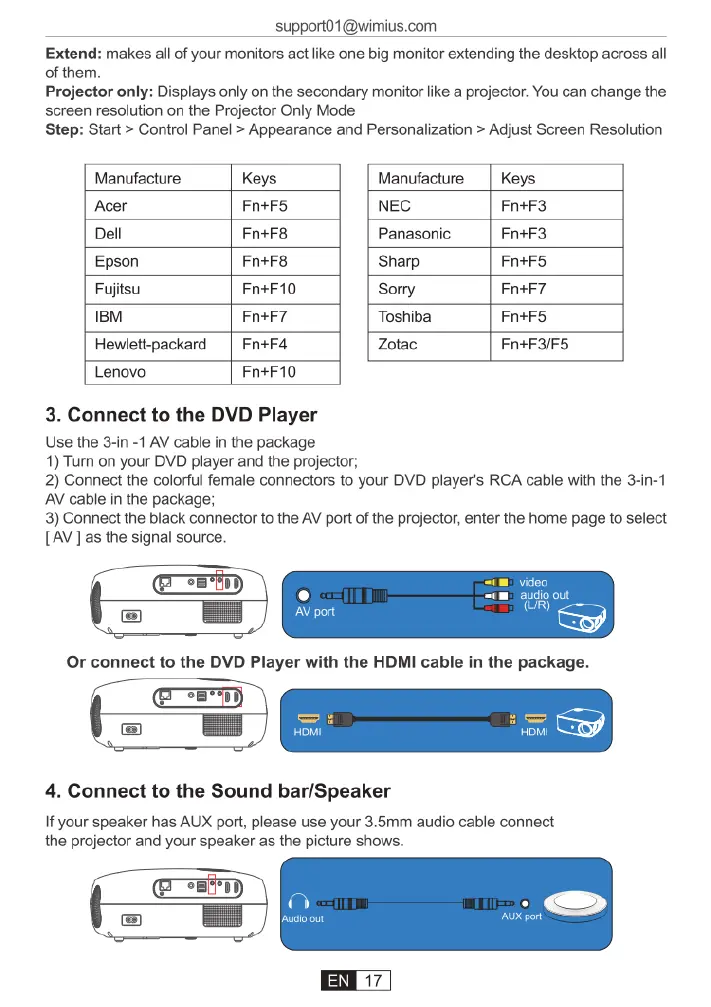
Use
the
3-in
-1
AV
cable
in
the
package
1)
Turn
on
your
DVD
player
and
the
projector;
2)
Connect
the
colorful
female
connectors
to
your
DVD
player's
RCA
cable
with
the
3-in-1
AV
cable
in
the
package;
3)
Connect
the
black
connector
to
the
AV
port
of
the
projector,
enter
the
home
page
to
select
[AV]as
the
signal
source.
HOMI
4.
Connect
to
the
Sound
bar/Speaker
If
your
speaker
has
AUX
port,
please
use
your
3.5mm
audio
cable
connect
the
projector
and
your
speaker
as
the
picture
shows.

Related product manuals