Asupport02@wimius.com
.AirpIay ( for iOS Devices)
Method 1: Setting with cellular data
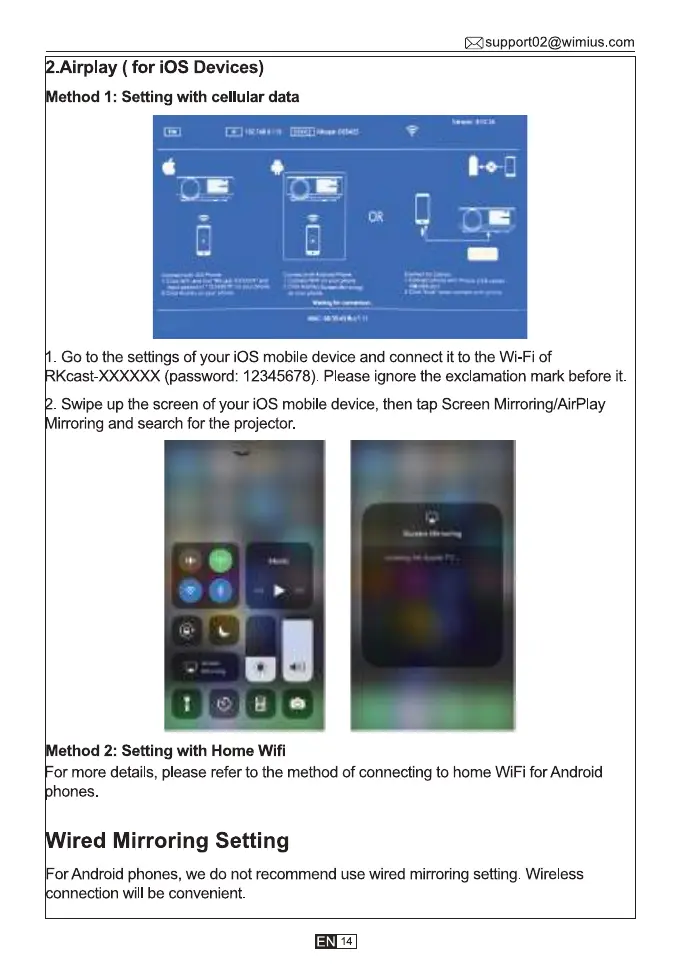
Go to the settings of your iOS mobile device and connect it to the Wi-Fi of
(password: 12345678). Please ignore the exclamation mark before it.
Swipe up the screen of your iOS mobile device, then tap Screen Mirroring/AirPIay
irroring and search for the projector.
Method 2: Setting with Home Wifi
or more details, please refer to the method of connecting to home WiFi for Android
hones.
ired Mirroring Setting
For Android phones, we do not recommend use wired mirroring setting. Wireless
nnection will be convenient.
14



 To Next Page