Asupport02@wimius.com
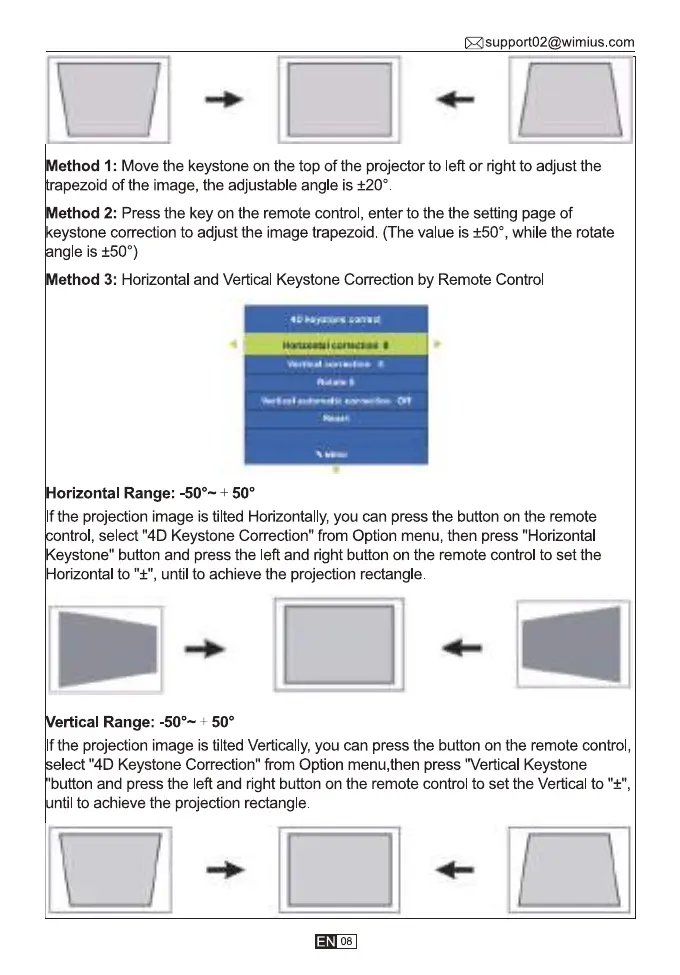
Method I: Move the keystone on the top of the projector to left or right to adjust the
rapezoid of the image, the adjustable angle is ±200
Method 2: Press the key on the remote control, enter to the the setting page of
eystone correction to adjust the image trapezoid. (The value is ±500,while the rotate
ngle is ±500)
Method 3: Horizontal and Vertical Keystone Correction by Remote Control
Horizontal Range: -500— 500
If the projection image is tilted Horizontally, you can press the button on the remote
ntrol, select "4D Keystone Correction" from Option menu, then press "Horizontal
Keystone" button and press the left and right button on the remote control to set the
Horizontal to "±", until to achieve the projection rectangle
ertical Range: -500—+ 500
If the projection image is tilted Vertically, you can press the button on the remote control,
elect "4D Keystone Correction" from Option menu,then press "Vertical Keystone
button and press the left and right button on the remote control to set the Vertical to "±",
ntil to achieve the projection rectangle.
08



 To Next Page