com
Tips: If there is a freeze or delay during playback, you can restart your mobile
device. Because too much software running on the phone will affect the smooth-
ness of the projection.
Wireless Mirroring with iOS Devices (For iOS iPhone I iPad)
NOTE:
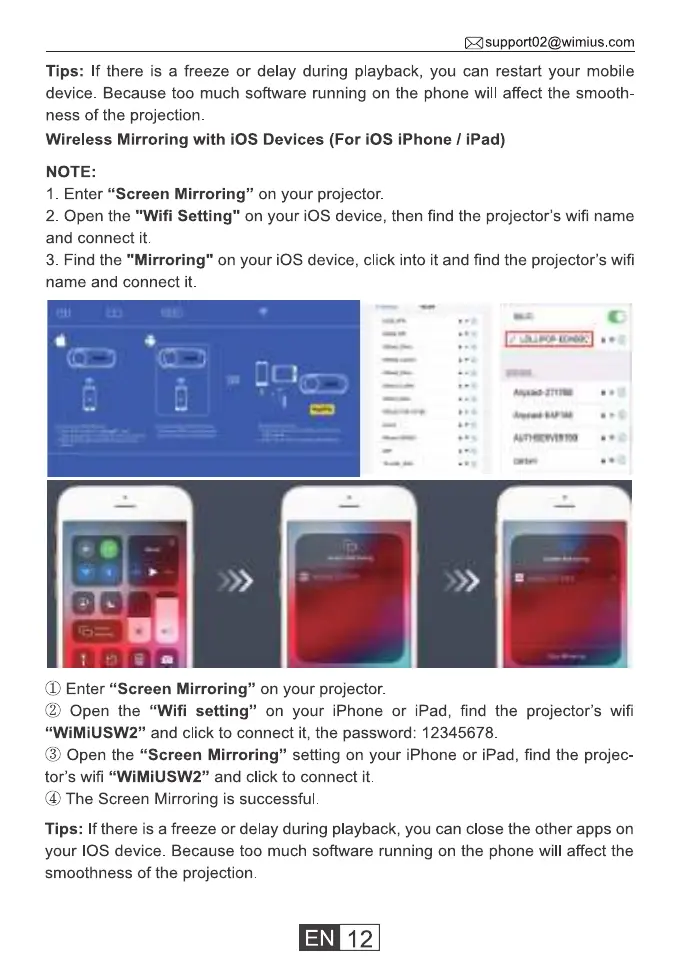
1. Enter "Screen Mirroring" on your projector.
2. Open the "Wifi Setting" on your iOS device, then find the projector's wifi name
and connect it.
3. Find the "Mirroring" on your iOS device, click into it and find the projector's wifi
name and connect it.
(T)Enter "Screen Mirroring" on your projector.
(2) Open the "Wifi setting" on your iPhone or iPad, find the projector's wifi
"WiMiUSW2" and click to connect it, the password: 12345678.
(9) Open the "Screen Mirroring" setting on your iPhone or iPad, find the projec-
tor's wifi "WiMiUSW2" and click to connect it.
@ The Screen Mirroring is successful.
Tips: If there is a freeze or delay during playback, you can close the other apps on
your IOS device. Because too much software running on the phone will affect the
smoothness of the projection.
12



 To Next Page