com
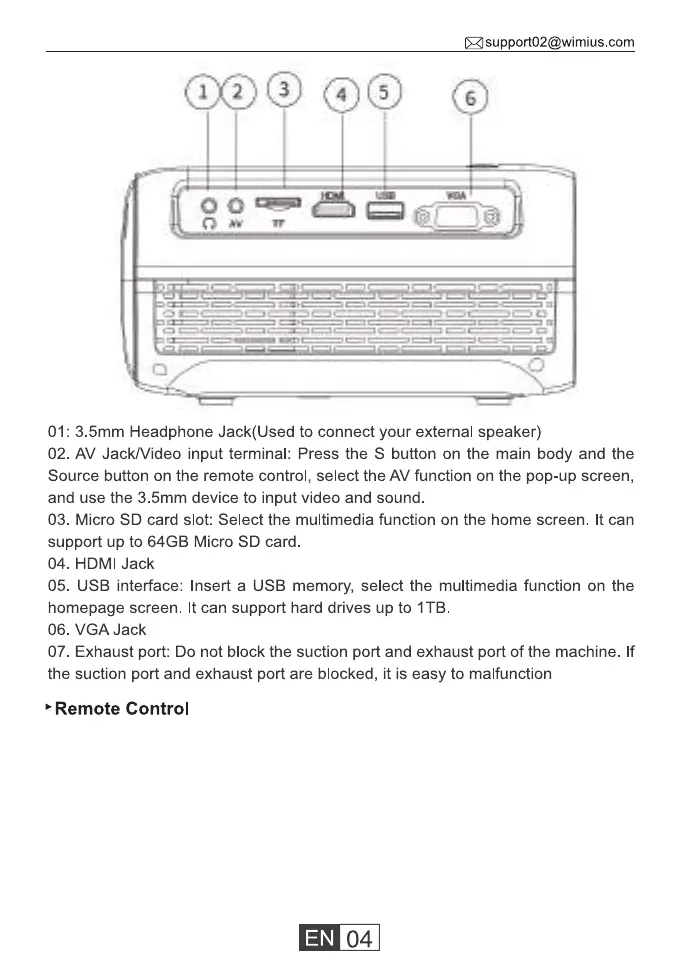
01: 3.5mm Headphone Jack(Used to connect your external speaker)
02. AV Jack/Video input terminal: Press the S button on the main body and the
Source button on the remote control, select the AV function on the pop-up screen,
and use the 3.5mm device to input video and sound.
03. Micro SD card slot: Select the multimedia function on the home screen. It can
support up to 64GB Micro SD card
04. HDMI Jack
05. USB interface: Insert a USB memory, select the multimedia function on the
homepage screen. It can support hard drives up to IT B.
06. VGA Jack
07. Exhaust port: Do not block the suction port and exhaust port of the machine. If
the suction port and exhaust port are blocked, it is easy to malfunction
Remote Control



 To Next Page