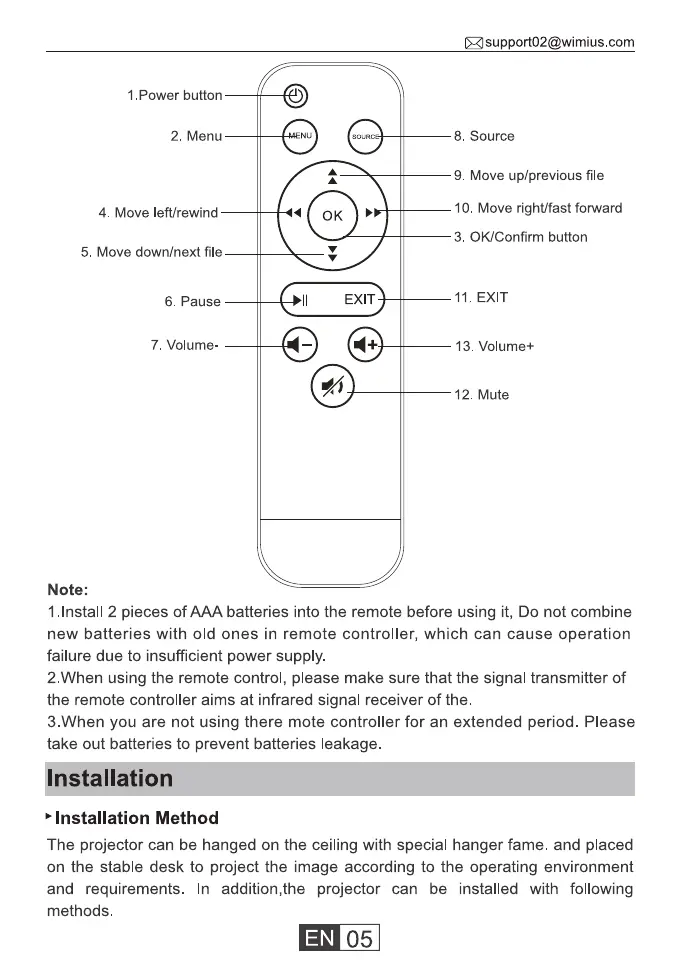
1 .Power button
2. Menu
4. Move left/rewind
5. Move down/next file
6. Pause
7. Volume
Note:
EXIT
com
8. Source
9. Move up/previous file
10. Move right/fast forward
3. 0K/Confirm button
11 EXIT
13. Volume+
12 Mute
1.lnstall 2 pieces of AAA batteries into the remote before using it, Do not combine
new batteries with old ones in remote controller, which can cause operation
failure due to insufficient power supply.
2 When using the remote control, please make sure that the signal transmitter of
the remote controller aims at infrared signal receiver of the.
3.When you are not using there mote controller for an extended period. Please
take out batteries to prevent batteries leakage.
nstallation
Installation Method
The projector can be hanged on the ceiling with special hanger fame. and placed
on the stable desk to project the image according to the operating environment
and requirements. In addition,the projector can be installed with following
methods
05



 To Next Page