com
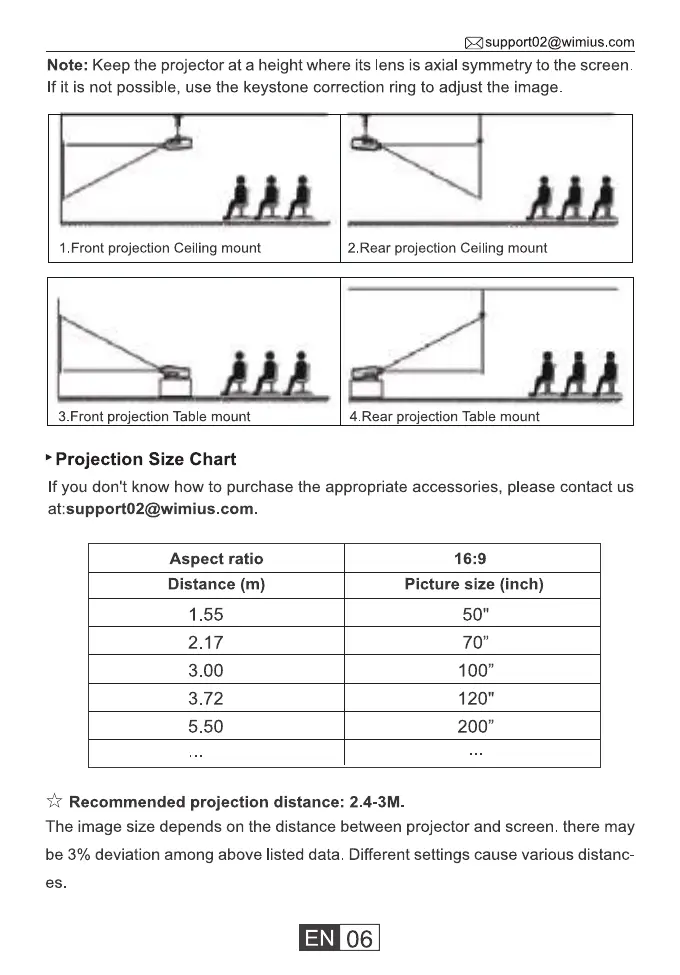
Note: Keep the projector at a height where its lens is axial symmetry to the screen.
If it is not possible, use the keystone correction ring to adjust the image
1 .Front projection Ceiling mount
3.Front pro•ection Table mount
Projection Size Chart
2.Rear projection Ceiling mount
4. Rear ro•ection Table mount
If you don't know how to purchase the appropriate accessories, please contact us
at:support02@wimius.com.
Aspect ratio
Distance (m)
1.55
2.17
3.00
3.72
5.50
16:9
Picture size (inch)
70"
100"
120"
200"
Recommended projection distance: 2.4-3M.
The image size depends on the distance between projector and screen. there may
be 3% deviation among above listed data. Different settings cause various distanc-
06



 To Next Page