com
Installing the Projector(Tripod & Ceiling Mounted)
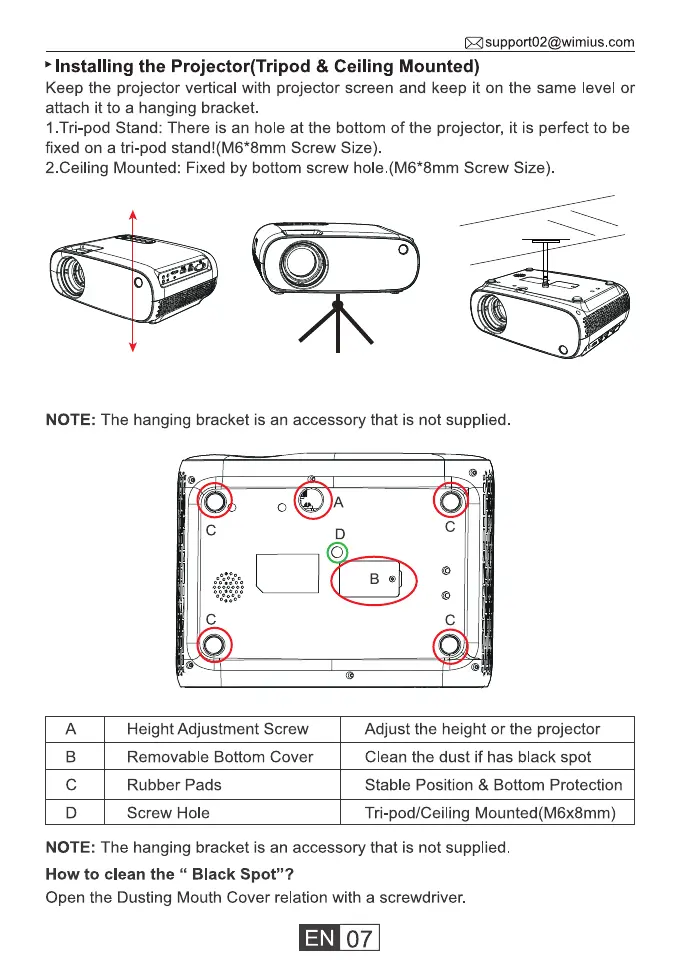
Keep the projector vertical with projector screen and keep it on the same level or
attach it to a hanging bracket.
I .Tri-pod Stand: There is an hole at the bottom of the projector, it is perfect to be
fixed on a tri-pod stand!(M6*8mm Screw Size).
2.CeiIing Mounted: Fixed by bottom screw hole.(M6*8mm Screw Size).
o
NOTE: The hanging bracket is an accessory that is not supplied
B
c
D
c
c
Height Adjustment Screw
Removable Bottom Cover
Rubber Pads
Screw Hole
O
c
c
Adjust the height or the projector
Clean the dust if has black spot
Stable Position & Bottom Protection
Tri-pod/Ceiling Mounted(M6x8mm)
NOTE: The hanging bracket is an accessory that is not supplied
How to clean the " Black Spot"?
Open the Dusting Mouth Cover relation with a screwdriver.
07



 To Next Page