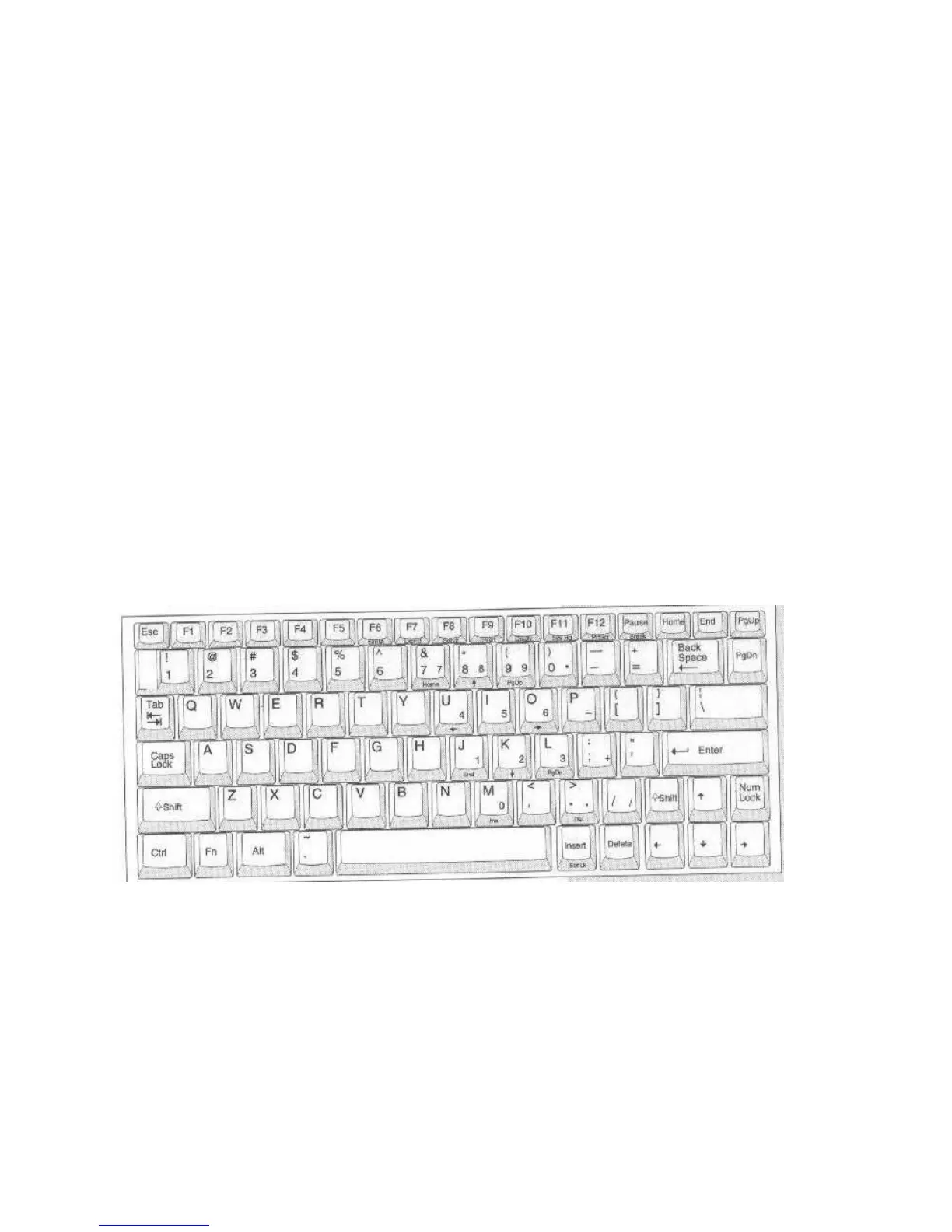
THE KEYBOARD
The keyboard has all the standard computer typing and control keys. It also has a numeric
keypad and some other key functions “embedded.” The standard letter, number and symbol keys
are printed in white on the key-tops. The computer control and cursor keys are printed in yellow.
The embedded keys are printed in gray or teal.
The embedded numeric keypad characters are printed in gray on the lower right-hand corner and
the front of the keys used. They reproduce the functions of the numeric keypad on an IBM 101-
type keyboard, which has a dedicated keypad. To use the embedded keypad, turn on Number
Lock by pressing the ‘Num Lock’ key once. With Num Lock on, the numeric keys are active. If
you hold down either Shift key as well, the keypad cursor control functions, printed in gray on
the front of the keys, are activated. The Num Lock function is disabled in the default system
Setup program configuration.
There are also some additional Fn-key activated functions printed in Teal on the front of some
keys. These include screen controls and a key to call up the power management setup screen.
The keyboard layout is the same for both the trackball and Track Point models, with the
exception that the TrackPoint control button sticks up out of the keyboard between the G and H
keys. The following figures show the keyboard layout and which keys are used by the embedded
keypad. There is more information on specific key functions in Appendix B.
Figure 11: Full Keyboard



 To Next Page