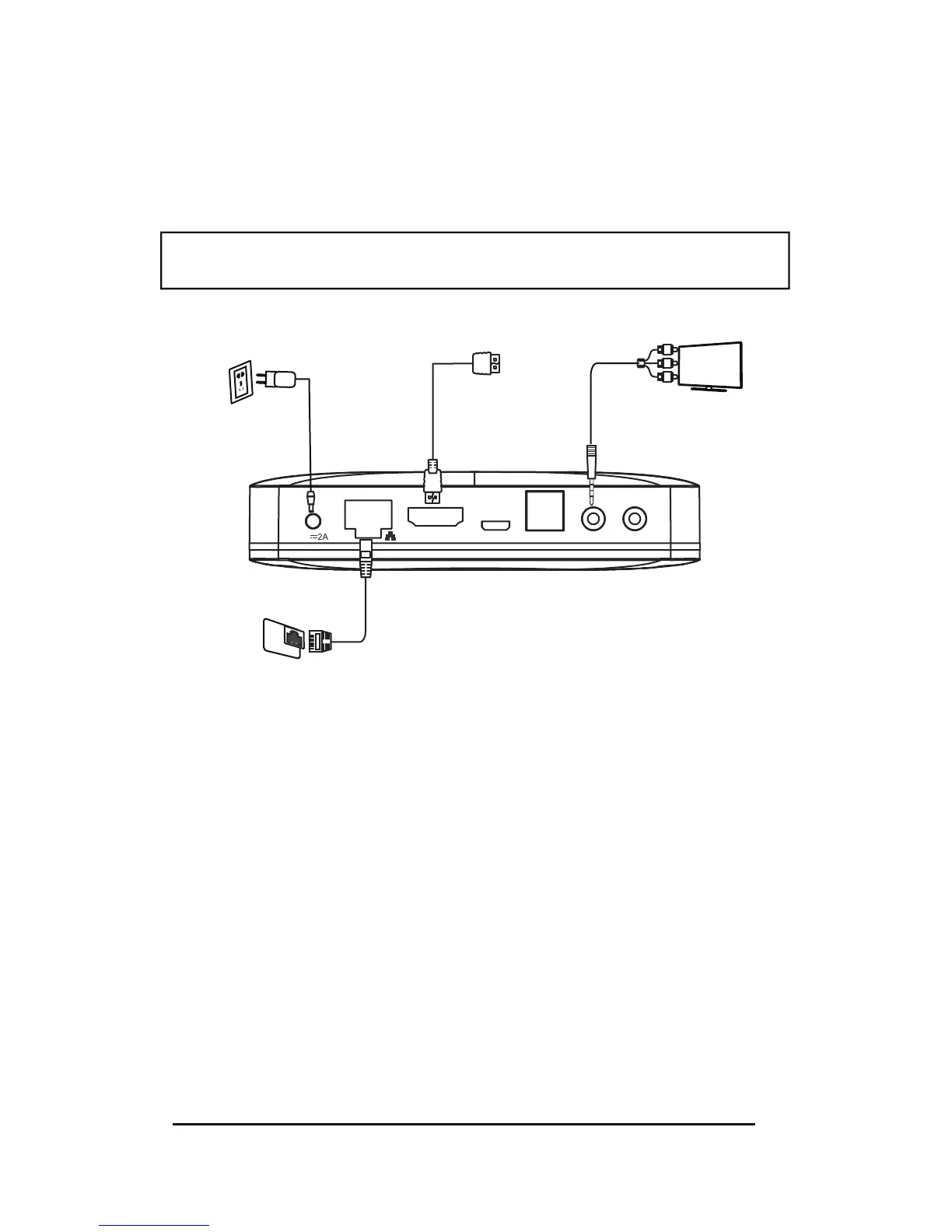
Step1: Connection to TV
Connect the supplied HDMI / AV cable to the HDMI / AV output port of the KineticTV box and
to an HDMI/AV input on your TV.
Step2a: Connection to your network wired
Connect the Ethernet cable to the LAN port of the KineticTV box, and an open Ethernet port
on your router or broadband network.
Step2b: Connection to your network wirelessly The TV box supports Wi-Fi; After you have
connected the KineticTV box correctly and powered on the unit please enter Settin
gs
→Network interface Wi-Fi operation, you will be presented fields to add your SSID and Wi-Fi
password, once entered the KineticTV box will be connected to the Internet. The device will
detect your Wi-Fi Access, and any other near SSID’s. Be sure to select your network.
Wireless supports both 2.4 Ghz and 5.0 Ghz, you will see better performance on a 5Ghz
wireless connection.
Note: Please turn off all e quipment before connectin g the audio and video
sources to the KineticTV box and television.
S/P DIFHDMI AV IR INOTG5V
Internet Connection
TV
Power Input
HDMI
HDMI


 To Next Page