EasyManua.ls Logo

Winegard Converge WIFIRANGER - User Manual

Winegard Converge WIFIRANGER
28 pages
Print Icon
To Next Page IconTo Next Page
Loading...
OWNERS MANUAL
Converge Indoor / Outdoor Routers
©2022 WIFIRANGER – A WINEGARD COMPANY
Converge
TM
by
WIFIRANGER
TM
Question and Answer IconNeed help?

Do you have a question about the Winegard Converge WIFIRANGER and is the answer not in the manual?

Summary

Owners Manual

Preliminary Recommendations and Cautions

Package Contents

Indoor Router Units (IDU)

Lists Indoor Router Units (Poplar, Spruce, Aspen).

Outdoor Router Units (ODU)

Lists Outdoor Router Units (Teton, Denali, Everest).

Typical Accessories

Details common accessories like fused wire and cables.

Optional Accessories

Lists optional accessories like AC/DC adapters.

Outdoor Installation

Installation Steps and Guidance

Step-by-step instructions for mounting the ODU.

Tools and Supplies for Outdoor Installation

Lists necessary tools and supplies for rooftop mounting.

ODU Installation Diagrams

Visual guides for ODU mounting methods.

Indoor Installation

Warning and Disclaimer for Indoor Installation

Safety warnings and disclaimers for indoor installation.

IDU Installation Considerations

Key factors for indoor unit installation, including cabling and spacing.

Wiring Diagram

Power Source Options

Details on connecting to DC and AC power sources.

Quick Start Guide

Power Up Your WiFiRanger

Steps to power on the WiFiRanger device.

Wireless Connection Setup

Instructions for connecting devices wirelessly to the WiFiRanger.

Enter Network Password

Guide to entering the correct password for network access.

Access Control Panel

Instructions to access the WiFiRanger Control Panel.

Connect to WiFi or Cellular

Steps to connect to WiFi networks or cellular data.

LTE Activation

Finding Activation Information

Resources for finding carrier and plan information.

Important Activation Considerations

Key points about data plans, SIMs, and carriers.

Modem Activation and Carrier Changes

Details on modem activation, upgrades, and carrier compatibility.

LTE Setup

Accessing Cellular Settings

How to access and configure cellular settings.

Viewing ICCID, SIM & IMEI Numbers

Locating essential SIM and IMEI information.

Refreshing ICCID;SIM Number

Steps to refresh SIM card details.

Manually Setting APN

Guide for manually configuring the Access Point Name (APN).

Troubleshooting

Cannot Connect to Internet

Steps to resolve internet connectivity issues.

WiFiRanger Not Visible

Solutions if the WiFiRanger network is not found.

Factory Reset Procedure

Instructions for performing a factory reset.

Forgot Password Recovery

Steps to recover or reset the WiFiRanger password.

Control Panel Access Issues

Troubleshooting access to the Control Panel.

Public WiFi Connection Handling

Handling connections to filtered public WiFi networks.

Finding IMEI and SIM Numbers

How to locate IMEI and SIM details.

Product Registration Troubleshooting

Workarounds for product registration issues.

Warranty Information

Functionality Warranty

Details the 1-year warranty for product functionality.

Hardware Warranty (1-Year)

Covers hardware failure for specific models for one year.

Hardware Warranty (2-Year)

Covers hardware failure for the Everest model for two years.

Return Authorization Policy

Procedure for returning products for service or repair.

Out-of-Warranty Service Options

Information on repair pricing for out-of-warranty products.

30-Day Satisfaction Guarantee

Policy for returning products within 30 days for a refund.

Warranty Restrictions and Limitations

Exclusions and limitations of the warranty coverage.

Compliance Information

FCC Statement and Operating Conditions

Compliance statement and operating conditions per FCC rules.

FCC Caution and Modification Warnings

Warnings regarding unauthorized changes to the equipment.

FCC Radiation Exposure Statement

Information on radiation exposure limits and safe usage.

Overview

The WiFiRanger Converge Indoor/Outdoor Routers are a system designed to provide reliable internet connectivity, particularly for vehicles like RVs. The system includes both indoor (IDU) and outdoor (ODU) router units, which can be used together or as standalone devices, depending on the user's needs and the specific package purchased.

Function Description:

The primary function of the WiFiRanger Converge system is to act as a central hub for internet access, aggregating various sources to provide a consistent and strong Wi-Fi signal within a vehicle or other mobile environment. It is capable of connecting to existing Wi-Fi networks (like those found at RV parks, campgrounds, or public hotspots) and also supports LTE cellular data for internet access when Wi-Fi is unavailable or unreliable. The system is designed to extend the range of available Wi-Fi signals and to optimize cellular data performance, ensuring users have continuous internet access for their devices.

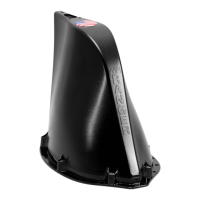
The outdoor router unit (ODU), available in models like Teton, Denali, and Everest, is typically mounted on the roof of a vehicle. Its elevated position and specialized antennas are engineered to capture weaker Wi-Fi signals from a greater distance and to improve cellular signal reception, especially in areas with challenging topography or signal interference. The ODU is designed to be weather-resistant and aerodynamic, ensuring durability and minimal impact on vehicle performance.

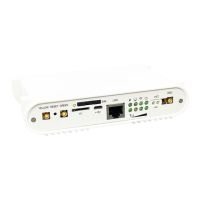
The indoor router unit (IDU), available in models such as Poplar, Spruce, and Aspen, serves as the internal distribution point for the internet connection. It creates a local Wi-Fi network within the vehicle, allowing multiple devices (smartphones, tablets, laptops, smart TVs, etc.) to connect simultaneously. When paired with an ODU, the IDU receives the optimized internet feed from the outdoor unit via a TetherPoint cable, which carries both power and data. The IDU also typically includes multiple LAN ports for wired connections and may offer additional features like USB ports for connecting external modems or storage.

The system's core functionality is managed through the WiFiRanger Control Panel, accessible via a web browser. This interface allows users to scan for available Wi-Fi networks, connect to them, manage cellular data connections, monitor network status, and configure various settings. The Control Panel is designed to be user-friendly, providing a centralized point for controlling all aspects of the internet connection.

Usage Features:

The WiFiRanger Converge system offers several features to enhance the user experience and connectivity:

  • Flexible Installation: The system can be installed as a combined indoor/outdoor solution for maximum performance or as a standalone indoor router for basic needs. The outdoor unit is designed for rooftop mounting, with clear instructions for securing it and routing cables while maintaining weather integrity.
  • Dual Power Options: Users can power the routers using either a 12VDC battery system (recommended for constancy and reliability in vehicles) or a standard 110-240VAC outlet via an AC adapter. This flexibility ensures compatibility with various power setups.
  • Easy Wi-Fi Connection: The Quick Start Guide outlines a straightforward process for powering up the units, wirelessly connecting devices to the WiFiRanger's local network, and then using the Control Panel to connect to external Wi-Fi networks or cellular data. For filtered Wi-Fi networks (those requiring a login page or terms of service), the system guides users through the captive portal process.
  • LTE Cellular Integration: The system supports LTE modems, allowing users to access the internet via cellular data plans. The Control Panel provides tools for managing LTE connections, including viewing ICCID/SIM and IMEI numbers for activation and troubleshooting. The system is designed to be carrier-agnostic, offering flexibility in choosing cellular providers and data plans.
  • Modem Activation and APN Settings: The manual provides detailed guidance on activating LTE modems, including how to refresh SIM card information and manually set Access Point Names (APNs) if necessary, although APNs are often automatically detected by the latest firmware.
  • Optimal Spacing Recommendation: For systems with both indoor and outdoor units, it is recommended to space them at least 8 feet apart to minimize wireless interference and maximize performance.
  • Firmware Updates: The system encourages users to check for firmware updates once connected to a reliable internet source, ensuring the routers operate with the latest features and security enhancements.
  • Product Registration: Users can register their product through the Control Panel, which is important for warranty purposes and accessing support.

Maintenance Features:

The WiFiRanger Converge system incorporates several features and guidelines for maintenance and troubleshooting:

  • Troubleshooting Guide: The manual includes a comprehensive troubleshooting section to address common issues such as inability to connect to the internet, WiFiRanger network not appearing, forgotten passwords, and difficulties accessing the Control Panel.
  • Factory Reset Procedure: A step-by-step process for performing a factory reset is provided, which can resolve persistent connectivity issues by restoring the router to its default settings. This involves a specific power cycling sequence.
  • Technical Support Contact: Users are encouraged to contact WiFiRanger's technical support via email or phone for issues that cannot be resolved through the troubleshooting guide or factory reset.
  • Warranty Information: The product comes with a warranty (1-year for functionality and hardware on most models, 2-year for Everest and paired indoor routers) that covers failures under normal use. This ensures that users can get repairs or replacements for defective hardware.
  • Return Material Authorization (RMA) Policy: For warranty claims or out-of-warranty repairs, an RMA number is required. The policy outlines the process for obtaining an RMA and returning products, including an assessment fee for out-of-warranty items.
  • 30-Day Satisfaction Guarantee: A 30-day return policy allows customers to return products in as-delivered condition for a refund, excluding shipping charges, providing peace of mind for new purchases.
  • SIM Card Compatibility: The manual specifies that Converge routers and LTE modems only support standard SIM card sizes, and adapter kits may be used to resize SIMs if needed, preventing damage from incorrect SIM insertion.
  • Installation Best Practices: The installation instructions emphasize cleaning the roof area thoroughly before mounting the ODU, using manufacturer-recommended sealant, and protecting cable ends during routing. These practices contribute to the long-term durability and performance of the outdoor unit.
  • Avoid Painting: Users are explicitly cautioned against painting any portion of the Converge system, as this could compromise performance and void the warranty.
  • Proper Wiring: The manual stresses the importance of careful wiring, recommending direct connection to a fused electrical panel and warning against modifications to the TetherPoint cable, to prevent electrical issues and ensure safety.

Winegard Converge WIFIRANGER Specifications

General IconGeneral
Wireless Standards802.11ac
Wireless SpeedUp to 1200 Mbps
USB Ports1 x USB 2.0
TypeRouter
Frequency Band2.4 GHz / 5 GHz
Ethernet Ports4 x Gigabit Ethernet
Antennas4 x External

Related product manuals