10
1. Be sure vehicle is in a location free of all obstruc-
tions and with a clear view of the satellite.
2. Power up unit, turn on receiver. Verify that the
correct satellite is found. Refer to page 3 for de-
tail of operation.
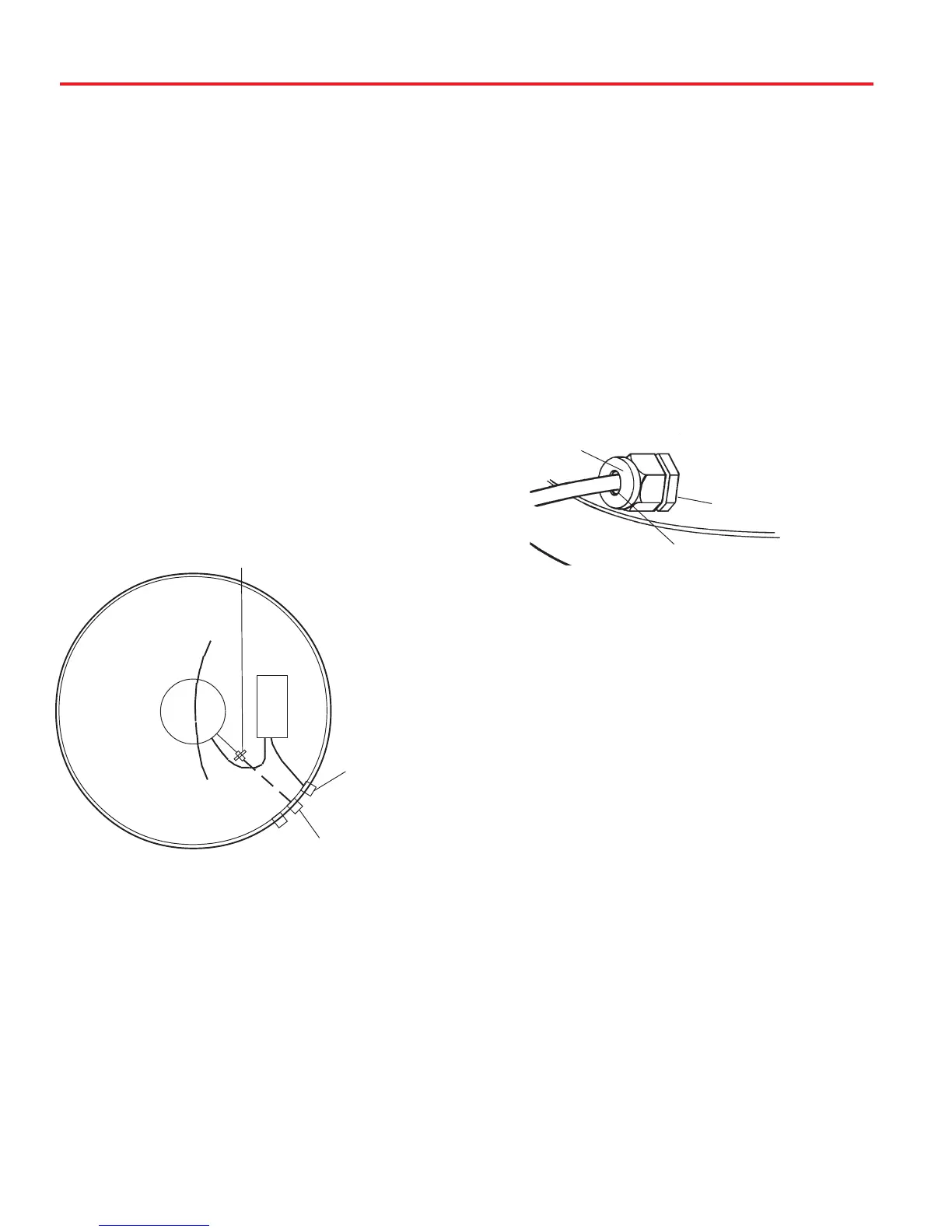
3. Install dome. NOTE: After connectors are tight-
ened, apply bead of silicone around the
connector where the exterior hex nut touches the
base and around the cables where they enter the
connector on the exterior of the unit. See drawing
below. If second receiver is not used, apply sili-
cone to seal center hole of third connector. See
drawing below.
Initializing & replacing the dome after
connecting the receiver(s) —
Connecting two receivers
1. Connect the coax cable coming from the
MV3500A to the “ SATELLITE IN” input on the
primary receiver. The primary receiver is the
receiver used most often and will toggle between
satellites.
2. Run a second cable through the empty Heyco
opening and connect to the ground block-type
feed through and connect the other end of this
cable to “Satellite IN” input on the second re-
ceiver. NOTE: Secondary receiver will not
toggle.
Installation • Wiring
Connecting one receiver
1. Connect the coax cable from the MV3500A to
the “SATELLITE IN” on the receiver.
Connecting the receiver —
PRIMARY
RECEIVER
USED ONLY WITH
A SECONDARY
RECEIVER
GROUND BLOCK
CUSTOMER/INSTALLER
PROVIDES COAX FOR
SECOND RECEIVER
CONNECTOR
APPLY SILICONE BEAD IN HOLE
WHERE COAX ENTERS
APPLY SILICONE BEAD
AT BASE OF CONNECTOR
UNIT BASE









 To Next Page