3
2. Determine which programming you will be using. This will determine how you set your switches.
For DISH Network set switches to 119°. For ExpressVu
®,
set switches to 091°.
NOTICE!
This model is PRESET for DIRECTV
®
receivers.
If you have a DISH Network
®
or ExpressVu
®
(Canada) receiver,
you must change the numbered switches inside the dome.
TO CHANGE SWITCHES INSIDE DOME —
1. Remove screws holding dome to base and remove dome. Place dome in safe spot to avoid damage.
Switches will be set at 101° for DIRECTV
®
. You may be changing these switches.
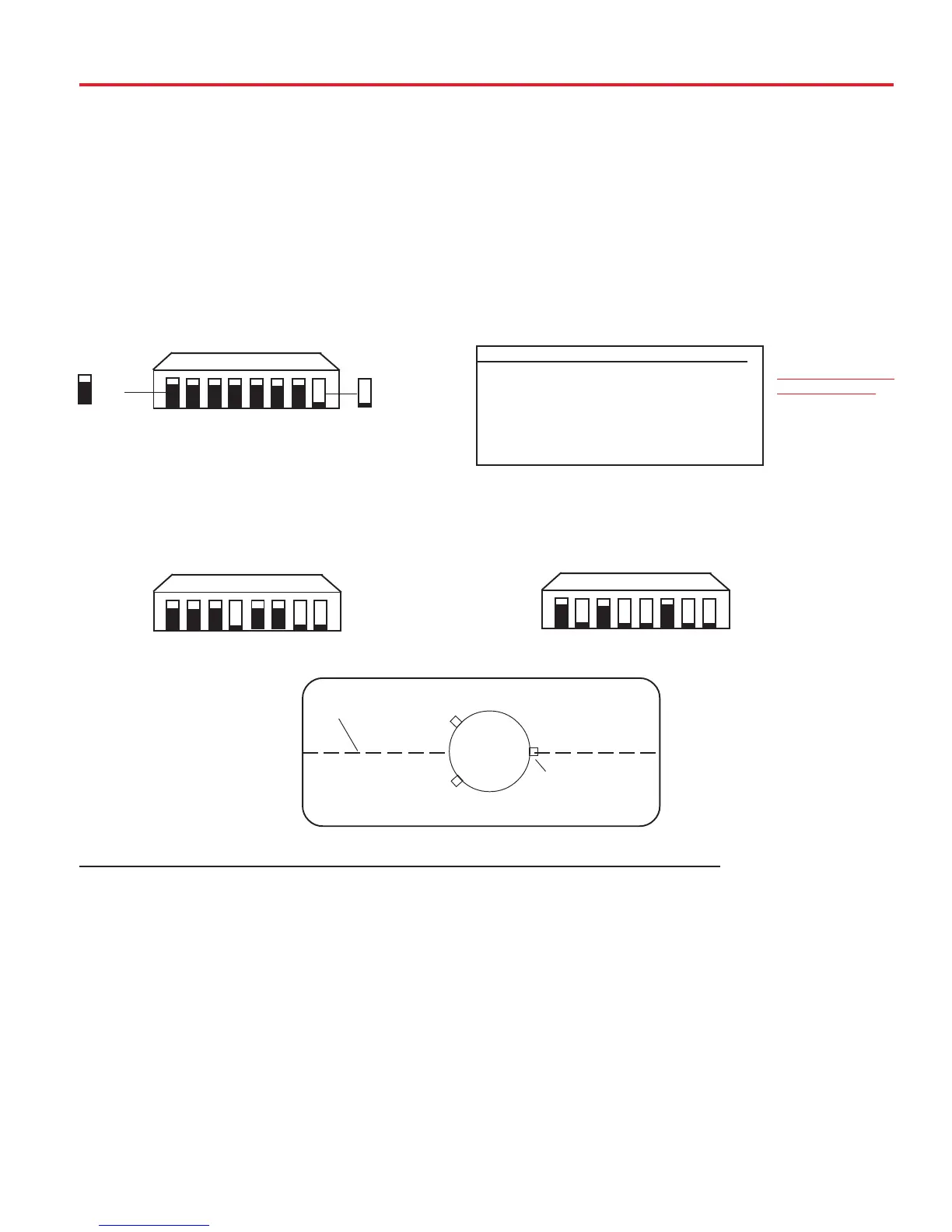
(#1 represents Switch DOWN; #0 represents Switch up)
Sat. Rcvr. Mt. Option Switch Set Position
...................................
1 2 3 4 5 6 7 8
DIRECTV 0 0 0 0 0 0 0 1
(FACTORY PRESET)
DISH NETWORK 0 0 0 1 0 0 1 1
ExpressVu 0 1 0 1 1 0 1 1
Quick Reference Guide
1 2 3 4 5 6 7 8
SWITCH SETTINGS
SHOWN BELOW
1 2 3 4 5 6 7 8
1 2 3 4 5 6 7 8
1= DOWN
0= UP 1= DOWN
0= UP 1= DOWN
0= UP
1 = DOWN
0 = UP
0 0 0 0 0 0 0 1
0 0 0 1 0 0 1 1
0 1 0 1 1 0 1 1
1. Turn on receiver and television set. The MV3500A
must be connected to a receiver that is plugged
into 120 VAC.
2. Verify that you are getting the receiver’s menu
screens on the television. These screens are available
with or without the dish finding the signal.
3. Turn the power switch on for the MV3500A. The
dish will detect if it is already on a satellite signal. If it
detects a signal, the dish will move to check its alter-
nate satellite and then move back to the original
satellite signal that it was on.
4. If no signal was detected, the dish will begin its
search to locate the primary satellite. Once the dish
locates a signal, it will pause long enough to identify
which satellite it has located. This may or may not be
OPERATION (VEHICLE MUST BE STATIONARY!!)
visible on your receiver’s point dish screen.
5. After the unit has verified that it has the correct satel-
lite, it will move to check the alternate satellite and move
back to the primary satellite to complete the search rou-
tine.
6. If you do not have signal, see Troubleshooting, p.11.
NOTE: Because the MV3500A uses information from
the last location that it was on a signal, satellite ac-
quisition may take longer if the dish is inactive over
long distance traveling.
DirecTV must be set to the “two” satellite, oval dish
setting. Refer to your receiver manual.
DISH Network receivers must have the check switch
set for “SW42”. See page 4.
CENTER LINE OF VEHICLE
REAR BASE FOOT
(MUST BE PARALLEL
TO CENTER LINE)
MV-3500
BACK OF VEHICLE
FRONT OF VEHICLE
MV3500A
MOUNTING









 To Next Page