EasyManua.ls Logo

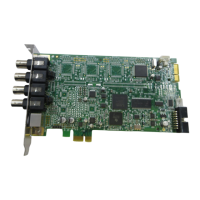
Winnov Videum 4100 - User Manual

Default Icon
96 pages
Print Icon
To Next Page IconTo Next Page
Loading...
1
Videum 1000
Plus
Videum 1010
Plus
Videum 1000 VO
Plus
Videum 4100/4400
Videum Conference Pro XP
VideumII Broadcaster Base Kit
VideumII Broadcaster Lite Kit
Hardware and Software
Installation Guide
10/2002 EU010
Technical Support: support@winnov.de
Website: http://www.winnov.de
Sales Contact: sales@winnov.de
Tel: +49 8243 9684 0
Question and Answer IconNeed help?

Do you have a question about the Winnov Videum 4100 and is the answer not in the manual?

Summary

Welcome to the Guide

Video Streaming and Collaboration Applications

Details video streaming, collaboration, surveillance, and multimedia capabilities.

CE Declaration and Compliance

About This Guide and Support

Contacting Winnov Support and Sales

Provides contact details for technical support and sales inquiries.

Videum 10 xx Product Family

Videum 1000 Plus Capture Card

Details the features and specifications of the Videum 1000 Plus.

Videum 1010 Plus Capture Card

Describes the Videum 1010 Plus, highlighting its low profile design.

Videumll Broadcaster Family

Videumll Broadcaster Base Kit

Details the professional capture card with rackmountable breakout box.

Videumll Broadcaster Lite Kit

Describes the capture card with breakout cable.

Connectivity and Connectors

Videum 1000 Plus;1010 Plus;1000 VO Plus Connectors

Lists and describes connectors for specific Videum models.

Videumll Broadcaster Connectivity Details

Explains connectivity for breakout boxes and cables.

Videum 4100 Specifications

Videum 4100 Features

Lists key features of the Videum 4100 capture card.

Videum 4400 Specifications

Videum 4400 Features

Details the features of the Videum 4400 capture card.

Hardware Installation Guide

Installing the Videum Board into Computer

Step-by-step instructions for installing the capture card.

Connecting Video Sources

Connecting Video to Videum 1000 Plus

Guide for connecting analog video cameras to the 1000 Plus.

Connecting Video to Videum 1010 Plus

Instructions for connecting cameras to the 1010 Plus.

Software Installation Procedures

Supported Operating Systems

Lists operating systems compatible with capture cards.

Windows NT;2000;XP Installation

Guides for installing software on Windows NT, 2000, and XP.

Breakout Box Configuration

Configuring the Breakout Box

Steps to configure the breakout box for video sources.

Videum Capture Application Usage

Using the Videum Capture Window

Overview of the capture application window and its controls.

Video Capture Format Settings

Setting image size, data format, and compression.

Capturing Audio or Video Clips

Detailed steps for recording video, audio, and still images.

Time Lapse and Stop Motion Video

Using the Time Lapse Feature

Instructions for creating time lapse movies from snapshots.

Creating Stop Motion Animations

Guide to creating animations by capturing frames one by one.

Videum Configure Application

Device Selection and Configuration

Selecting and configuring devices within the application.

Audio Input;Output Configuration

Setting up audio input gain and audio output volume.

Audio Mixer Applications

Adjusting Audio Mixer Levels

Controls for adjusting audio source volume and mute.

Winnov Watchdog Feature

Configuring and Testing the Watchdog

Steps to configure, enable, and test the watchdog timer.

Digital Inputs;Outputs Management

Digital I;O Technical Specifications

Technical details for 5V and 3.3V digital I/O operations.

Configuring Digital Input;Output Lines

Steps to set lines as input/output and configure events.

Remote Control Server Setup

Enabling and Configuring the Server

Steps to enable, configure, and auto-start the remote control server.

Surveillance Features Overview

Quad DVR System

Description of the 4-channel digital video recorder.

Face Recognition and Motion Detection

Using face recognition for access and motion detection setup.

Troubleshooting Common Issues

Resolving Video Display Problems

Solutions for no video, scrambled, or grainy video.

Troubleshooting Audio and Conferencing

Fixes for no audio, echo, and NetMeeting black bars.

Detailed Technical Specifications

Winnov Analog Video Camera Specs

Specifications for the analog video camera.

Videum 1000;1010;1000 VO Plus Specs

Technical details for Videum 1000, 1010, and 1000 VO Plus models.

Videumll Broadcaster Capture Card Specs

Technical specifications for the Broadcaster capture card.

Videum 4100;4400 Capture Card Specs

Comprehensive specifications for Videum 4100 and 4400 cards.

Winnov Videum 4100 Specifications

General IconGeneral
BrandWinnov
ModelVideum 4100
CategoryPCI Card
LanguageEnglish

Related product manuals