Need help?
Do you have a question about the Winnov Videum 4400 and is the answer not in the manual?
Introduction to the manual, its scope, and user guidance.
Statement of conformity to EU directives and relevant technical standards.
Contact information for technical support and sales inquiries.
Details on Videum 1000 Plus, VO Plus, and 1010 Plus capture cards.
Information on Base Kit and Lite Kit capture cards for professional use.
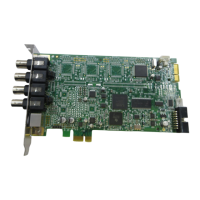
Specifications and features of Videum 4100 and 4400 capture cards.
Describes video and audio input/output connectors for the 1000 series.
Details breakout box and cable connectors for the Broadcaster series.
Explains bracket, audio, and reset cable connections for 4100/4400.
Step-by-step guide for physically installing the capture card into a computer.
Instructions for connecting cameras and audio devices to capture cards.
Guides for installing drivers and software on supported operating systems.
Steps to configure the breakout box for different video sources.
Managing software updates and configuring multiple capture cards.
How to use the Videum Capture application for recording and capturing images.
Options for setting video format, resolution, and compression.
Using features for time-lapse, stop-motion video, and webcam capture.
Setting up video inputs, audio inputs, and outputs using the configuration tool.
Adjusting audio levels and switching between audio sources.
Setting up and testing the crash recovery watchdog feature.
Configuring digital inputs and outputs for event signaling.
Enabling remote control of camera pan, tilt, and zoom during conferencing.
Using Videum for video conferencing and sending video emails.
Overview of surveillance applications like Quad DVR and presentation manager.
Information on using the SDK for developing multimedia applications.
Solutions for common problems like no video, scrambled video, or no audio.
Addressing echo during conferencing and system-related issues.
Detailed technical specs for Winnov camera and Videum 1000 series.
Technical details for Videumll Broadcaster and Videum 4100/4400 series.
In-depth hardware and driver specifications for Videum 4100 and 4400.
Explanations of technical terms used throughout the manual.
 General
| Category | PCI Card |
|---|---|
| Interface | PCI |
| Capture Resolution | 720 x 480 (NTSC), 720 x 576 (PAL) |
| Frame Rate | 30 fps (NTSC), 25 fps (PAL) |
| Video Inputs | 4 Composite |
| Video Standard | NTSC, PAL |
| Audio Inputs | 4 Stereo |
| Operating System Support | Windows 2000/XP |


 To Next Page