The device described in the manual is a robotic lawnmower from the "Wiper" brand, specifically the "POP" series, which includes models WIPOP3 and WIPOP5S. It is designed for automatic grass cutting, aiming to maintain a healthy and better-looking lawn.
Function Description
The robotic lawnmower is designed for regular mowing, allowing it to operate at any time or frequency without restrictions, depending on the size of the lawn. It is an IoT (Internet of Things) device, meaning it can connect to the internet via WIFI 2.4G or Bluetooth 4.0 (for WIPOP5S models only) to access full functionality, automatic scheduling instructions from the cloud, and download the latest software for optimized performance. The installation process involves setting up a charging base and laying a boundary wire to define the working area. The lawnmower automatically returns to the charging base when the battery is low or according to its mowing schedule.
Important Technical Specifications
The manual provides detailed technical data for both WIPOP3 and WIPOP5S models.
- Cutting Area: WIPOP3 handles up to 300m², while WIPOP5S handles up to 500m².
- Voltage: Both models operate at 20V max (nominal voltage 18V).
- No-load Speed: 2800rpm ± 100rpm.
- Cutting Diameter: WIPOP3 has a 100mm cutting diameter, and WIPOP5S has a 130mm cutting diameter.
- Cutting Height: Adjustable from 20-60mm.
- Maximum Managed Slope: Both models can handle slopes up to 35% (20°).
- Narrowest Possible Passage: 0.8 meters.
- Battery Type/Model: LBF202E Lithium-ion/2.0Ah for both.
- Charging Time: 120 minutes.
- Charger Rating: CGF251 (input 100-240V 50/60Hz, 28W; output 20.5V--1.1A (IP67)).
- Noise (Sound Power): <55dB (according to 2000/14/EC amended by 2005/88/EC, Annex III).
- Weight: Approximately 8kg.
- Boundary Wire: WIPOP3 comes with 100m, WIPOP5S with 130m.
- Wire Pegs: WIPOP3 includes 130 pieces, WIPOP5S includes 180 pieces.
- Charging Base & Charger: One of each is included for both models.
- Battery Pack: One LBF202E battery pack is included for both models.
Usage Features
The lawnmower offers several user-friendly features:
- Easy Installation: The manual emphasizes that the installation process is straightforward, involving setting up the charging base and laying a boundary wire. A distance gauge is provided to ensure correct spacing of the boundary wire (30cm from the perimeter, with pegs placed approximately 80cm apart).
- Automatic Operation: Once installed and configured, the lawnmower operates automatically within the defined boundary.
- Manual Control: The device can also be controlled manually.
- PIN Code: A default PIN (0000) is used for the first use, which can be changed later for security. Incorrect PIN entries will trigger an alarm and shut down the device.
- Scheduling: Users can set the year, date, and time, and configure default mowing times per day (1-24 hours) and per week (3-7 days).
- Error Messages and Self-Checking: The manual includes a comprehensive list of display statuses and corresponding actions for troubleshooting, such as "Rain delay activated," "Lawnmower outside working area," "No Boundary signal," "Wheel motor blocked," "Blade disc blocked," "Obstruction sensors trigger not recovered," "The lawnmower is lifted up," "Rollover sensor has been triggered," "Tilt sensors have been triggered," "Charging docking unsuccessful," "Battery pack temperature protection," and "Error unknown."
- App Connectivity (for POP5S): The POP5S model can be managed via a smartphone app (Android 4.4.2+ or iOS 11+) for registration, adding devices, and configuring network settings. This allows for remote control and access to cloud-based scheduling.
Maintenance Features
Regular maintenance is crucial for the longevity and performance of the lawnmower:
- General Maintenance: Keep all nuts, bolts, and screws tight. Frequently check the grass catcher for wear. Replace worn or damaged parts with genuine cutting means of the right type.
- Battery Care: Ensure batteries are charged with the correct charger. Avoid incorrect use to prevent electric shock, overheating, or corrosive liquid leakage. If electrolyte leaks, flush with water/neutralizing agent and seek medical help if it contacts eyes.
- Blade Sharpening/Replacement: Blades should be checked frequently for chipping or damage and replaced when dull. All blades should be replaced simultaneously to maintain balance. Always wear protective gloves and turn off the lawnmower before handling blades. Ensure new blades spin freely after installation.
- Cleaning: Turn off the lawnmower and wear protective gloves before cleaning. While waterproof, it's preferable not to use water for cleaning. Compressed air and a brush are recommended for cleaning.
- Winter Hibernation: For extended life, it's recommended to store the lawnmower in a shed or garage during winter. Before storage, thoroughly clean the device, fully charge and remove the battery, and turn off the power. Do not store it upside down outdoors or expose the underside to water.
- Battery Replacement: The manual provides step-by-step instructions for replacing the battery, including removing screws, carefully lifting out the old battery, disconnecting connectors, and installing a new original battery.
- Software Update: New software versions may be available, and users are advised to contact their dealer for firmware updates.

 Need help?
 General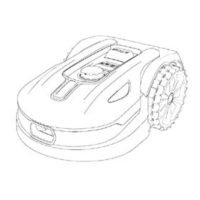

 To Next Page