10
4.3.3 Charging bank mode
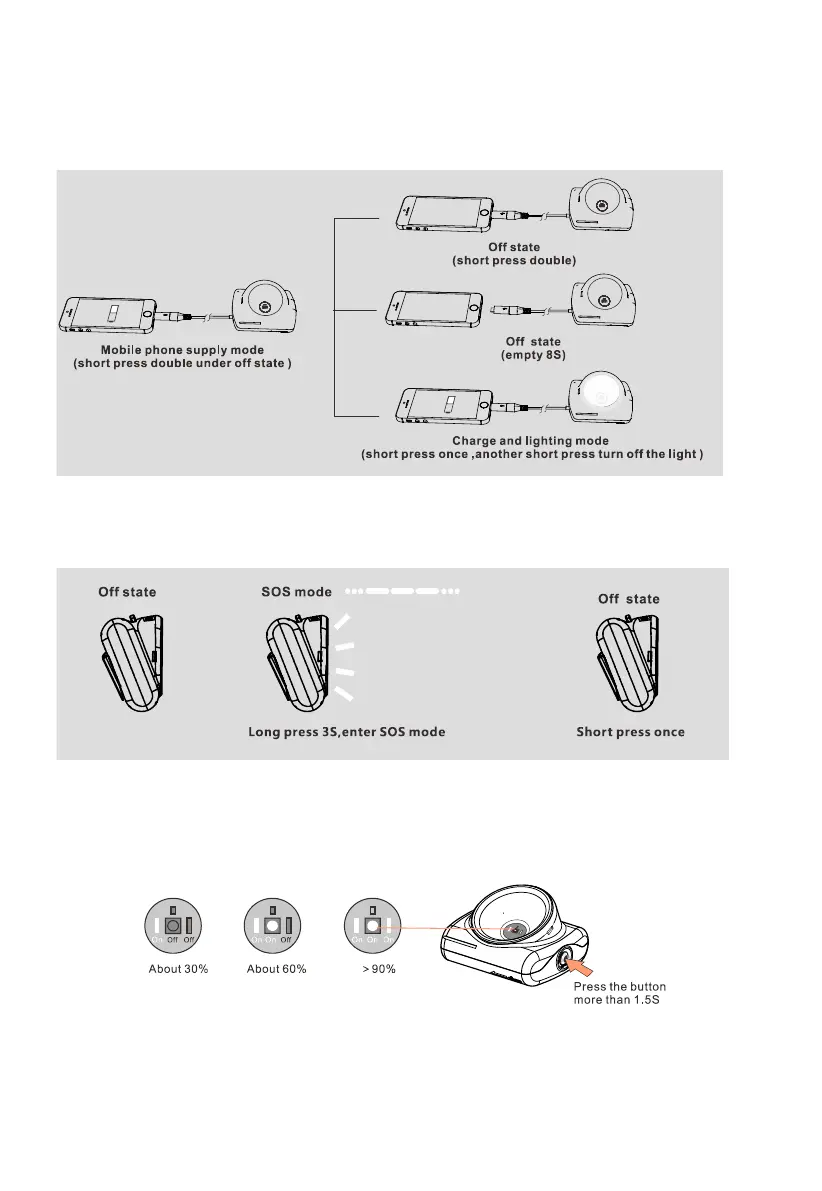
Pressing the button double shortly (within 3s ) when the light is off, it will be into charging bank
mode. At this time, you can charge for your mobile phone or other equipment. Meanwhile, you
can also turn it on for lighting when it is charging for the mobile phone. The details are as follows:
4.3.4 SOS mode
Pressing the button for 3s when the light is off, it will be into SOS mode by the regular flashing
with 3 times short and long flashing .The details are as follows.
4.3.5 Battery indicator
Pressing the button for more than 1.5 seconds when the light is off, it will be into the battery
power indicator status. The main light source and two auxiliary light sources flash a low light as
the battery power status instructions.
The battery power indicator is on for 3 seconds before off.
Note:The above status instructions are just for your reference.



 To Next Page