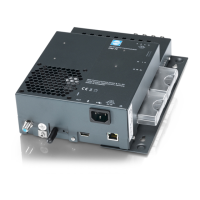
The WISI Micro Headend OM 11 0648 is a multichannel transmodulator with CI, designed for converting DVB-T/T2/C channels to DVB-T or DVB-C. This device is capable of handling 6 DVB-T/T2/C input channels and converting them to 6 DVB-T or 8 DVB-C output channels, making it a versatile solution for various signal distribution needs.
Function Description:
The core function of the OM 11 0648 is transmodulation, which involves receiving digital television signals (DVB-T/T2/C) and converting them into a different digital format (DVB-T or DVB-C) for distribution. It features an integrated switch matrix that minimizes installation effort by allowing parallel insertion of DVB-T/T2 and DVB-C signals. The input signals can be routed to specific tuners: Input A feeds Tuners 1-2, Input B feeds Tuners 1-6, and Input C feeds Tuners 3-6. This flexible input distribution allows for complex signal setups.
For encrypted content, the device is equipped with 4 CI slots, enabling central decryption of Pay-TV services. A key feature for hospitality applications is PID remapping (Hotel Mode), which allows for static service IDs at the output. This eliminates the need for TV sets to rescan for transponders after input signal modifications, simplifying maintenance in hotel environments. The device also supports LCN (Logical Channel Number) and NIT (Network Information Table) processing, which aids in central program sorting and network management.
Multiplex functionality is available at both the input and output, providing flexibility in combining and distributing services. The OM 11 0648 also supports the insertion of video files, such as hotel information channels or advertisement videos, into the output stream.
Important Technical Specifications:
- Input frequency range: 42...1002 MHz
- Input frequency steps: 250 kHz
- Input level range: 55...95 dBμV
- Modulation DVB-T/T2: COFDM / OFDM (EN 300 744)
- Modulation DVB-C: 16-, 64-, 256 QAM (EN 300 429)
- Symbol rate DVB-T/T2: According to modulation standard
- Symbol rate DVB-C: 1...7.2 Mbaud
- FEC DVB-T: RS 204, 1885.8 / Convolution
- FEC DVB-T2: LDPC / BCH
CI-Processing:
- Number of PCMCIA slots: 4
QAM Processing:
- Constellations: 64-, 128-, 256-QAM
- Symbol rate: 4.45...7.20 MSymb/s
- MER: >40 dB
COFDM Processing:
- Constellations: QPSK, 16-, 64-QAM
- FEC: 1/2, 2/3, 3/4, 5/6, 7/8
- Guard Interval: 1/4, 1/8, 1/16, 1/32
- FFT Mode: 2k, 8k
- Spectrum flatness: ± 0.6 dB
- MER: >40 dB
Output:
- Output frequency range: 110...862 MHz (COFDM), 50...862 MHz (QAM)
- Output frequency steps: 1 kHz
- Output level: 90...105 dBμV
- Output level setting: 0...15 dB (1 dB step)
- Channel allocation: Adjacent
- Return loss: ≥14 dB; 1.5 dB / Octave; Min. >10 dB
Connectors:
- RF-Input: 4x F
- RF Output: 1x F
- Ethernet: 1x RJ45
- USB: 1x USB-A
General data:
- Dimensions (width x height x depth): 272 x 196 x 75 mm
- Power consumption: Typ. <40 W
- Operating temperature range: 5...45 °C
Usage Features:
The OM 11 0648 is programmed via a user-friendly web interface, accessible through an Ethernet connection to a PC or laptop. The device has a standard IP address of 192.168.0.20. The web interface allows for comprehensive system settings, input configurations, remux settings, CAM information, and output adjustments.
- System Settings: Users can configure IP parameters, select output modulation (DVB-C or DVB-T), choose between Normal Mode and Hotel Mode for remux, reboot the system, restore factory settings, and manage user passwords. Bluetooth activation can also be set to "normal" (button-activated, then auto-deactivated after 3 minutes) or "hold" (permanently active).
- Input Settings: The web interface provides a visual representation of tuner status (signal strength, S/N ratio, BER, level). Users can select the input distribution (e.g., Input B to all tuners, or Input A to Tuners 1-2 and Input C to Tuners 3-6), set DVB-C or DVB-T/T2 center frequencies, and define bandwidth. For DVB-T, hierarchy mode can be set, and for DVB-T2, PLP settings are available.
- Remux Settings: This section allows for transparent or selective transmodulation. Transparent mode passes the entire data stream without modification, while selective mode enables individual program decryption via CI slots and assignment to output channels. LCN and LCN-HD settings are available for program sorting.
- OMTS (Video File Insertion): The device supports injecting video files (e.g., hotel information) into any output channel. A dedicated "OMTS_Tool" software is provided to convert video source files (MP4, WMV) into the required ".omts" format. Users can adjust video data rate, resolution (e.g., 1280x720 pixels with MPEG-4 compression), and service name. These files are uploaded via the file browser and can be played out.
- Network Settings (Remux NET): Users can define a Network ID, network name, and NIT Version. NIT and EIT routing can be activated or deactivated to manage service discovery and EPG information on connected TV sets. For Hotel Mode, a Service ID Offset can be configured to prevent duplicate service IDs across multiple headends.
- CAM Information: This section displays information about installed CAMs (validity, software version, type) and allows configuration of CI data rate and service insertion speed.
- Output Settings (DVB-T/DVB-C): Output channels can be activated/deactivated, and their names, frequencies, bandwidth (for DVB-T), symbol rate (for DVB-C), signal strength, FEC, guard interval, mode, constellation, and spectrum (Normal/Inverted for DVB-C) can be configured.
- File Browser: This feature allows for storing and managing configuration files (CFG) and video files (OMTS). Users can upload, download, delete, and apply these files to the headend.
- Bluetooth Connectivity: The OM 11 0648 features Bluetooth for remote management via an Android smartphone or tablet using the "WISI OM Manager" application. This allows for system settings, configuration/video file uploads (via USB or Bluetooth), device settings management, and device updates.
Maintenance Features:
- Log File: The system maintains a log file that records all events, which can be opened and cleared via the web interface for troubleshooting.
- Software Update: The device supports software updates via the web interface. Users can upload new software versions (.omu files) downloaded from the WISI website (https://wisiconnect.tv/). It is crucial not to disconnect the power supply during an update.
- Factory Reset: The web interface offers a factory reset option to restore all parameters to their default settings.
- Bluetooth Access: The Bluetooth connection provides an alternative method for managing and updating the device, which can be useful in situations where direct Ethernet access is inconvenient.
- Physical Grounding: Proper grounding is emphasized before commissioning to prevent damage.
- Environmental Considerations: The manual provides guidelines for selecting an installation location to avoid excessive heat, moisture, and oil vapors, which can affect the device's lifespan.
- Serviceability: Service work should only be carried out by authorized personnel, with the device's power supply disconnected beforehand.
- Battery Disposal: If applicable, batteries must be disposed of separately and not in household waste.
- Recycling: All packaging materials are fully recyclable.

 Need help?

 To Next Page
 General