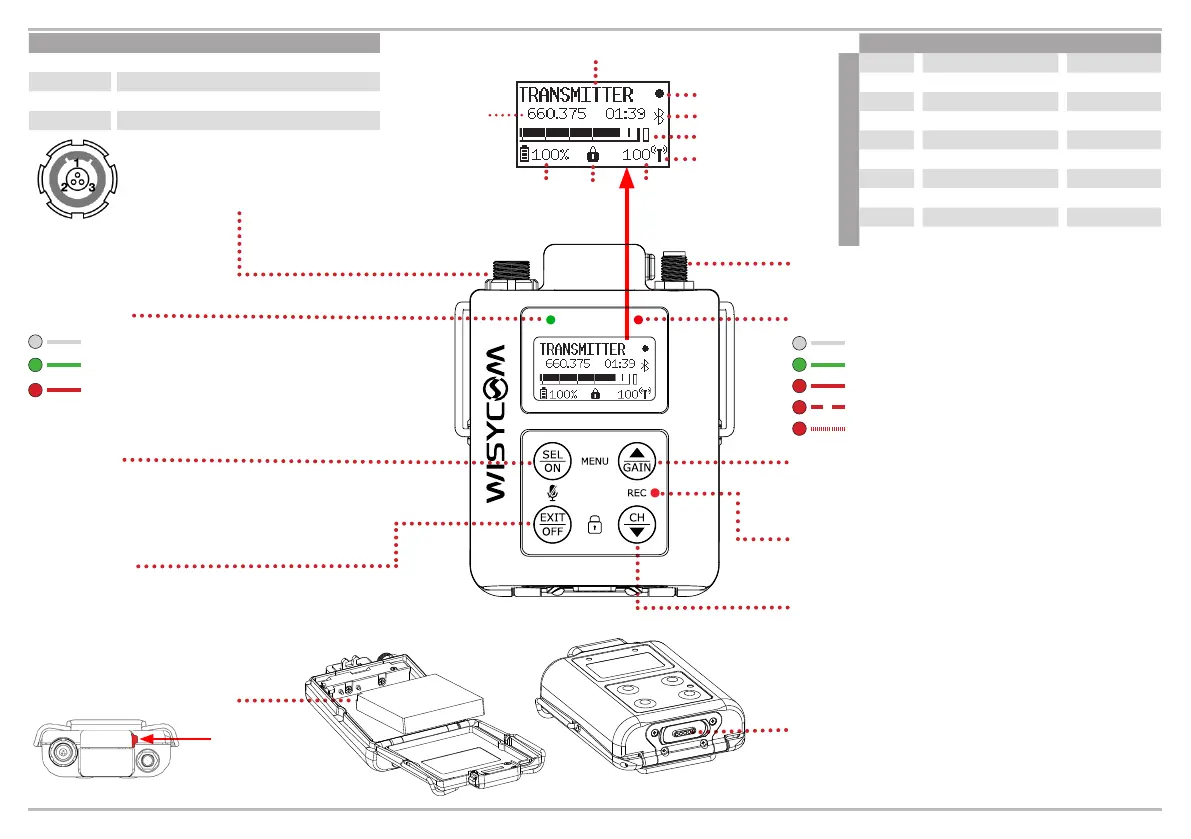
Antenna Connector (SSMA type).
SEL / ON
Push to switch ON the device. Push together with
GAIN/UP to enter the main MENU. When in menu
single push to save and conrm selections.
EXIT / OFF
Long press to switch the unit OFF.
Short press to step back in menu
Press together with SEL/ON to mute/
unmute the audio.
Ch Shortcut/Down
Short press to access channel/group/
frequency menu and/or scroll down while in
the menu. Long press it with EXIT/OFF to
lock the front panel.
Gain Shortcut/Up
Push to quickly access gain setup frequency
menu and/or scroll up while in the menu.
Recording Status Led
Solid red when recording has started.
Battery compartment
Press to
open
Mic Input (LEMO type)
Load a mic PRESET to suit your
wiring or enter the Audio menu.
Transmitter name
Frequency
Group
Channel
Audio bar
Tx PWR status
Battery
status
Panel
locked
RF level
in mW
Bluetooth
Recording ON
Label Code Band MHz
Antenna type
507
AWSS-507
470-547
590
AWSS-590
547-663
552
AWSS-552
510-595
646
AWSS-646
595-698
710
AWSS-710
663-760
796
AWSS-796
760-832
808
AWSS-808
806-810
950
AWSS-950
940-960
1K1
AWSS-1K1
960-1160
1K2
AWSS-1K2
1240-1260
Mic Mode Pinout
2 W 1 = GND / 3 = AF
2 W+B 1 = GND / 3 = AF+5,5 V
3 W 1 = GND / 2 = 5,5 V / 3 = AF
AUX 1 = GND / 3 = AF (High impedance)
Magnetic Connector 5 pin
to recharge battery, connect to Wisycom
Manager, LTC Timecode sync, Download
recorded les (USB High Speed).
OFF: Audio is muted
GREEN: Audio is enabled
RED: Audio is peaking
OFF: MTP61 is OFF
GREEN: Transmission is ON
RED: Transmission is OFF
RED SLOW BLINK: battery < 25%
RED FAST BLINK: battery < 12%
Audio LED
RF/Power LED



 To Previous Page