Bedienungsanleitung Nr. 9999-041-0
Seite 1
B7202_E_1.pmd
12.06.2003
Electronic lock 7202
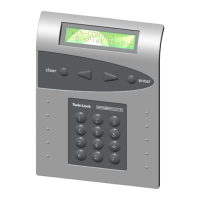
Fig. 1
Contents:
1. Important notes
1.1 Explanation of terms
1.2 General
2. Opening the electronic lock
3. Closing the electronic lock
4. Time-out following erroneous entries
5. Correction with the „C“ button
6. Battery charge monitoring, replacing the battery
7. Emergency opening
8. Programming the electronic lock
8.1 Programming the master combination
8.1.1 Programming a new primary combination using the
emergency opening lock
8.2 Programming a user combination
8.2.1 Deleting a user combination
8.3 Programming a timed delay period
8.3.1 Opening the lock with the timed delay function
activated
8.3.2 Deleting a timed delay period
8.4 Programming a time-lock period
8.4.1 Starting a time-lock period
8.5 Activating a combination interlock
8.5.1 Opening the lock with an interlock activated
8.5.2 Deleting an interlock
8. Triggering a silent alarm
10. Troubleshooting
1. Important notes
• Please read these instructions carefully and
completely before putting the lock in operation.
• Replace the 0 _ 1 2 3 4 5 6 factory combination
immediately by programming your own master
combination; see Section 8.1.
• Do not use any personal data for your new master or
user combination.
• The maximum permissible interval between any two
keypad entries is 30 seconds. If this limit is exceeded,
then the entire procedure will have to be repeated
from the beginning.
1.1 Explanation of terms
The following terms and symbols are used:
User number = User number (abbreviated UNo.)
UNo. = 0 for master
UNr. = 1 to 5 für users
Code = A series of digits,
e.g. 4 7 6 2 3 9
Combination =
A series of digits required to open
the lock. It comprises the:
User number and code:
Example for the master combination
0 _ 6 5 4 7 2 1
Example of a user combination
3 _ 8 7 9 5 8 3
Factory
combination = The initial combination, programmed at
the factory. The combination for this
electronic lock has been pre-set to
0 _ 1 2 3 4 5 6
Master
combionation = Combination used by the master to
open the lock
User
combination = Combinations for additional users.
All user combinations are subordinate
to the master combination.
P - No. = Program number
LED = Light-emitting diode at the keypad.
Note =
Caution =
• A signal tone sounds each time a button is pressed.
• A 10-second time-out period will be started after
invalid combinations have been entered in three
consecutive attempts.
• Do not damage the inspection seal on the lock as the
guarantee will otherwise be invalidated.



 To Next Page
 General