19
en
Action Touch button Display
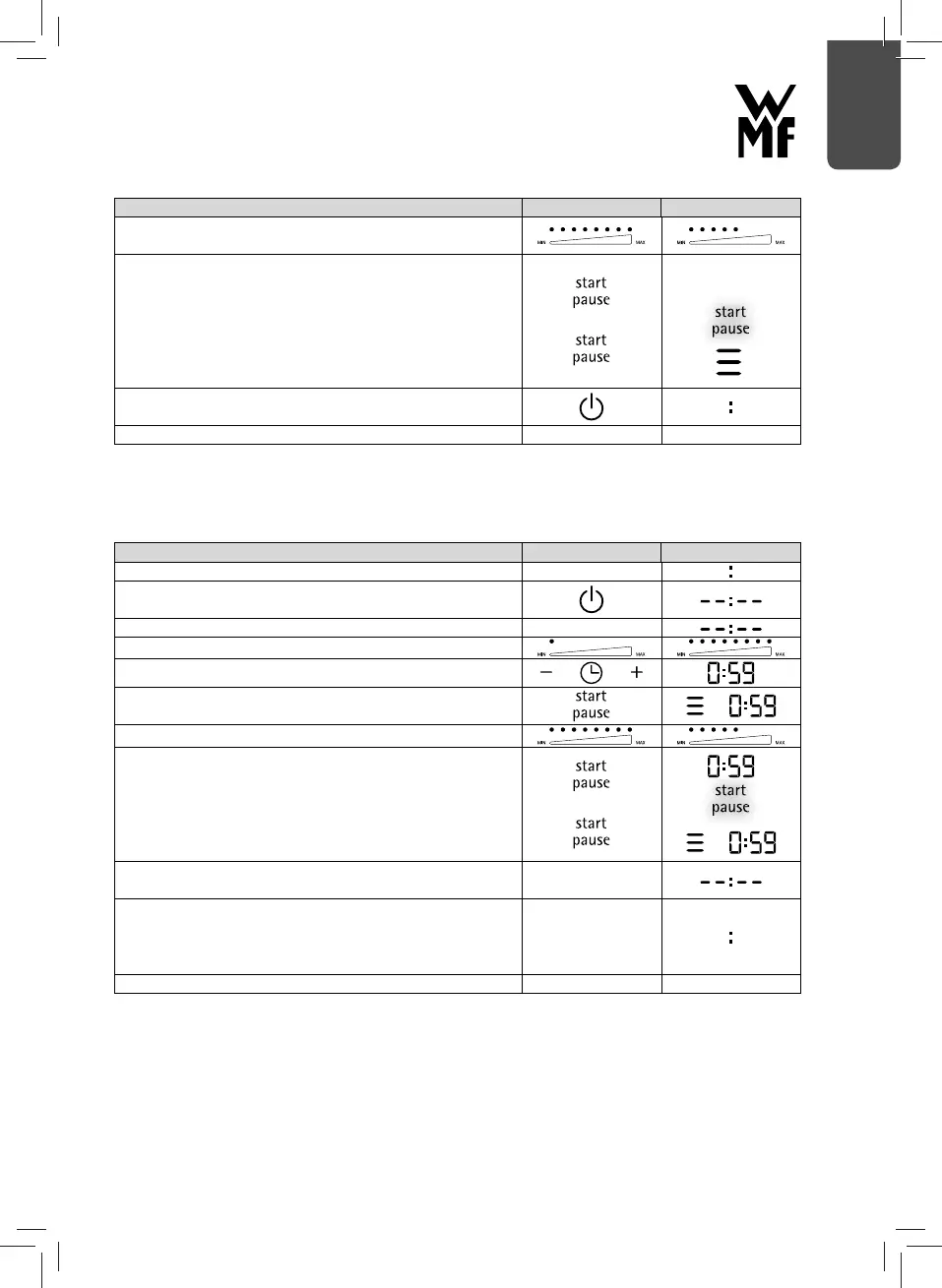
Adjust the power level as required, e.g. when the boiling
point is reached.
If necessary, tap the Start/Pause button again:
- Cooking process is paused
- The “Appliance in use” symbol disappears
- Start/Pause LED fl ashes
- Tap on the Start/Pause button to resume the cooking
process
Switching off the hob by pushing the On/Off button twice.
Note: The fan runs on for a few seconds.
Pull out plug.
Note: If the induction hob is in pause mode it switches itself to standby automatically after 10
minutes if the control panel is not operated.
Use of the power levels (7) with timer function
Action Touch button Display
Plug the appliance in. Appliance is in standby mode.
Tap the On/Off button, appliance is in operational readiness
mode.
Position the pan on the hotplate.
Set the desired power level 1-8.
Set the timer with +/- buttons.
Tap the Start/Pause button. Cooking process and Timer
starts. The “Appliance in use” symbol is shown in the display
Change the power level if required
If necessary, tap the Start/Pause button again:
- Cooking process and Timer is paused
- The “Appliance in use” symbol disappears
- Start/Pause LED fl ashes
- Tap on the Start/Pause button to resume the Cooking
process and Timer
Once the defi ned timer time has elapsed, the appliance
switches automatically to operational readiness mode.
After one minute, the appliance switches automatically to
standby mode.
Alternatively, press the On/Off button.
Note: The fan runs on for a few seconds.
Pull out plug.
Note: If the induction hob is in pause mode it switches itself to standby automatically after 10
minutes if the control panel is not operated.


 To Next Page