EasyManua.ls Logo

Wolfgang Puck CCDCM030 - Product Overview and Setup; Before First Use; About Wolfgang Puck

Wolfgang Puck CCDCM030
10 pages
Print Icon
To Next Page IconTo Next Page
To Previous Page IconTo Previous Page
Loading...
K
n
o
w Y
o
ur
Coffee
Mak
e
r
A
ctua
l
pro
d
uct may
d
i
ff
er s
l
ig
h
t
l
y
f
rom images on t
h
is page
6
7
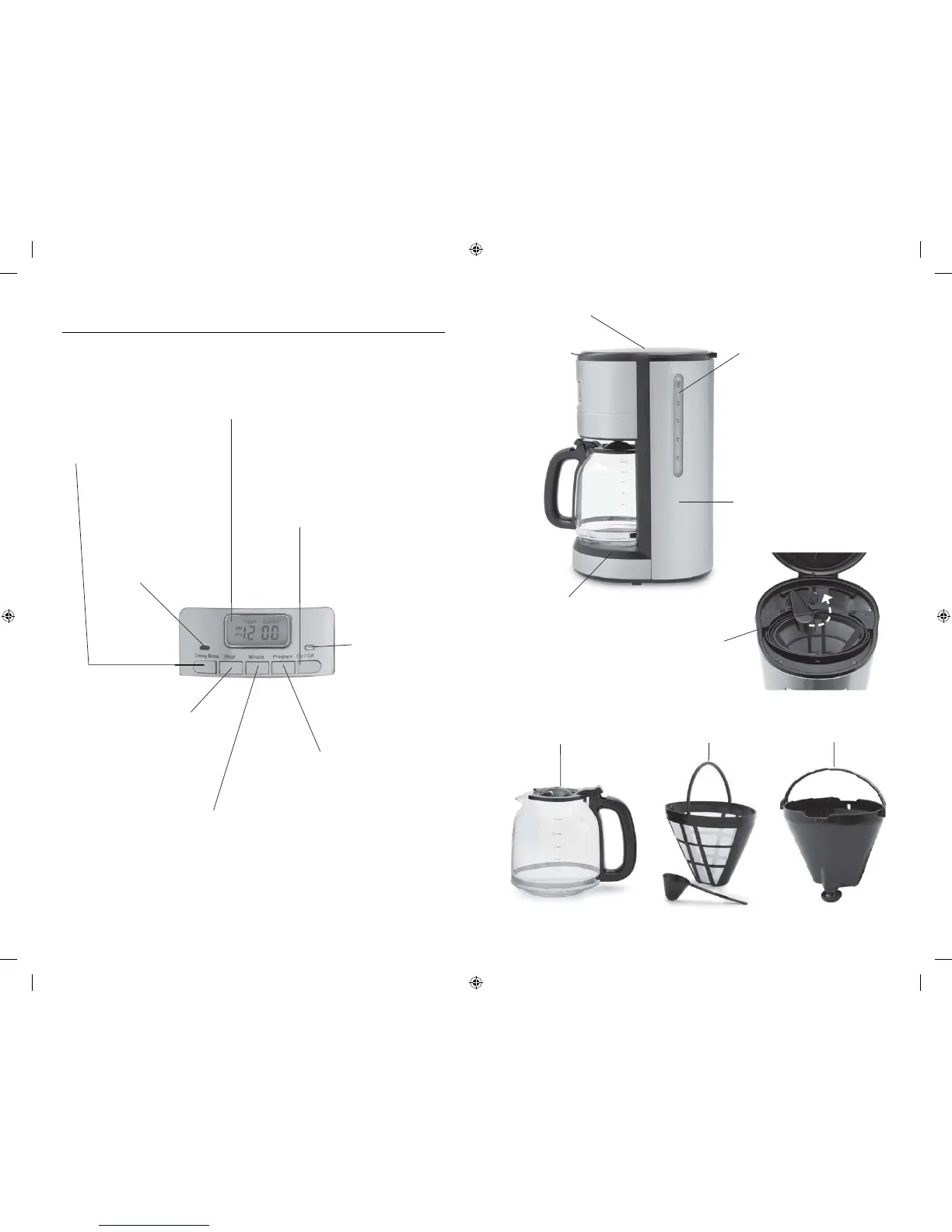
DELAY BREW BUTT
O
N
:
Press this button to en
g
a
g
e
the dela
y
brew time
r
LC
D DISPLAY:
I
n
d
icates Current Time
,
K
ee
p
Warm E
l
a
p
se
d
Time,
o
r De
l
a
y
Program Timer
BLUE P
O
WER
LI
G
HT
:
Ill
u
min
a
t
e
s wh
e
n
co
ff
ee
m
a
k
e
r
is brewin
g
or
in Kee
p
Warm
m
ode
H
O
UR BUTT
O
N
:
T
h
is
b
utton a
d
vances t
h
e
hour display
f
or the clock
an
d
timer. See t
h
e section
“Setting the Clock”
f
or proper
us
e
D
ELAY LI
G
HT:
I
n
d
i
ca
t
e
s th
a
t th
e
c
offee maker is in dela
y
t
im
e
r m
ode
a
n
d
will
b
r
e
w
a
t th
e
s
e
t tim
e
programmed
MINUTE BUTT
O
N:
T
h
is
b
utton a
d
vances t
h
e
minute display
f
or the clock
an
d
timer. See t
h
e section on
“Setting the Clock”
f
or proper
us
e
O
N
/
OFF:
Use t
h
is
b
utton to imme
d
iate
l
y
b
egin
b
rewing cyc
l
e, or to stop t
h
e
b
rewing cyc
l
e. T
h
is
b
utton is a
l
so
u
se
d
to cance
l
t
h
e DELAY BREW
mo
d
e or KEEP WARM mo
d
e
P
ROGRAM BUTTON:
T
his button allows you to preset
t
he brewing c
y
cle to begin at a
se
l
ec
t
ed
tim
e
. S
ee
th
e
s
ec
ti
o
n
o
n
Usin
g
the Timer” for proper use
W
a
t
e
r L
e
v
el
Win
dow
C
offee Maker Housin
g
Lid
Warmin
g
Plat
e
ous
i
ng
H
Swing Out Spray Hea
d
P
e
rm
a
n
e
nt Filt
e
r with
Measurin
g
Spoo
n
12 Cu
p
G
l
a
ss
Ca
r
a
f
e
Filt
er
B
a
sk
et