WOLSTEAD PRO BELGIAN WAFFLE MAKER OWNER’S MANUAL WOLSTEAD PRO BELGIAN WAFFLE MAKER OWNER’S MANUAL
OPERATING INSTRUCTIONS
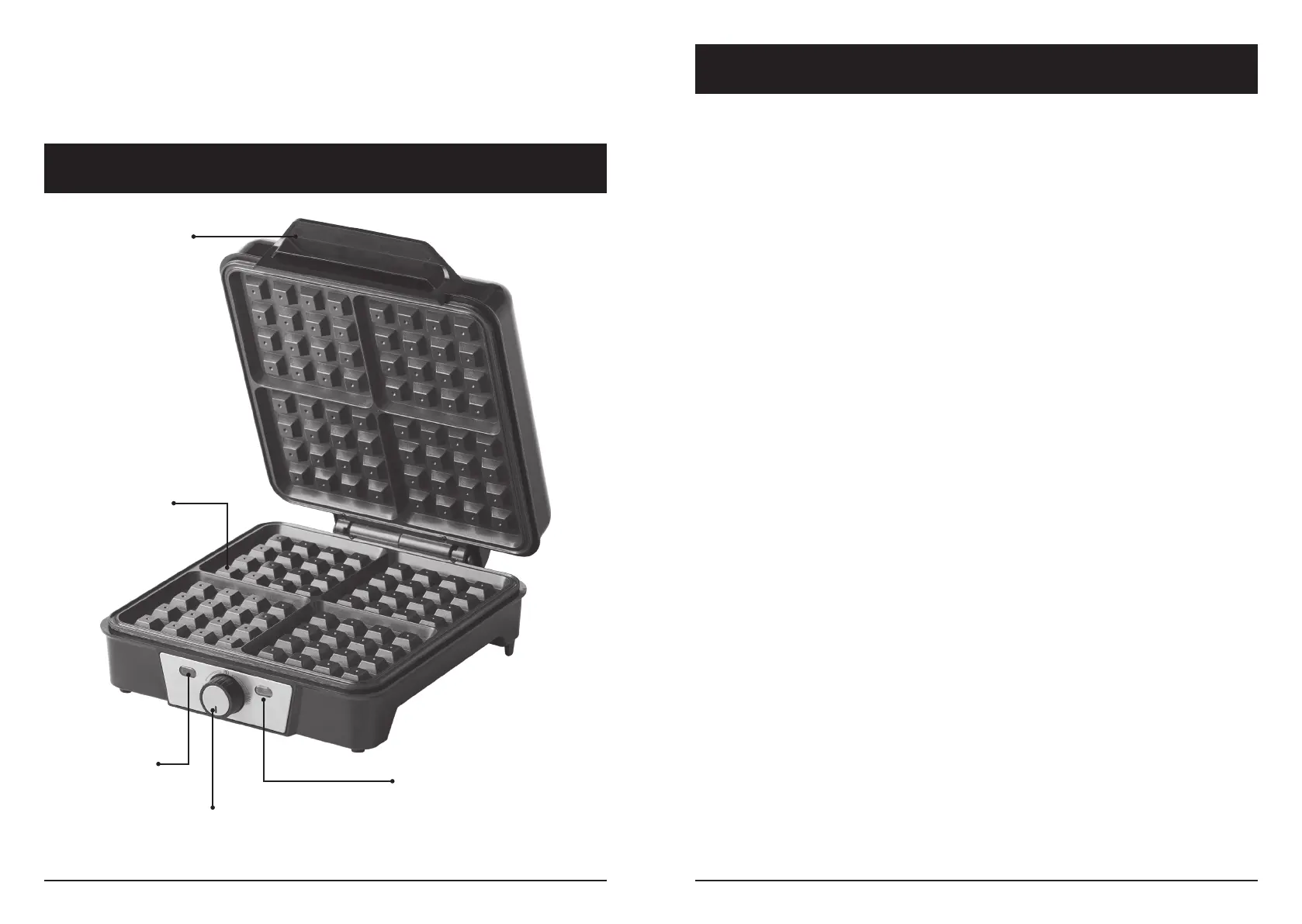
WAFFLE MAKER COMPONENTS
Before First Use
• Before rst use, remove all packaging and any promotional labels or stickers from
the appliance.
• Wipe the outside and inside of the wafe maker with a damp cloth to remove any
residual dust or dirt from the manufacturing process.
During rst use, the wafe maker may emit a non-toxic odour and may smoke.
This will not affect use of the appliance, or the avour of food and will disappear
rapidly.
15. To safely disconnect power at any time, remove the plug from the outlet.
16. Extreme caution must be taken when moving an appliance containing hot oil or
other hot liquids.
Red Power
Indicator Light
Green Temperature
Indicator Light
Temperature Dial
Cool Touch Handle
Non-stick Wafe
Plates
Cooking Wafes in the Wolstead Pro Belgian Wafe Maker
For crispy golden wafes, follow the below instructions when using the Wolstead Pro
Belgian Wafe Maker.
• Place the closed wafe maker on a clean, at surface.
• Use a pastry brush to carefully coat the entire surface of the inner wafe maker
plates with a avourless oil, such as vegetable. Ensure you coat both the top and
bottom plates. Alternatively, use a avourless spray oil to coat the surface of the wafe
plates.
• Plug the power cord into a standard electrical outlet. Ensure the cord does not hang
over the edge of the table or counter while in use.
• The red power indicator light on the front of the wafe maker will illuminate to
indicate that the power is on and that the appliance is heating. The red light will
remain on throughout use and will turn off when the appliance is disconnected from
power.
• Allow the wafe maker to heat to its maximum temperature setting by turning
the temperature dial to the far right. Once the plates have reached the selected
temperature, the green temperature indicator light will illuminate to indicate that the
wafe plates are at temperature and ready to be used.
• Once the green temperature light illuminates, add 2 cups of wafe batter to the
centre of the bottom wafe plate. Use a heat-proof spatula to distribute the batter
evenly across the grid leaving a 2cm space around the edge of the plate. Once the lid
of the wafe maker is closed, the batter will be pushed to the outside of the plates.



 To Next Page
 Loading...