Operation
Greenstar 2000 – 6 721 820 553 (2021/02)
10
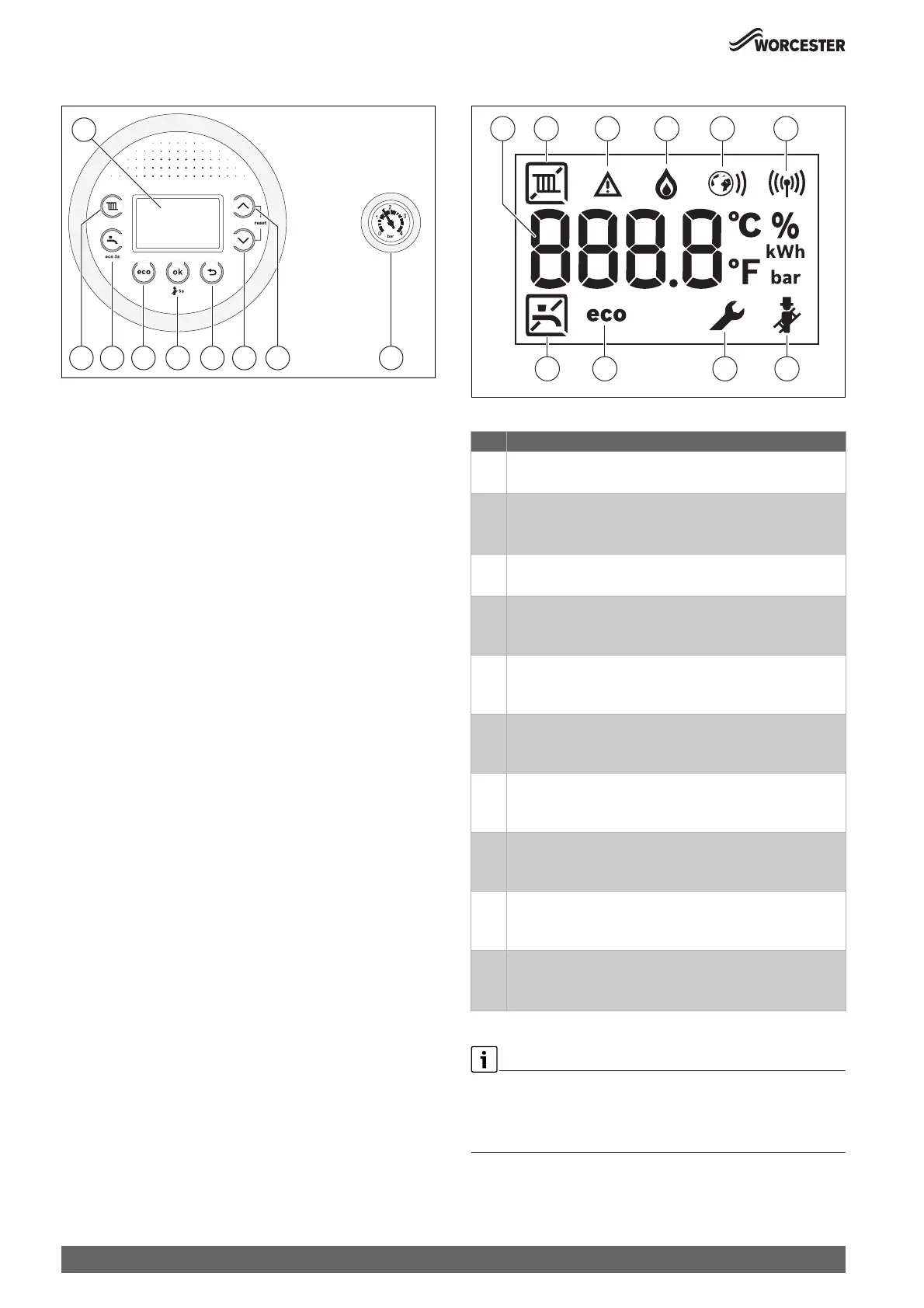
4.2 Control panel overview
Fig. 6
[1] Display
[2] (key: Heating mode on/off, set the maximum flow temperature
[3] * key: Hot water mode, adjusting the hot water temperature
[4] eco key: Toggle economy mode (pre-heat off)
[5] ok key: Save settings
[6] " key: Return/back
[7] key: To navigate through menus and decrease settings
[8] key: To navigate through menus and increase settings
[9] Pressure gauge
4.3 Screen display
Fig. 7 Screen display
Table 3
The heating and hot water system has been set up by the installer to its
optimum settings.
▶ It is advised to make a note of these settings before adjusting so that
you can return to these optimum settings in the future.
0010029487-001
1
2 3 4 5 6 7 8 9
Key Explanation
[1] Digital display
• Displays a temperature or appliance status/diagnostic code.
[2] Central heating (CH)
• ( Heating mode On
• ] Heating mode Off
[3] Fault indicator
• Displays during a fault condition.
[4] Burner operation
• Displays when the appliance is firing during a CH/DHW
mode.
[5] Internet connected (accessory)
• Displays when compatible controller is connected to the
appliance (not used).
[6] Radio link connected (accessory)
• Displays when compatible controller is connected to the
appliance.
[7] Chimney sweep mode
• Displays during service when the appliance is set to
maximum or minimum output.
[8] Service mode
• Displays when a qualified service engineer is in the service
menus.
[9] Eco mode active
• Displays when in Economy mode (DHW Pre-heat/comfort
function is turned off)
[10] Domestic hot water (DHW)
• * Hot water mode On
• [ Hot water mode Off
0010016015-004
10 9
21 3 4 5 6
8 7



 To Next Page