LM-2 Bi-directional DMX / USB interface EN
1. INTRODUCTION
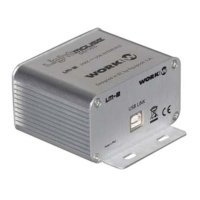
Thank you for purchasing a LM-2. LM-2 is a bi-directional USB-DMX interface, which allows to control, from
a computer, a whole lighting system up to 512 DMX channels. It also can be used for reading DMX frames
from an external console, in order to trigger videos or software effects.
It is recommended for use with application software like ARKAOS
©
or Chamsys MagicQ PC
©
.
WARNING:
1. LM-2 SHOULD BE PLACED AWAY FROM HIGH VOLTAGE.
2. LM-2 CAN BE USED AS DMX INPUT OR OUTPUT, BUT NOT SIMULTANEOUSLY.
3. TWO LM-2 CAN BE CONNECTED TO THE SAME COMPUTER, ONE OF THEM CONVERTING
DMX TO USB, AND THE OTHER ONE CONVERTING USB to DMX.
2. TECHNICAL SPECIFICATIONS
OPERATING VOLTAGE: DC 5 V, 100 mA (through USB port)
USB PORT COMPATIBILITY:
1.0 / 2.0
CONTROL:
1 DMX Universe (512 channels)
DIMENSIONS:
86 x 45 x 54 mm
WEIGHT:
300 g
3. INSTALLATION:
To make LM-2 work, you need to install its own drivers.
• For Windows
: (working with Chamsys
©
or Arkaos
©
)
1. Before connecting the LM-2 to the USB, install the driver LM2_driver.exe. It can be
downloaded from www.equipson.es/prodDetail.asp?idproducto=736
#
2. When the installation is finished, connect the LM-2 to an USB port in the computer. It will
look for the drivers and will install them automatically. If the OS does not find the drivers, you
must indicate the installation folder (Program Files\LM2_driver).
3. Remove the USB connection and connect it again after few seconds in order to finish the
installation process. (This step is only necessary the first time)
• For MAC OS X
:
• Download the drivers from www.equipson.es/prodDetail.asp?idproducto=736#
LM-2 User Manual / Manual de Usuario Pag3


 To Next Page