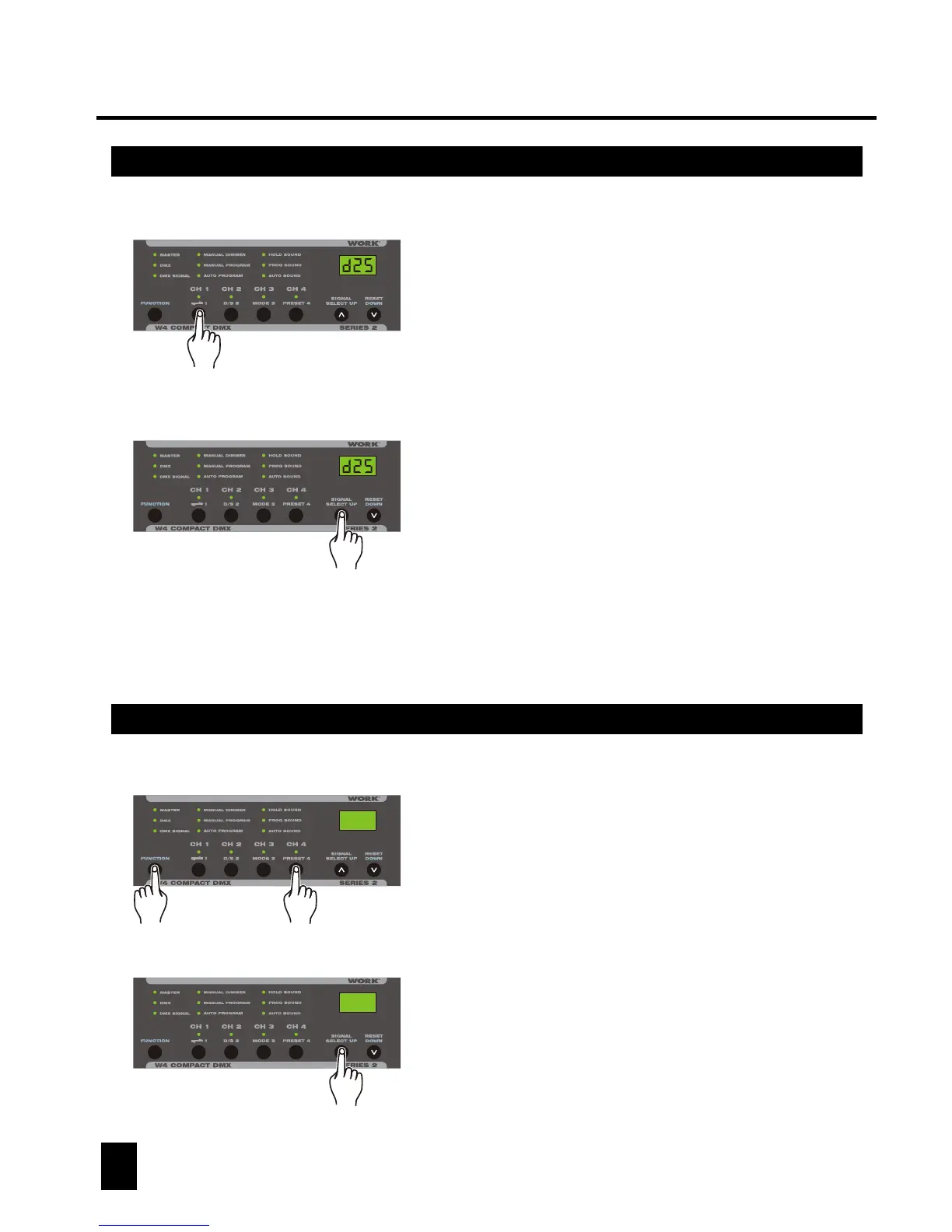
Keep pressing F button, tap Preset button
several times to change functions between
Fade Time/Dimmer/Preheat/Speed/Program.
f00
Fade Time The Segment Display shows "F"
followed by two numbers 00-99.
Tap Up/Down button to set fade
time from instant to 10 seconds.
2. Operation Guide2. Operation Guide
2.4 Preset Functions
7
8
2.3.2 Channel Dimmer
2.4 Preset Functions
1. When Manual Dimmer mode is active, tap the
channel button, the corresponding channel LED
blinks indicating your selection and the Segment
Display shows the intensity of last change.
2. Tap the Up/Down button to adjust the channel
intensity.
3. Continue steps 1-2 until you've set all 4
channels.
e25
Master
Dimmer
Preheat
Program
Speed
The Segment Display shows "d"
followed by two numbers 00-FF.
Tap Up/Down button to adjust
intensity from fully off(00) to fully
on(FF).
The Segment Display shows "E"
followed by two numbers 00-25.
Tap Up/Down button to adjust from
0% intensity to 25% intensity.
The Segment Display shows "P"
followed by two numbers 01-16.
Tap Up/Down button to select
desired chase program.
The Segment Display shows "A"
followed by two numbers 01-99.
Tap Up/Down button to select
desired chase speed. 01 will give
a slowest speed, 99 will give a
fastest speed.
f00


 To Next Page