* Pour plus d'informations sur votre pompe à chaleur, retrouvez le manuel d'utilisation complet sur
www.warmpool.fr ou via le QR code, à scanner en fin du Quick Start
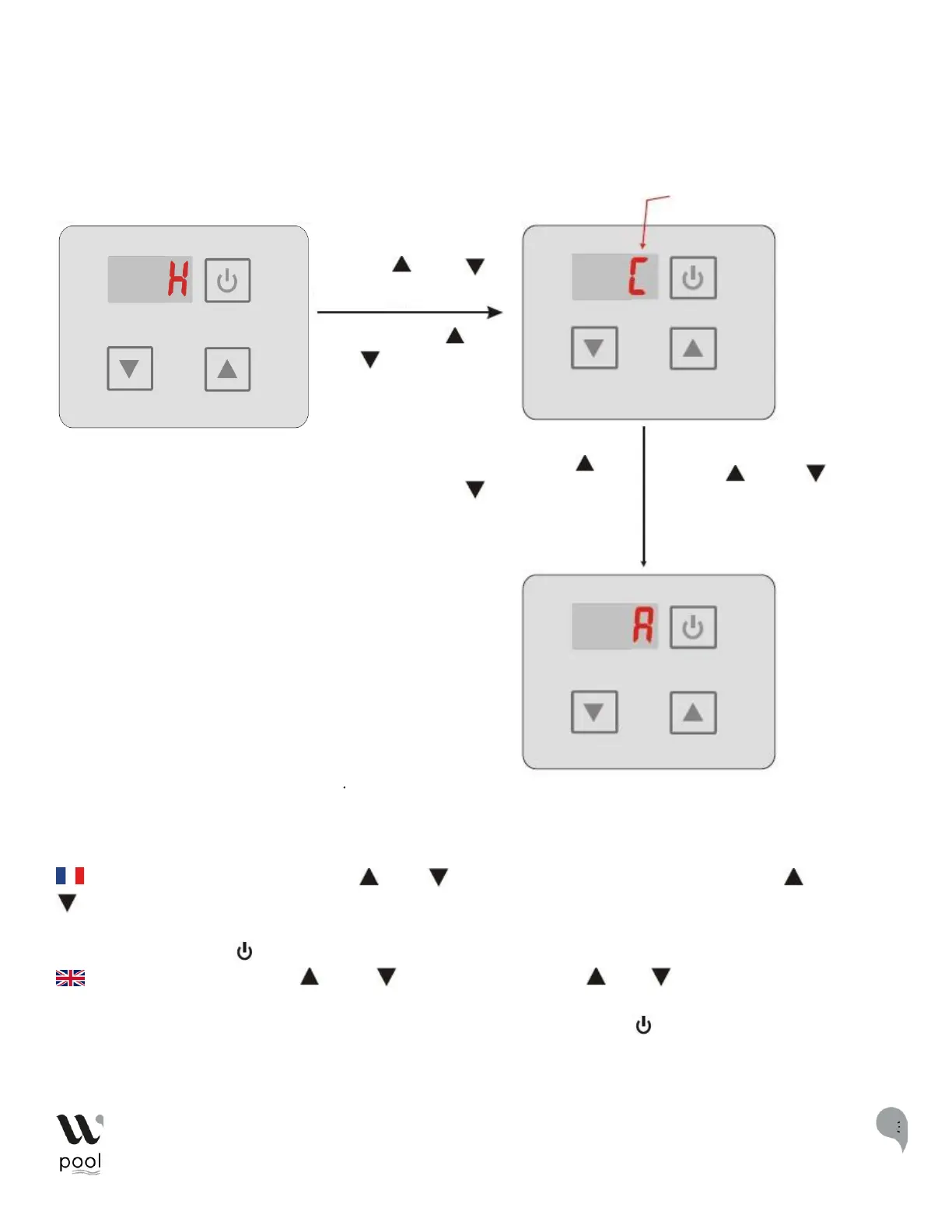
Sélection du mode - Mode selection - Selección del modo - Auswahl des Modus - Selezione del
modo
FR : Dans l'interface principale, appuyez « « » et «« » pendant 0,5s pour régler le mode, « puis sur « » ou «
» pour changer le mode actuel. Vous pouvez changer les différents modes de froid, chaud et automatique. S'il
n'y a pas de fonctionnement pendant 5s, le système enregistre le mode en cours et retourne à l'interface
principale, appuyer sur « » ne peut enregistrer le réglage.
: In the main interface, press " " and " " for 0.5s to set the mode, " " or " " to change the current
mode, you can change the different modes of cooling, heating and automatic mode. If there is no operation for 5s,
the system will save the current mode and return to the main interface, pressing " " can not save the setting.


 To Next Page