2-6
Unit Description
2.5. RSM-16R16 Series - Front Panel
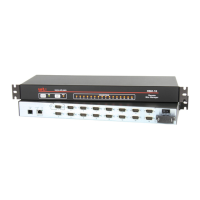
As shown in Figure 2.8, the RSM-16R16 series front panel includes the following
components:
PhoneLinePort(InternalModemPort): When the Internal Modem is present, the
phone line port is used for connection to your external phone line.
NetworkPorts: Two Ethernet ports for connection to your primary and secondary
10Base-T or 100Base-T, TCP/IP networks. Note that the RSM-16R16 features a
default, IPv4 format IP address (192.168.168.168). This allows you to connect
to the unit without first assigning an IP address. The Network Ports also include
two LED indicators for Link and Data Activity. For more information on port
configuration, please refer to Section 5.9.
Notes:
• TheleftNetworkPortisETH0;therightNetworkPortisETH1.
• WhenconnectingasinglenetworkcabletoanRSM-16R16seriesunit(Dual
EthernetPorts,)makecertaintoconnecttoPortETH0.
SerialPorts: For connection to console ports on target devices. Standard RJ45
connectors configured as DCE ports. For more information on connecting devices
to the serial ports, please refer to Section 4.5 and Appendix B and Appendix C.
Ã
PortActivityIndicators: A series of LEDs, which will light when a CTS signal is
detected and flash during data transmission to indicate activity at the port.
RESETButton: Restarts the RSM-16R16 as described in Section 2.11.
DEFAULTButton: Switches all plugs Off or sets plugs to default values as
described in Section 2.11.
ONIndicator: Lights when AC Power is applied to the unit.
RDYIndicator: (Ready) Flashes to indicate the unit is ready to receive commands.
DCDIndicator: The Data Carrier Detect indicator.
PlugActivityIndicators: A series of sixteen LED indicators which light when
power is applied to the corresponding switched outlet.
Note:Providingthatpowerisstillpresentatthesecondarypowerinletfora
givenbranch,thePlugActivityindicatorsforthatbranchwillblinkonandoff
whentheprimarypowersourceforthatbranchislostordisconnected.
www.wti.com
RSM-16R16
Remote Site Manager
+
Power Control
SET UP
SERIAL PORTS
1 3 5 7 9 11 13 15
2 4 6 8 10 12 14 16
PLUG ACTIVITYPORT ACTIVITYSTATUS
ACT LNKACT LNK
Ethernet 0 Ethernet 1
PHONE
RST DEF
ON RDY DCD
1 3 5 7 9 11 13 14
2 4 6 8 10 12 14 16
A1 A2 A3 A4 A5 A6 A7 A8
B1 B2 B3 B4 B5 B6 B7 B8
1 2 3 4 5 6 7 8 9 10
Figure 2.8: RSM-16R16 Series - Front Panel



 To Next Page
 Loading...