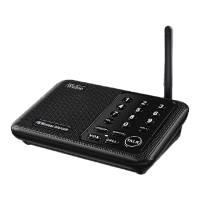
The Wuloo Wireless Intercom System (Model: WL-888, FCC ID: 2AQQS-888) is a real-time communication device designed for various indoor and outdoor applications. It offers a range of features aimed at providing clear, reliable, and user-friendly communication.
Function Description:
The intercom system facilitates two-way communication between multiple units. It operates on 22 channels (01-22) and 100 codes (00-99), allowing users to select specific settings to avoid interference and establish private communication networks. The system supports various communication modes:
- TALK Mode: This is the primary communication mode where users press and hold the "TALK" button to speak and release it to listen. The indicator light turns red when transmitting. It's a single-way communication system, meaning you cannot receive messages while holding the "TALK" button. There's a Transmission Time Limit (TOT) of 1 minute per message to prevent accidental continuous transmission.
- GROUP Mode: This function allows a user to broadcast a message to all intercom stations within the system simultaneously, regardless of their individual channel and code settings. This is particularly useful for making announcements to multiple users at once. The GROUP function can be toggled on or off: to turn off, press and hold "GROUP" and "VOL-" simultaneously; to turn on, press and hold "GROUP" and "VOL+" simultaneously.
- MONITOR Mode: This mode allows an intercom unit to continuously transmit audio from a specific room (e.g., a baby's room) to another intercom unit set to the same channel and code. The monitored unit stays in transmit mode for up to 10 hours. In this mode, the monitored unit can only send audio and cannot receive voice. It supports one monitor unit receiving audio from one monitored unit, or multiple monitor units receiving from one monitored unit, but not one monitor unit receiving from several monitored units simultaneously.
- VOX (Voice Operated Exchange) Mode: In VOX mode, users do not need to press and hold the "TALK" button to speak. The intercom activates transmission when it detects a voice within close speaking range. The indicator light turns red upon voice detection. This mode has a 24-hour time limit. While both sides can use VOX, communication involves a slight delay, requiring users to speak one by one.
- CALL Function: This feature allows a user to initiate a call to a specific intercom unit by setting their channel and code to match the target unit and pressing the "CALL" button. Both intercoms will ring, and the other user can then press and hold "TALK" to respond.
Important Technical Specifications:
- Power Source: DC 5V 1A via AC adapter. The system does not operate on batteries but can be powered by a power bank for outdoor use.
- Channels: 22 available channels (01-22).
- Codes: 100 available codes (00-99).
- Frequency: Utilizes FM wireless technology, operating on public frequencies. A detailed frequency table is provided in the manual (Section 2.2).
- Volume Levels: 8 adjustable volume levels.
- Range: Up to 1 mile (approximately 1.6 km) for long-range communication.
- Anti-interference Features: 22 channels and 100 codes are available to help resolve interference issues by allowing users to change their channel or code settings.
Usage Features:
- Easy Setup: Basic setup involves connecting AC power, setting the channel and code, and testing the connection.
- Address List: For larger systems with different channel numbers for each unit, creating an "address list" is recommended to keep track of which intercoms belong to which users.
- Expandability: The system supports expansion by purchasing additional intercom units of the same model and setting them to the same channel and code as the existing system.
- User-Friendly Design: Shipped with a quick start guide and detailed instructions.
- Lock Channel & Code Number Function: After setting a channel and code, users can press and hold the MENU button for 3 seconds to lock these settings as the original numbers for that intercom station. This prevents the settings from reverting within 1 minute of inactivity.
Maintenance Features:
- Troubleshooting Guide: The manual includes a comprehensive troubleshooting section to address common issues such as non-working units, inability to receive responses, inability to talk to other intercoms, and continuous "beep" sounds. Solutions often involve checking connections, adjusting settings (channel, code, volume), or repositioning units to avoid interference.
- Warranty: Wuloo provides a warranty service including:
- Free replacements for quality-related issues detected within 1 year.
- A 50% discount on new replacement purchases within 2 years for accidental damage.
- Lifetime service for all product-related questions.
- Customer Support: Users can contact customer service via email (support@wulooofficial.com) or Facebook (@WulooOfficial) for assistance with product-related questions or issues.
- Original Accessories: It is recommended to use the original adapter and cable provided with the packaging. Free replacements are offered for faulty accessories within the warranty period.
The Wuloo Wireless Intercom System is designed to be a versatile and reliable communication tool for homes, offices, and other environments, offering clear audio and flexible operation modes to suit various needs.


 To Next Page
 General