EasyManua.ls Logo

Wuloo WL-666 - User Manual

Wuloo WL-666
17 pages
Print Icon
To Next Page IconTo Next Page
Loading...
Wuloo Wireless Intercom System
Model: WL-666
FCC ID: 2AOBR-666
E-mail: support@wulooofficial.com
Facebook page: @WulooOfficial

Questions and Answers

Summary

Whats Included in the Box

Intercom Overview

Provides an overview of the intercom station and its included accessories.

Getting Started

Connect AC Power

Instructions for connecting the intercom unit to a local AC power source.

Set Code & Channel

Guide on how to set the communication code and channel for intercoms.

Make an Address List

Guidance on creating an address list for managing multiple intercom units.

Test Connection

Step-by-step instructions for testing intercom connectivity.

Distribute Stations to Users

Assigning intercom stations and address lists to different users.

Usage Notes

Important notes and operational guidelines for using the intercom system.

Advanced Settings

Volume Setting

Instructions on how to adjust the intercom's volume levels.

Code & Channel Setting

Details on setting the code and channel for intercom communication.

Functions Description

Overview of the various functions available on the intercom.

TALK Function

How to use the TALK button for two-way communication.

GROUP Function

Using the GROUP button to communicate with all stations simultaneously.

MONITOR Function

How to use the MONITOR button to listen to a specific room.

VOX (Voice Operated Exchange)

Using VOX mode for hands-free communication.

CALL Function

How to use the CALL button to ring other intercom stations.

Usage Scenario

Practical examples demonstrating how to use the intercom system.

Additional Notes

Communication System Characteristics

Details on the real-time nature and lack of memory in the system.

Interference Avoidance

Tips on avoiding interference by changing channel or code.

Troubleshooting

Machine Not Working

Solutions for when the intercom unit is connected but not functioning.

Cannot Receive Responses

Troubleshooting steps for when the intercom does not receive responses.

Cannot Talk to Other Intercoms

Solutions for issues preventing communication with other intercoms.

Continuous Beep Sound

How to resolve a continuous beep sound issue on the intercom.

Units Not Working in Different Locations

Troubleshooting for units not working in specific locations.

No Audio in Monitor Mode

Resolving issues with not receiving audio while in monitor mode.

Adding Additional Units

Expand to More Stations

Instructions on how to expand the system with more intercom stations.

Questions & Answers

Intercom Noise Issues

Explanation and solutions for receiving noise in the intercom.

License Requirements

Information on whether a license is needed for FM wireless communication.

TALK Key Usage

Clarification on using the TALK key for speaking.

Interference on Public Frequency

Addressing interference when using public frequencies.

Battery Usage

Information about using batteries versus a power bank.

Operating Voltage

Details on the voltage the intercoms operate with.

Warranty Information

Warranty Service Details

Explanation of the warranty services provided for the product.

Contacting Support

How to contact customer support for questions and issues.

Overview

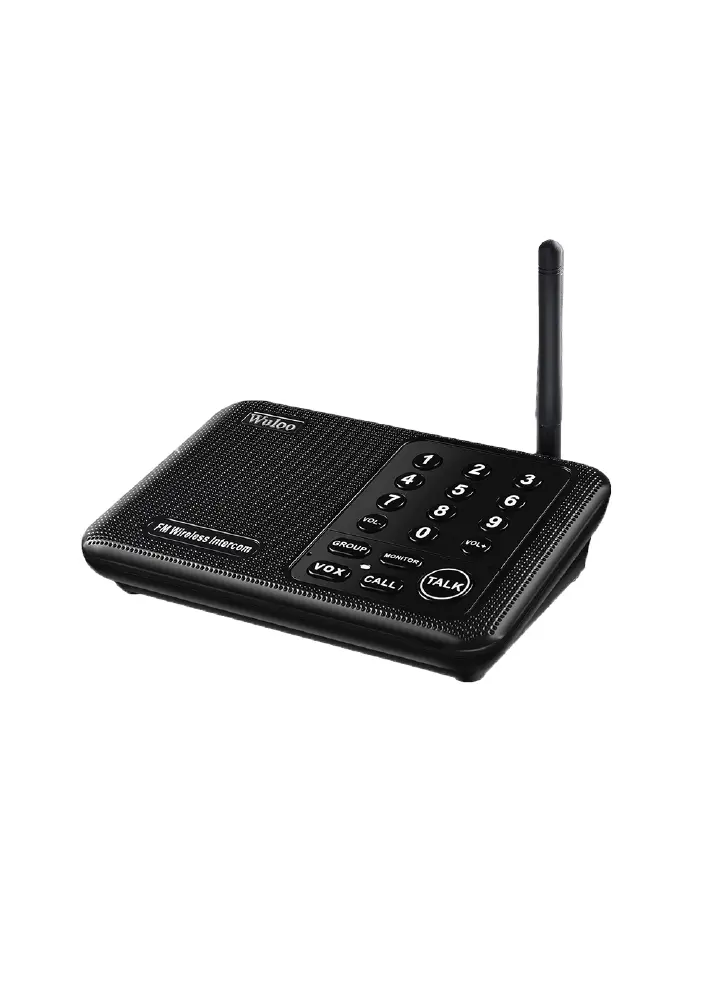
The Wuloo Wireless Intercom System (Model: WL-666, FCC ID: 2AOBR-666) is a real-time communication device designed for clear, long-range, and expandable communication. It utilizes FM wireless technology, offering a range of up to 1 mile. The system is user-friendly and comes with a quick start guide and detailed instructions.

Function Description:

The Wuloo Wireless Intercom System offers several key functions for versatile communication:

  • TALK: This is the primary communication function. To speak, users must press and hold the "TALK" button. A red indicator light will illuminate while speaking. Releasing the button sends the message. It's a single-way communication system, meaning you cannot receive messages while holding the "TALK" button. There's a Transmission Time Out (TOT) limit of 1 minute per message to prevent accidental continuous transmission.
  • GROUP: This function allows users to call all intercom stations within the system simultaneously, regardless of their individual channel and code settings. To activate, press and hold the "GROUP" button, then speak. This is particularly useful for broadcasting announcements to multiple users at once. The "GROUP" function can be turned on or off. To turn off, press and hold "GROUP" and "VOL-" simultaneously until a beep is heard. To turn on, press and hold "GROUP" and "VOL+" simultaneously until a beep is heard.
  • MONITOR: This mode is designed for continuous audio monitoring, such as in a baby's room. When activated by pressing the "MONITOR" button, the intercom unit stays in transmit mode, constantly sending audio to any intercom unit with the same channel and code. The monitor function has a 10-hour time limit, requiring a reset after this period for continued monitoring. In this mode, the monitoring unit can only send audio and cannot receive messages.
  • VOX (Voice Operated Exchange): This hands-free communication mode eliminates the need to press and hold the "TALK" button. When activated by pressing the "VOX" button, the channel number key will flash blue. Users speak closely into the intercom to activate transmission, indicated by a red light. Other intercoms with the same channel and code can receive the message and reply by pressing and holding "TALK." Both sides can enter VOX mode simultaneously, but communication will have a slight delay, requiring users to speak one by one. VOX mode has a 24-hour time limit and can be exited by pressing the "VOX" button again.
  • CALL: To initiate a call to a specific intercom, users set their intercom to the same channel and code as the desired recipient, then press the "CALL" button. Both intercoms will ring. The recipient can then press and hold "TALK" to speak, and the caller can reply by pressing and holding "TALK."

Important Technical Specifications:

  • Model: WL-666
  • FCC ID: 2AOBR-666
  • Power Source: DC 5V 1A (AC adapter included). Can also be powered by a power bank for outdoor use. The included adapter supports 100-240V AC power.
  • Communication Technology: FM Wireless
  • Range: Up to 1 mile
  • Codes: 3 available codes (A, B, C) to minimize interference.
  • Channels: 10 available channels (0-9) to minimize interference.
  • Volume Levels: 8 adjustable volume levels.
  • Monitor Mode Duration: Up to 10 hours.
  • VOX Mode Duration: Up to 24 hours.
  • Transmission Time Out (TOT): 1 minute in TALK mode.

Usage Features:

  • Clear Voice Quality: Designed for high-quality communication.
  • Expandability: The system is easily expandable, allowing users to add more intercom stations by purchasing additional units of the same model and setting them to the existing system's channel and code.
  • Anti-Interference Features: With 10 channels and 3 codes, users can easily adjust settings to solve interference problems from other wireless intercom devices operating on similar frequencies.
  • Address List: For larger systems with multiple units and users, creating an "address list" to record channel numbers for each user is recommended for efficient communication.
  • Automatic Channel Restoration: After 1 minute of inactivity, each intercom automatically restores to its original channel number.
  • User-Friendly Design: Shipped with a quick start guide and detailed instructions for easy setup and operation.

Maintenance Features:

  • Troubleshooting Guide: The manual includes a comprehensive troubleshooting section to help users resolve common issues such as intercoms not working, not receiving responses, inability to talk, or continuous "beep" sounds. Solutions often involve checking power connections, verifying channel and code settings, adjusting volume, or repositioning units to avoid interference.
  • Warranty: Wuloo offers a robust warranty service:
    • 1-Year Free Replacements: For quality-related issues detected within 1 year.
    • 50% Discount on Replacements (2 Years): For accidental damage (e.g., drop and break) within 2 years.
    • Lifetime Service: For all product-related questions.
  • Customer Support: Users can contact Wuloo customer service via email (support@wulooofficial.com) or Facebook (@WulooOfficial) for assistance with product-related questions or issues. Support aims to respond within 12 business hours, often quicker if an admin is online.
  • Firmware Updates: The manual mentions a "GROUP" function update, indicating that Wuloo provides updates to address user feedback and improve functionality, such as adding a switch for the GROUP function to mitigate interference from neighbors.

Wuloo WL-666 Specifications

General IconGeneral
BrandWuloo
ModelWL-666
CategoryIntercom System
LanguageEnglish

Related product manuals