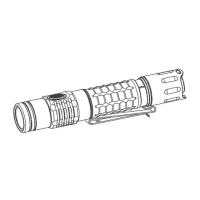
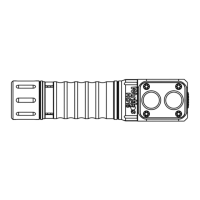
ProtectionFeatures
Some features which aren’t visible on the diagram: Andúril includes low voltage protection (LVP) and
thermalregulation.
LVPmakesthelightstepdowntoalowerlevelwhenthebatteryislow,andifthelightisalreadyatthe
lowestlevel,itshutsitselfoff.Thisactivatesat2.8V.LVPadjustmentshappensuddenly,inlargesteps.
Thermalregulationattemptstokeepsthelightfromoverheatingandotherwiseadjustsoutputtostayas
closeaspossibletotheuser‐configuredtemperaturelimit.Thermaladjustmentshappengradually,insteps
sosmalltheyaredifficultforhumanstoperceive.Itrampssmoothlyacross512internalsteps(from1x7135
tofullpower)toadjustoutputwhileitsearchesforthehighestlevelitcanmaintainwithoutoverheating.
UsageofTS21
YoucandoalittlebitmorewithyournewTS21…
TS21LOCKOUTmodedoublesasamomentarymoonmode.Thatway,afterlockingitandtossingitinabag,
itcanstillbeusedtolookaroundinsidethebagwithoutunlockingit.
Lockoutusesmoonlightasthefloorofthecurrentrampor,byusingclickthenhold,theflooroftheother
ramp.Ifyouhavetwodifferentsettingsforthis,youcanhavedifferentilluminationalso.
OryoucanuseMugglemodeifyouwantasaferwaytocarryyourflashlightwithareducedoutputanddon’t
wantlockout.
Whileon,adoubleclicktogglesbetweenturboandthememorizedlevel.So,ifyouwantfullpowerfora
moment,doubleclick.Whenyou’redone,doubleclickagaintoreturntotheoriginalbrightness.
TocustomizeyourTS21youcanadjusttheFLOORandCEILINGlevelsofthetworamps.Let’ssayyourfavorite
modeissmoothramping,buttosavethecellchargeyouwanttolimitthemaximumoutputbrightnesslevel.
Youcanchooselevel101(50clicksduring)forthesmoothrampceiling.Thiskeepstheceilingatalower
level.Smoothrampflooronlevel1forareallydimmoonlight.Youcanset20clicksforsteppedfloorfora
usablelowoutdoors.And130forsteppedceilingifyoualsoliketohaveapowerfulceiling.
Ifyouclickzerotimes,thefloororceilingvaluedoesn’tchange.Thisisgreatbecauseyoucanchangejust
thefloorortheceilingwithoutreprogrammingtheother.
FAQs
Youtriedtoconfigureyourflashlightandnowitisonlyworkingifyoupressthebutton.
Whenyoupress4xfromOFFyoulockoutTS21.Pressfourtimesagaintounlock.Whenyouwanttoconfigure
TS21itmustbeON,thenclickfourtimes.
IfIturnonusingmoonshortcut,itwon’tmemorizemoon.
Inshort:theTS21hasonlymemoryifyouramptoavalue.
Itdoesn’tmemorizethefloor,ceiling,orturbolevelswhenthey’rereachedbyashortcut.Thisisonpurpose,
becausepeopledidn’tlikelosingtheirmemorizedlevelafterusingmoonorturbo.Tomakeitremember
moon,theusermustramptoit…typically,byrampingupalittlethenbackdown.Basically,itbehavesthat
waybecausethat’swhatpeopleaskedfor.
TroubleshootingandMaintenance


 To Next Page