Page 18 of 31 Pages
3.3. Selection of the measuring unit
The desired measuring unit can be selected by repeatedly pressing the key
ON/MODE until the selection
pointer is below the function UNIT and then the
ENTER is pressed.
The possible formats may now be chosen by pressing the key
ZERO/SELECT "+/-" until the desired unit
is displayed. This selection must be confirmed by pressing
ENTER. The selection remains valid until changed
in the same manner as described above.
The following measuring units can be chosen:
XX°XX'XX"
DEG
Deg., Min., Sec.
XXX.XXX GON
New degree, 3 decimal
XX.XXXX GON
New degree, 4 decimal
XXXX.XX mm/m
mm per m, 2 decimal
XXX,XXX mm/m
mm per m, 3 decimal
XX.XXXX "/10"
Inch per 10 Inch, 4 decimal
XX.XXXX "/12"
Inch per 12 Inch, 4 decimal
XXXX.XX mRad
Milliradian, 2 decimal
XXX.XXX mRad
Milliradian, 3 decimal
XX.XX mm/REL
mm per relative base, 2 decimal
XX.XXX mm/REL
mm per relative base, 3 decimal
XX.XXXX "/REL
mm per relative base, 4 decimal
XXXX.XX A %o
mm per relative base, 2 decimal
XXXX.XX %o
‰, 2 decimal
XXX.XXX DEG
Degree, 3 decimal
XXX°XX' DEG
Deg., Min.
XX'XX" DEG
Min., Sec.
XXXXX" DEG
Sec.
XXXXX.X" DEG
Sec. 1 decimal
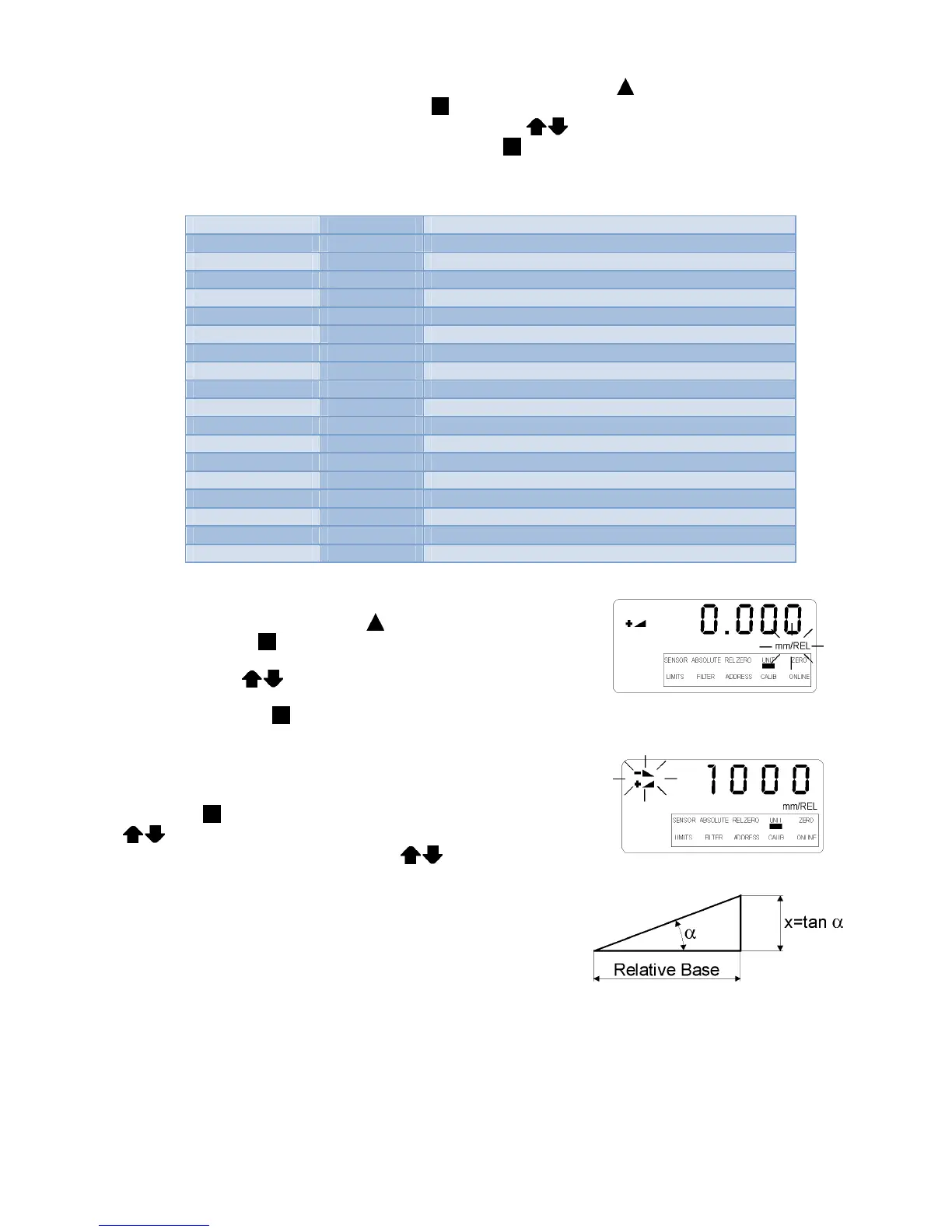
For a measurement with relative base length the selection pointer must
be moved by repeatedly pressing the
ON/MODE key to the position
UNIT. Confirm with
ENTER.
By using the keys
ZERO/SELECT "+/-" the desired unit can
now be chosen (mm/REL or inch/REL) The selection must be
confirmed with the key
ENTER.
On the display the direction indicator is flashing alternatively plus or
minus; the existing base length is shown (Standard length is 1000 mm
or 10")
By pressing
ENTER this value may be accepted or with
ZERO/SELECT „+/-“ the relative base length may be adjusted
as required and then finally confirmed with
ENTER.
In the relative mode the angle is related to the height "X" as the
elevation over the set relative base length in the chosen unit. (in mm,
or Inch).
Exception: RESET (see point 3.1)


 To Next Page
 Loading...




