Page 25 of 31 Pages
The selection pointer must be moved below the marking REL ZERO in the
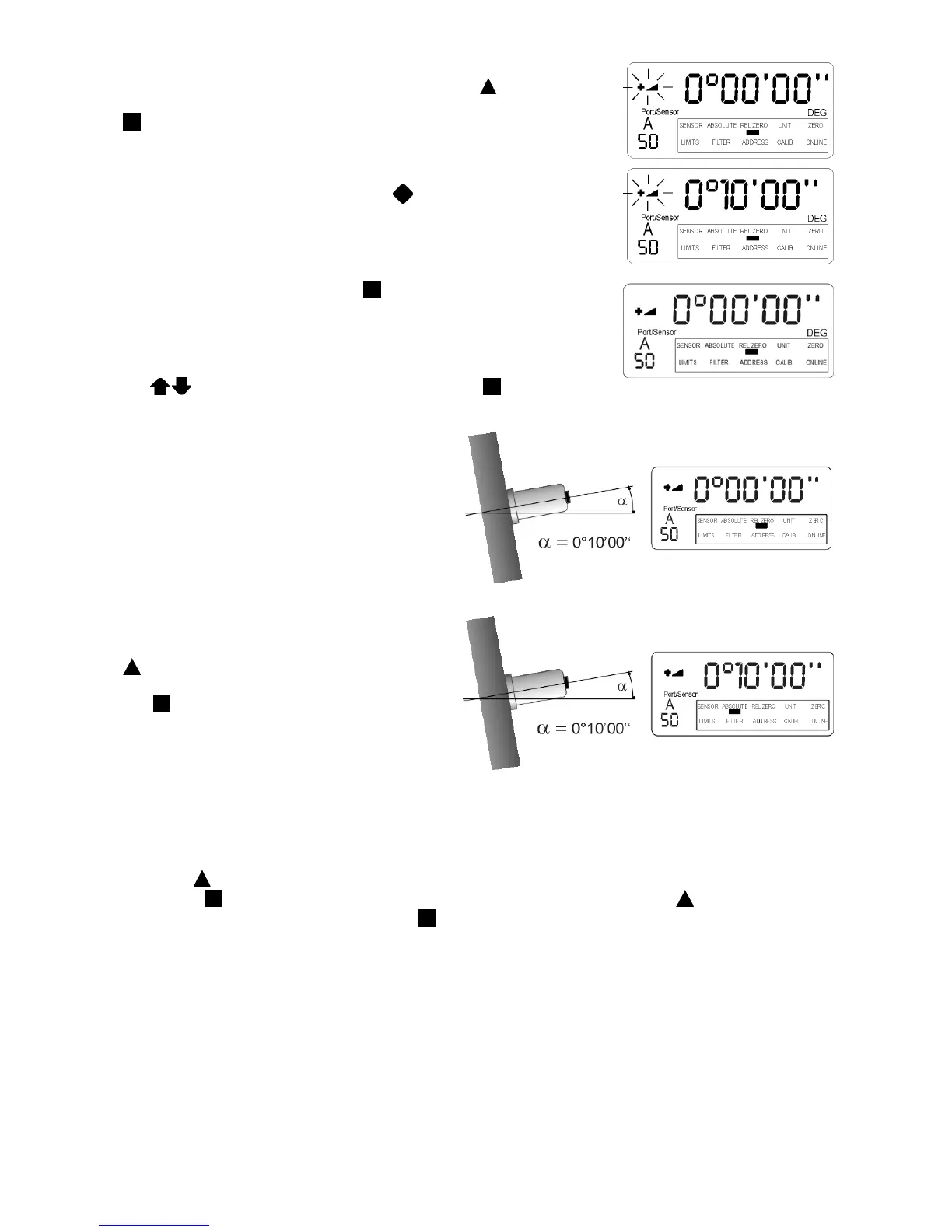
display of the LEVELMETER 2000 by pressing the key
ON/MODE
several times. If reached the selection must be confirmed by pressing
ENTER.
The last computed or manually entered value „REL ZERO value“, in our
example 0° 00'‘00'‘ The direction indicator is flashing
The sensor must now be at the correct position and after a few seconds
settling time allowed, by pressing the key
HOLD, the reading is
collected. This value )"REL ZERO OFFSET") is displayed.
Should this value no be stored press
ENTER. This relative zero value
is stored in the sensor head. The display jumps into the measuring mode
"REL ZERO", the display is 0°00‘00‘‘ and the measurement continues by
considering the "REL ZERO OFFSET"
As an alternative the value can also be changed manually by using the
key
ZERO/SELECT "+/-" before confirming with ENTER
Result:
Despite the fact that the sensor is still mounted
at the same angle the display of the
Levelmeter 2000 now shows the value
0°00‘00‘‘ (Fig. 1)
This new relative zero is the reference for all
the future measurements based on this angle
(originally 0°10‘00‘‘)
The selection pointer of the
LEVELMETER 2000 can now be placed below
the marking ABSOLUTE by pressing the
ON/MODE key several times to return to
the absolute measuring mode. After confirming
with
ENTER the original value is displayed.
(Fig. 2)
Fig. 1
Fig. 2
The values stored in the stacks of „ZERO“ and „Relative Zero“ can be deleted as follows:
Press the
ON/MODE key repeatedly until the selection pointer is located under "REL ZERO" or "ZERO" and
confirm with
ENTER. In the display the existing value is seen. By pressing the key ON/MODE the value will
be set to "0". This can now be confirmed with
ENTER and the Levelmeter 2000 starts in the measuring mode.
The stack is empty.


 To Next Page
 Loading...




