Page 28 of 31 Pages
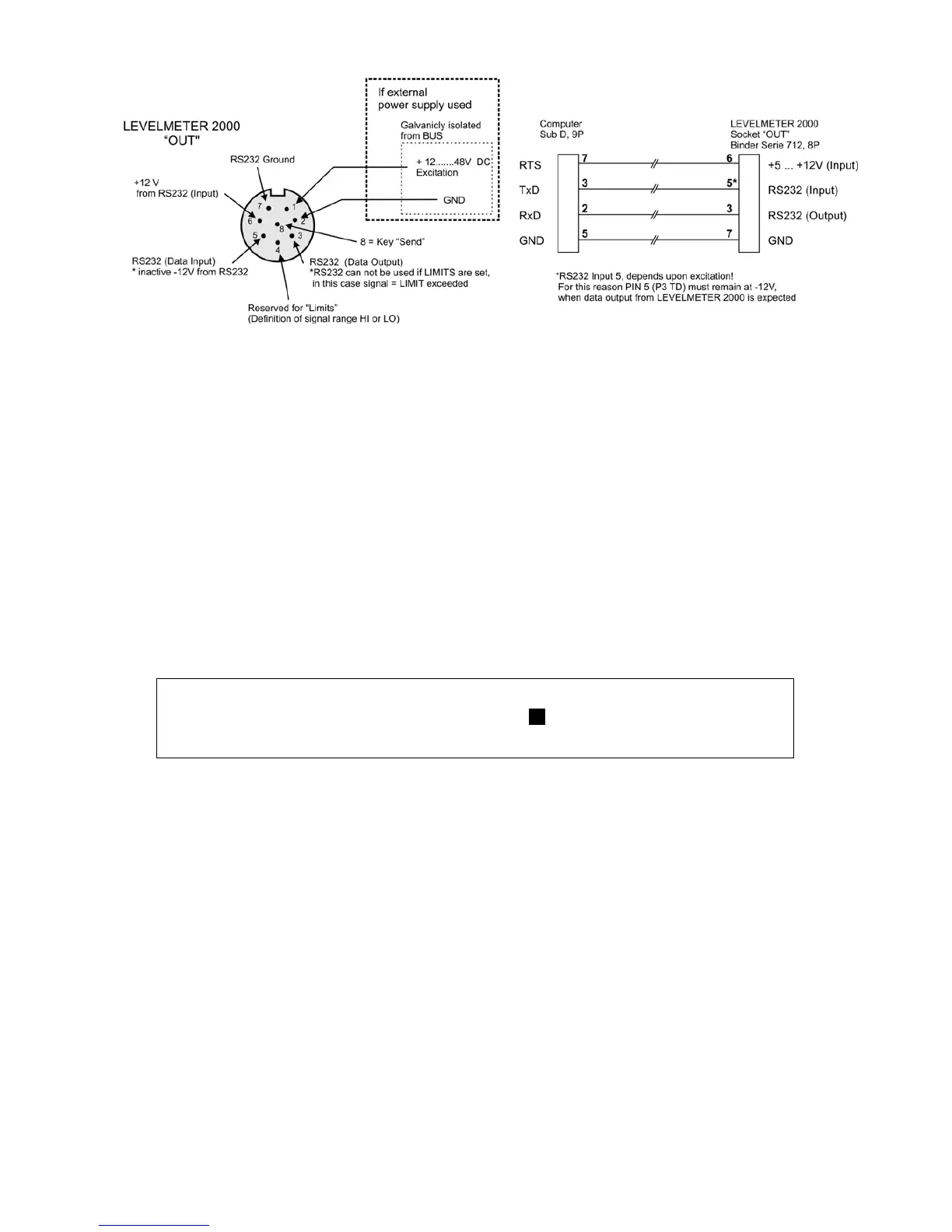
4.7. PIN definition / Connector
5. ERROR MESSAGES
ERROR 0
Instrument’s fault, needs to be sent to the service center
ERROR 1
Sensor(s) /Instrument(s) not connected, or not correct address
ERROR 2
No measuring has been made with the connected sensor. The sensor must
be addressed first (See point 3.7. Selecting a sensor or an instrument)
ERROR 3
No calibration data available (the respective sensor/port is displayed)
ERROR 4
No sensor address found
ERROR 5
More than one sensor found
ERROR 6
Changing of sensor address was not successful
ERROR 7
HOLD function has not been successfully completed within 60 seconds. The
procedure needs to be repeated.
ERROR 8
Battery not correctly installed
ERROR 9
It was not possible to save the calibration data successfully in the sensor
head
Remarks:
After the error message is displayed and confirmed with ENTER the position indicator jumps
to the position SENSOR (select sensor)
6. SERVICE
6.1. General
The LEVELMETER 2000 needs no special service other than the regular cleaning.
6.2. Storage / Care and handling of the batteries
Read the instructions in your manual before installing batteries. Make sure to insert the batteries properly,
following the symbols showing you the correct way to position the positive (+) and negative (-) ends of the
batteries. Keep battery contact surfaces clean by gently rubbing with a clean pencil eraser or cloth. Replace
batteries with the size and type specified by the device's manufacturer. Remove all used batteries from the device
at the same time, then replace them with new batteries of the same size and type. Store batteries in a cool, dry
place at normal room temperature. Remove batteries from devices that will be stored for extended periods. Don't
dispose of batteries in a fire—they may rupture or leak. Don't recharge a battery unless it is specifically marked
"rechargeable." Attempting to recharge a normal battery could result in rupture or leakage.



 To Next Page