Configuring Local Settings Options 39
Refresh rate list selections include:
60 Hz (default)
75 Hz
85 Hz
• Rotation - Select a rotation option (either None, Left turn (Experimental), or Right
turn (Experimental)). Note that left or right rotations provide a 90 degree rotation.
• Desktop Color - Select the Desktop Color (either 16 bit or 32 bit).
• Usage Help area - Contains brief instructions for using the Display dialog box and
running the test. No operator entry can be made in this box. Make note of the
instructions in the area regarding v-key reset usage in case of display failure.
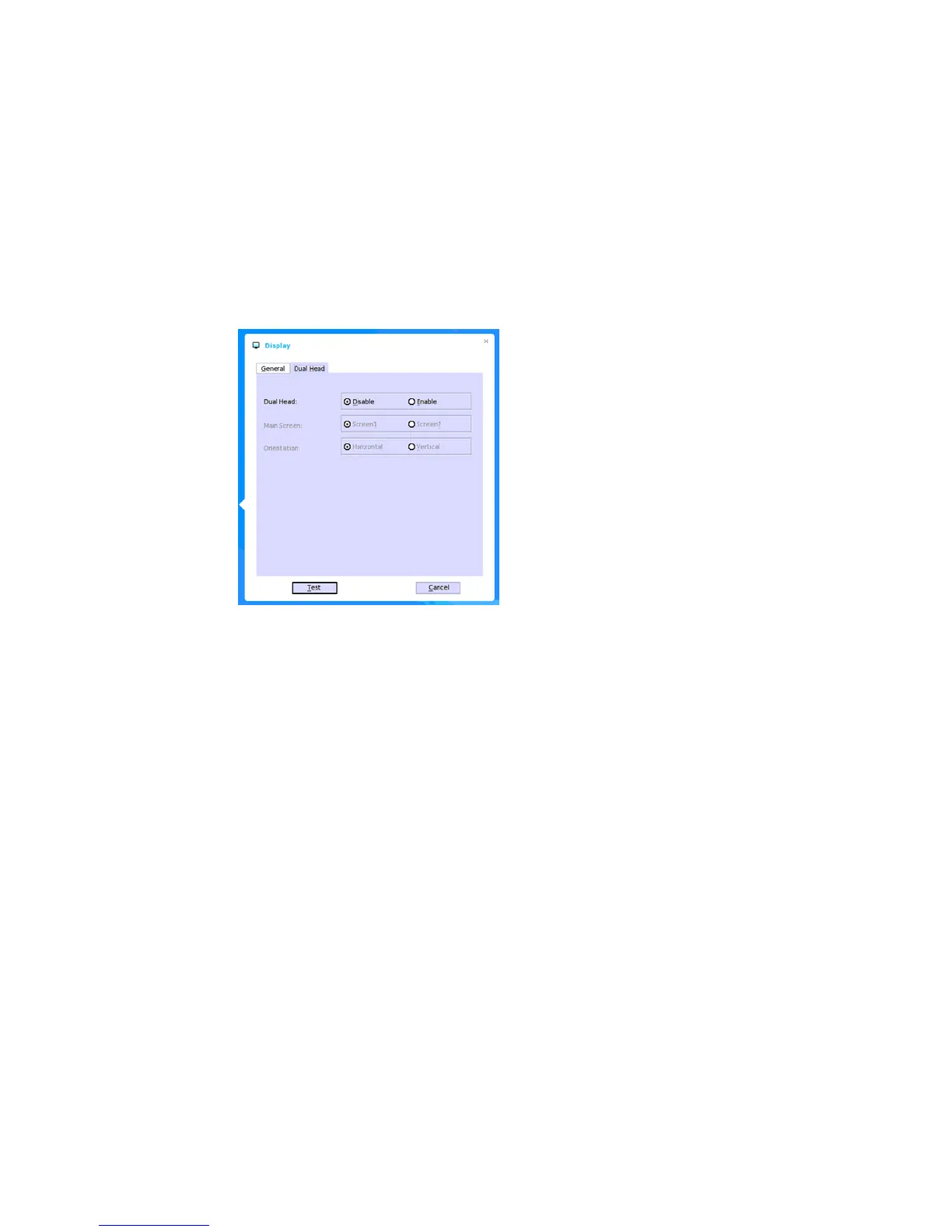
Use the following guidelines for the Dual Head tab (Supported Dual Monitor Capable Thin
Clients Only):
• Dual Head - Select Disable to have the two monitors work in a matching state, or
Enable to have the two monitors work separately (second is extended from first).
• Main Screen - Select which of the two monitors you want to be the main screen
(Screen1 or Screen2). The other screen is extended from the main screen.
• Orientation - Select how you want the two monitors to be oriented to each other
(Horizontal where you mouse between the monitors from the left and right of the
screens or Vertical where you mouse between the monitors from the top and bottom of
the screens).
•(Classic Desktop Only) Taskbar - Select under which screen you want the Taskbar to
appear (Whole Screen or Main Screen).


 To Next Page