AC Household Current:
The optional AC adaptor allows the TV to be powered by standard household
current (please look over the symbol of the AC adaptor.)
Car Battery (DC 12V):
The optional car adaptor (apply to the car with - polarity connected to the
ground) allows the TV to be powered by a car battery through the vehicle s
cigarette lighter.
D. POWER SUPPLY
E. BASIC OPERATION
Turning on power
Slide the MAIN POWER Located on
the back side of the main unit .
Selecting DTV/AV/ATV source
1)Turn on the power of the connected
video equipment.
2)Press the SOURCE button to select the
applicable input source .the screen
displays DTV/ AV/ATV mode at the
upper left corner each time SOURCE
is pressed.
ON-screen display
AV mode
DTV
DTV mode
AV
NOTE:NOTE:
6
7
ATV mode
ATV
If there is not signal, the screen will display :"NO SIGNAL"
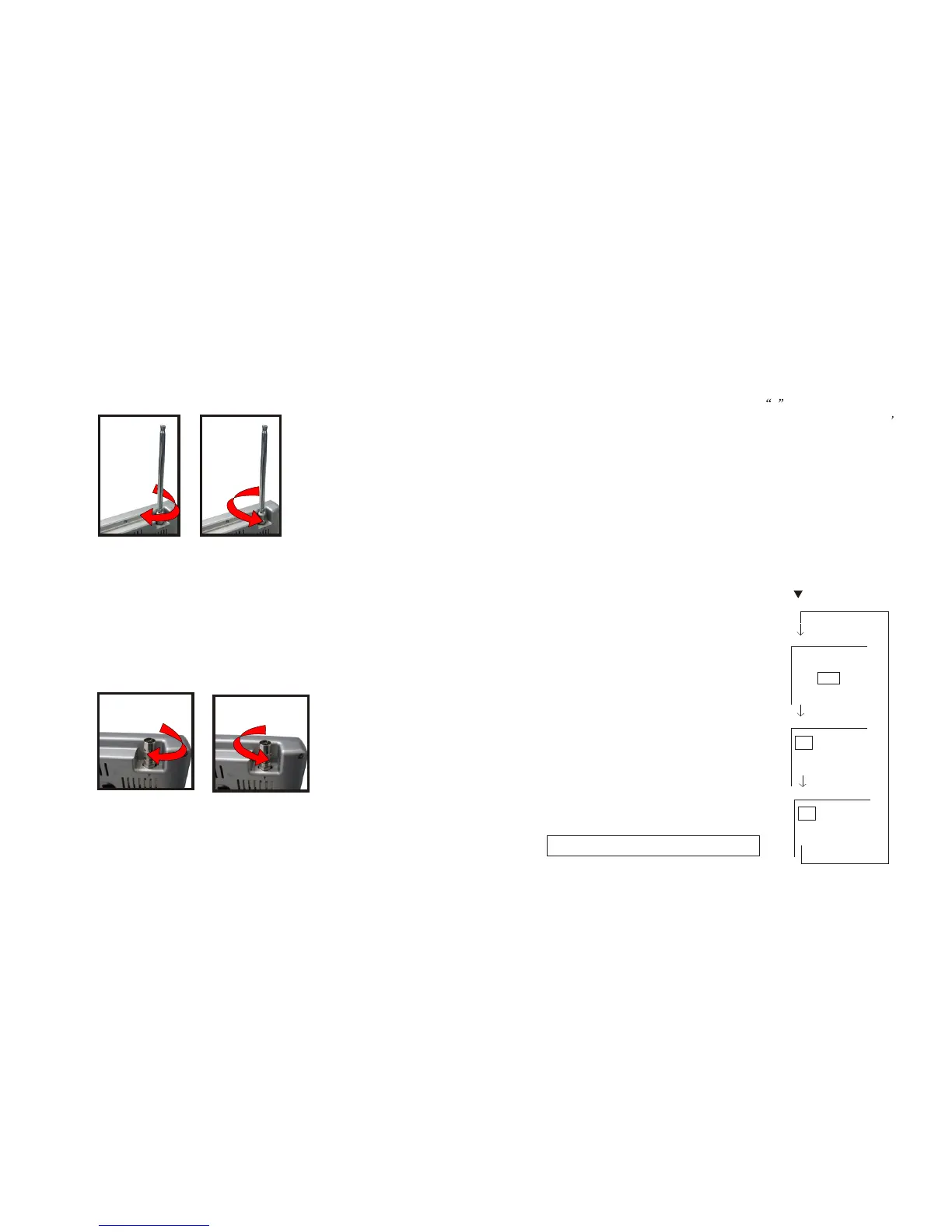
1.Rod Antenna
(1)Install the rod antenna clockwise rotation (figure 1)
(2)Uninstall the rod antenna anticlockwise movement (figure 2)
2.Use the Antenna adapter (IEC to F-type connect) to
connect outdoor Antenna
(1)Install the antenna adapter clockwise rotation (figure 1)
(2)Uninstall the antenna adapter anticlockwise movement (figure 2)
(1)
(2)
(1)
(2)
C. RF input(ANT input)


 To Next Page